> ## Documentation Index
> Fetch the complete documentation index at: https://docs.paradime.io/llms.txt
> Use this file to discover all available pages before exploring further.
# .dinoprompts
> .dinoprompts is a YAML configuration file that enables analytics teams to create, customize, and share AI prompts specifically designed for data workflows within DinoAI.
export const Arcade = ({src, title}) =>
;
The `.dinoprompts` file serves as your team's prompt library, allowing you to store and reuse battle-tested prompts that understand your data development patterns. This eliminates the need to recreate complex prompts and ensures consistency across your analytics engineering team.
**.dinoprompts file is git-tracked by default**
If you don't want this file git-tracked, [see docs](/products/dino-ai/copilot/dino-prompts#disabling-git-tracking) to disable.
**Key Benefits**
* **Centralized Library**: Store tailored prompts for analytics workflows
* **Time Savings**: Access proven prompts instantly
* **Team Knowledge Sharing**: Distribute effective prompts across your organization
* **Context-Aware**: Use variables for dynamic, situation-specific prompts
* **Fast Onboarding**: New team members access best practices immediately
***
**Step-by-Step Instructions**
1. **Open DinoAI** by clicking the DinoAI icon (🦖) in the right panel
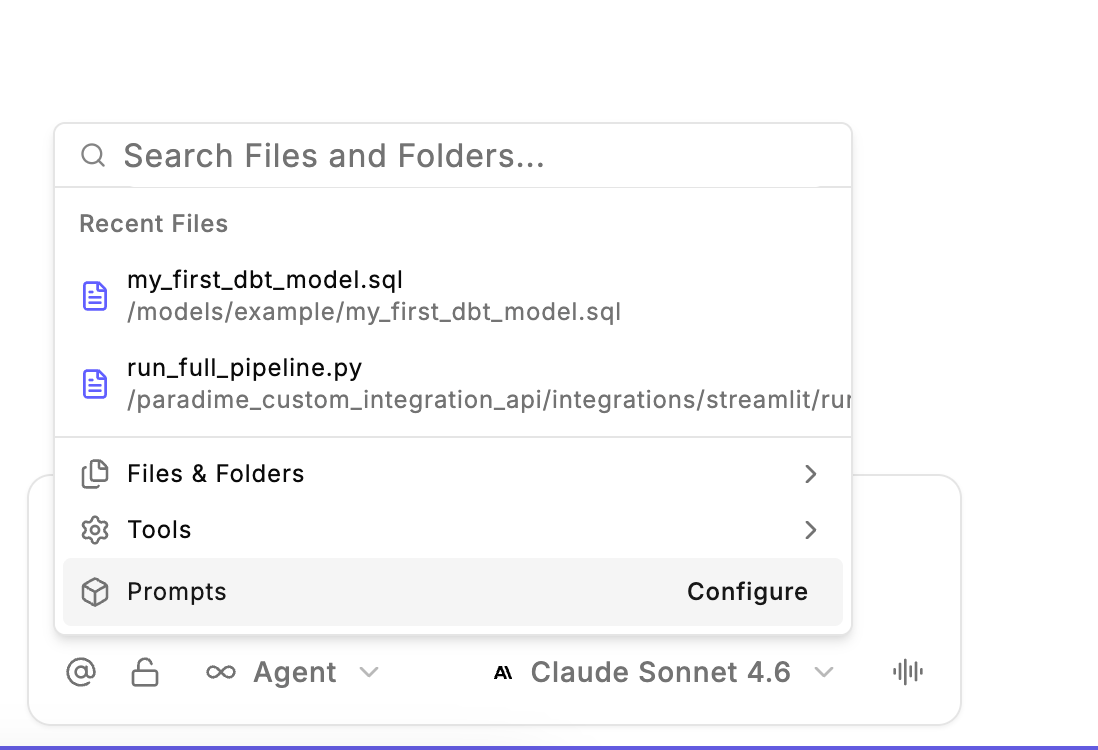
2. **Access Prompt Creation** by clicking the `@` context button and select prompt option in the chat input
3. **Create the file** by selecting "Configure `.dinoprompts`" to automatically create a new file with built-in prompts
4. **Define your prompts** using the [YAML structure](/products/dino-ai/copilot/dino-prompts#file-structure) with `name` and `prompt` fields
5. **Access your prompts** using the prompt quick-open feature in DinoAI
 Make sure the `.dinoprompts` file is placed in the **root directory of your repository**
```
your-repository
├── dbt_project/
│ ├── staging/
│ └── marts/
├── macros/
├── seeds/
├── .dinoprompts # .dinopropmts file location
├── README.md
```
***
### File Structure
The `.dinoprompts` file uses a simple YAML structure:
```yaml theme={"system"}
prompts:
- name: "Prompt Name"
prompt: |
Multi-line prompt content
Can include variables like {{ git.diff.withOriginDefaultBranch }}
- name: "Another Prompt"
prompt: "Single line prompts work too"
```
***
### Available Variables
DinoAI provides built-in variables you can use in your prompts. Variables enable you to dynamically attach context to your prompts.
| Vairable | Descriription |
| ---------------------------------------- | ------------------------------------------------------------------------------------------- |
| `{{ git.diff.withOriginDefaultBranch }}` | Includes the git diff between your current branch and the default branch of your repository |
| `{{ editor.currentFile.path }}` | Includes the file path of the current opened and selected file in your Code IDE |
| `{{ editor.openFiles.path }}` | Includes the file path of the all the opened files in your Code IDE |
***
### Git Tracking
**.dinoprompts file is git-tracked** **by default** to enable seamless team collaboration on DinoAI configurations.
**What This Means**
* **.dinoprompts** is tracked by git automatically
* **You can commit, modify, and request reviews** like any other file in your repository
* **Full change tracking and version history**
* **Seamless team collaboration** on AI configurations
#### Disabling Git Tracking
If you haven't agreed internally on rules/prompts: You may encounter a merge conflict when updating your branch. You can [use Paradime to resolve it](/guides/working-with-git/merge-conflicts), but we recommend agreeing on common versions for the .dinoprompts file first.
To disable, simply add `.dinoprompts` to your .gitignore file.
## Related topics
- [DinoAI](/products/dino-ai/index.md)
- [Mermaid](/integrations/mermaid-js/index.md)
- [Generating Pull Request Descriptions](/products/dino-ai/copilot/use-cases/generating-pull-request-descriptions.md)
- [AI-Generated Pull Request Descriptions](/guides/paradime-101/getting-started-with-the-paradime-ide/dinoai-accelerating-your-analytics-engineering-workflow/dinoai-agent/ai-generated-pull-request-descriptions.md)
- [Chat Interface](/products/dino-ai/copilot/chat-interface.md)
Make sure the `.dinoprompts` file is placed in the **root directory of your repository**
```
your-repository
├── dbt_project/
│ ├── staging/
│ └── marts/
├── macros/
├── seeds/
├── .dinoprompts # .dinopropmts file location
├── README.md
```
***
### File Structure
The `.dinoprompts` file uses a simple YAML structure:
```yaml theme={"system"}
prompts:
- name: "Prompt Name"
prompt: |
Multi-line prompt content
Can include variables like {{ git.diff.withOriginDefaultBranch }}
- name: "Another Prompt"
prompt: "Single line prompts work too"
```
***
### Available Variables
DinoAI provides built-in variables you can use in your prompts. Variables enable you to dynamically attach context to your prompts.
| Vairable | Descriription |
| ---------------------------------------- | ------------------------------------------------------------------------------------------- |
| `{{ git.diff.withOriginDefaultBranch }}` | Includes the git diff between your current branch and the default branch of your repository |
| `{{ editor.currentFile.path }}` | Includes the file path of the current opened and selected file in your Code IDE |
| `{{ editor.openFiles.path }}` | Includes the file path of the all the opened files in your Code IDE |
***
### Git Tracking
**.dinoprompts file is git-tracked** **by default** to enable seamless team collaboration on DinoAI configurations.
**What This Means**
* **.dinoprompts** is tracked by git automatically
* **You can commit, modify, and request reviews** like any other file in your repository
* **Full change tracking and version history**
* **Seamless team collaboration** on AI configurations
#### Disabling Git Tracking
If you haven't agreed internally on rules/prompts: You may encounter a merge conflict when updating your branch. You can [use Paradime to resolve it](/guides/working-with-git/merge-conflicts), but we recommend agreeing on common versions for the .dinoprompts file first.
To disable, simply add `.dinoprompts` to your .gitignore file.
## Related topics
- [DinoAI](/products/dino-ai/index.md)
- [Mermaid](/integrations/mermaid-js/index.md)
- [Generating Pull Request Descriptions](/products/dino-ai/copilot/use-cases/generating-pull-request-descriptions.md)
- [AI-Generated Pull Request Descriptions](/guides/paradime-101/getting-started-with-the-paradime-ide/dinoai-accelerating-your-analytics-engineering-workflow/dinoai-agent/ai-generated-pull-request-descriptions.md)
- [Chat Interface](/products/dino-ai/copilot/chat-interface.md)