> ## Documentation Index
> Fetch the complete documentation index at: https://docs.paradime.io/llms.txt
> Use this file to discover all available pages before exploring further.
# God Mode
> God Mode lets DinoAI auto-accept tool calls and file changes to complete multi-step workflows without confirmation prompts. Enable it from the DinoAI prompt input to run end-to-end tasks autonomously.
God Mode allows DinoAI to auto-accept changes and tool calls that would normally require your approval, enabling it to complete multi-step tasks end-to-end without pausing for confirmation at each step.
When God Mode is off, DinoAI stops before consequential actions — modifying a file, running a query, calling an external tool — and waits for your approval before continuing. When God Mode is on, DinoAI proceeds through these actions automatically and returns the final result.
**Terminal commands still require human review**, even with God Mode enabled. DinoAI will always pause and prompt for approval before executing any terminal commands.
***
### When to Use God Mode
God Mode is useful for multi-step workflows where you have a clear, well-defined goal and want DinoAI to handle the full execution without interruption. For example:
* Generating dbt models, tests, and documentation from a spec in a single run
* Implementing changes from a Linear ticket or Confluence page end-to-end
* Scaffolding a project structure across multiple files without approving each change individually
* Running a debugging workflow that spans queries, model files, and schema definitions
***
### Enabling God Mode
In the DinoAI prompt input, click the **lock icon** to toggle God Mode on or off. When enabled, the lock icon will appear unlocked, indicating DinoAI will auto-accept actions without pausing for confirmation. Click it again at any time to disable God Mode and return to standard confirmation prompts.
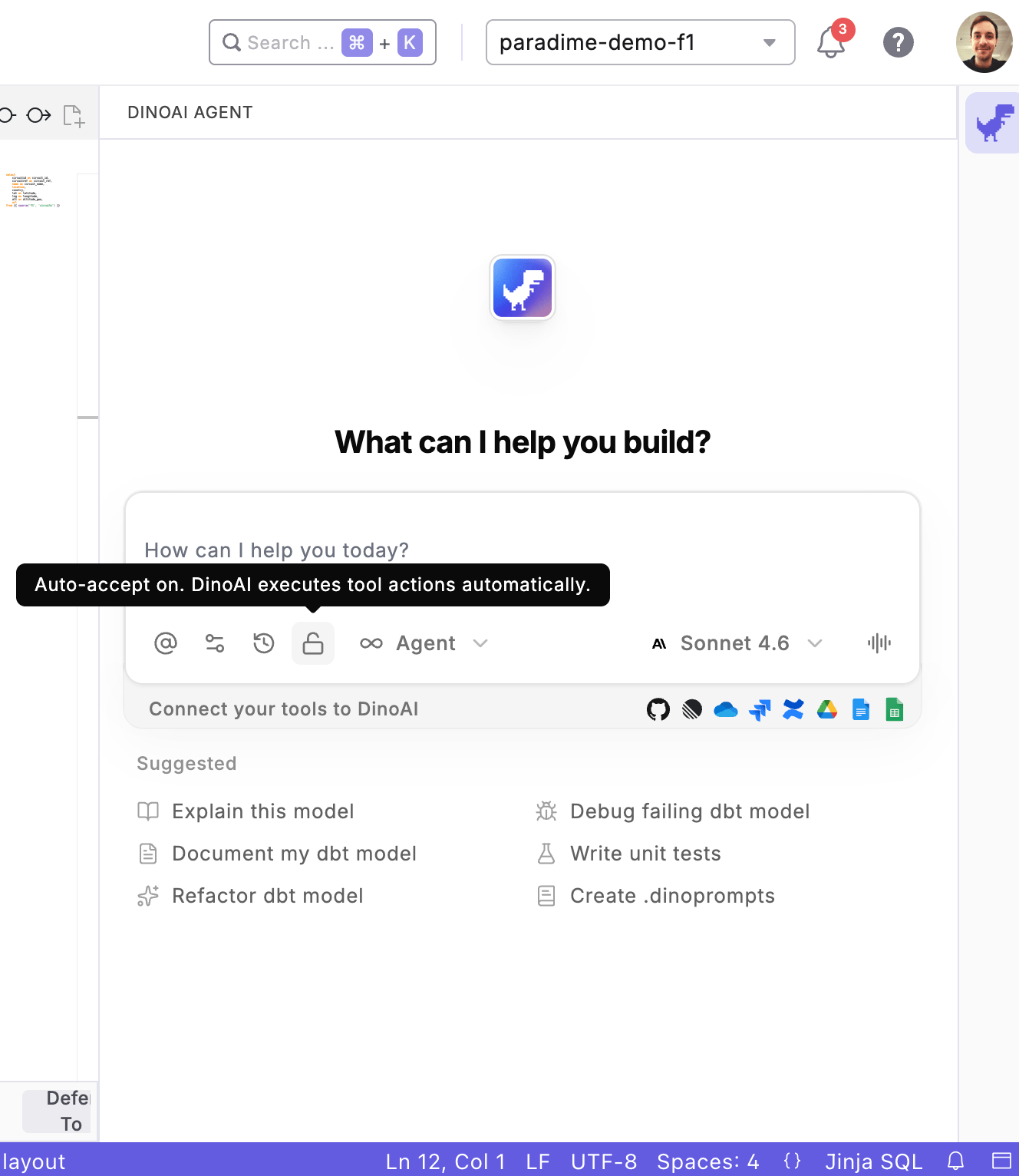 God Mode auto-accepts all tool calls and file changes without prompting for confirmation. Use it on feature branches and review all output before merging to main.
## Related topics
- [Chat Interface](/products/dino-ai/copilot/chat-interface.md)
- [Settings and Configurations](/products/dino-ai/copilot/dinoai-settings.md)
- [Ask Mode](/products/dino-ai/copilot/ask-mode.md)
- [Agent Mode](/products/dino-ai/copilot/agent-mode.md)
- [Model groups](/guides/data-mesh-setup/model-groups.md)
God Mode auto-accepts all tool calls and file changes without prompting for confirmation. Use it on feature branches and review all output before merging to main.
## Related topics
- [Chat Interface](/products/dino-ai/copilot/chat-interface.md)
- [Settings and Configurations](/products/dino-ai/copilot/dinoai-settings.md)
- [Ask Mode](/products/dino-ai/copilot/ask-mode.md)
- [Agent Mode](/products/dino-ai/copilot/agent-mode.md)
- [Model groups](/guides/data-mesh-setup/model-groups.md)