> ## Documentation Index
> Fetch the complete documentation index at: https://docs.paradime.io/llms.txt
> Use this file to discover all available pages before exploring further.
# Speech-To-Text
> Use DinoAI's Speech-to-Text feature to interact with your DinoAI assistant using voice commands instead of typing. Perfect for hands-free development and conversational interactions.
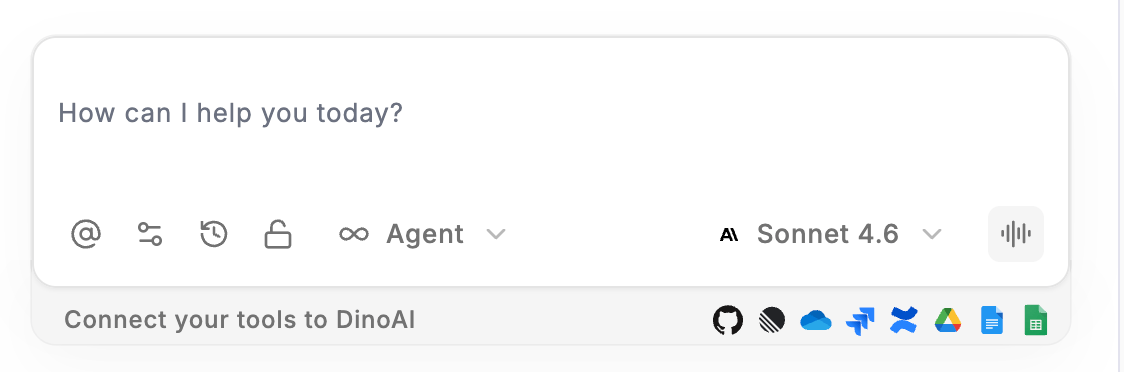
The DinoAI prompt bar includes a built-in **Speech-to-Text** tool, accessible via the **sound icon** on the right side of the prompt bar. This allows you to interact with the DinoAI copilot using your voice instead of typing — providing a more natural and efficient way to communicate during development.
 ### Using Speech-to-Text
1. Click the **sound icon** on the right side of the DinoAI prompt bar
2. Speak your request clearly — DinoAI will capture and process your voice input
3. Review the transcribed text in the prompt bar and make any necessary edits
4. Submit your request for DinoAI to process
You can combine Speech-to-Text with the **@** context picker — attach relevant files or folders before speaking your request for more accurate and targeted responses.
### Best Practices
* **Speak clearly** — use a normal speaking pace and clear pronunciation for the best transcription accuracy
* **Be specific** — include relevant details in your request, just as you would when typing a prompt
* **Review before submitting** — always check the transcribed text before sending to ensure it accurately reflects what you said
* **Combine with context** — use the **@** icon to attach relevant files or folders alongside your voice prompt for more precise results
## Related topics
- [Mindmaps](/integrations/mermaid-js/mindmaps.md)
- [Monte Carlo Commands](/products/bolt/creating-schedules/command-settings/monte-carlo-commands.md)
- [Microsoft Power BI CLI](/developers/paradime-cli/microsoft-power-bi-cli.md)
- [Fivetran CLI](/developers/paradime-cli/fivetran-cli.md)
- [Tableau CLI](/developers/paradime-cli/tableau-cli.md)
### Using Speech-to-Text
1. Click the **sound icon** on the right side of the DinoAI prompt bar
2. Speak your request clearly — DinoAI will capture and process your voice input
3. Review the transcribed text in the prompt bar and make any necessary edits
4. Submit your request for DinoAI to process
You can combine Speech-to-Text with the **@** context picker — attach relevant files or folders before speaking your request for more accurate and targeted responses.
### Best Practices
* **Speak clearly** — use a normal speaking pace and clear pronunciation for the best transcription accuracy
* **Be specific** — include relevant details in your request, just as you would when typing a prompt
* **Review before submitting** — always check the transcribed text before sending to ensure it accurately reflects what you said
* **Combine with context** — use the **@** icon to attach relevant files or folders alongside your voice prompt for more precise results
## Related topics
- [Mindmaps](/integrations/mermaid-js/mindmaps.md)
- [Monte Carlo Commands](/products/bolt/creating-schedules/command-settings/monte-carlo-commands.md)
- [Microsoft Power BI CLI](/developers/paradime-cli/microsoft-power-bi-cli.md)
- [Fivetran CLI](/developers/paradime-cli/fivetran-cli.md)
- [Tableau CLI](/developers/paradime-cli/tableau-cli.md)