> ## Documentation Index
> Fetch the complete documentation index at: https://docs.paradime.io/llms.txt
> Use this file to discover all available pages before exploring further.
# Creating Sources from your Warehouse
> Automatically generate accurate sources.yml files by connecting DinoAI to your data warehouse metadata. Save time and eliminate errors when defining source tables for your dbt™ projects.
export const Arcade = ({src, title}) =>
;
Setting up source definitions in dbt™ projects involves querying information schemas, documenting tables and columns, ensuring proper YAML formatting, and keeping sources up-to-date as new tables are added. This manual process can be time-consuming and prone to errors.
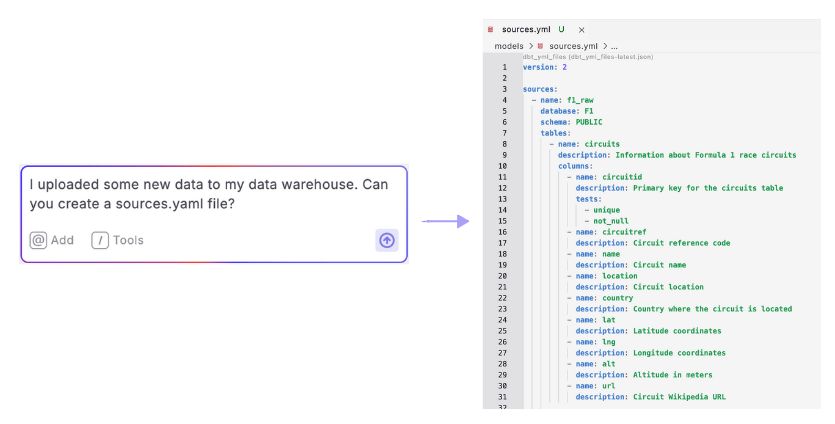
DinoAI Agent can automatically generate complete and accurate sources.yml files by directly accessing your data warehouse metadata.
### Example Prompt
> *I uploaded some new data to my data warehouse. Can you create a sources.yaml file?*
**Optional**: When updating existing sources with new tables, you can add [context](/products/dino-ai/copilot/context/index) by selecting your existing sources.yml file. Context helps DinoAI understand your existing project structure and make more relevant changes.
 ***
### Step-by-Step Instructions
**Prerequisite: Connect your warehouse** to your [Code IDE environment](/products/settings/connections/development-environment/index)
1. **Open DinoAI** by clicking the DinoAI icon (🪄) in the left panel
2. Ensure **Agent Mode** is selected
3. **Optional**\*\*\*:\*\*\* [**Add context**](/products/dino-ai/copilot/context/index) by clicking the "@" symbol and selecting any existing sources.yml files
4. **Enter your prompt** requesting a sources.yml file creation
5. **Review the preview** of the generated YAML file
6. **Accept the changes** to create the file in your project
7. **Verify the file** has been created correctly with all expected sources
***
### How It Works
After you enter your prompt:
1. DinoAI connects to your data warehouse and scans available schemas and tables
2. It retrieves column information including data types
3. If configured, DinoAI applies your [.dinorules](/products/dino-ai/dino-rules) preferences
4. It generates a properly formatted sources.yml file
**Note**: If you're updating existing (not creating) a YAML file, DinoAI preserves existing documentation and adds only the new tables
***
### Key Benefits
* **Time Savings**: Reduces a 30+ minute manual task to seconds
* **Accuracy**: Eliminates typos and formatting errors
* **Maintainability**: Makes it easy to keep sources up-to-date as your warehouse evolves
* **Completeness**: Captures all tables and columns without missing anything
## Related topics
- [Creating dbt Sources from Data Warehouse](/guides/paradime-101/getting-started-with-the-paradime-ide/dinoai-accelerating-your-analytics-engineering-workflow/dinoai-agent/creating-dbt-sources-from-data-warehouse.md)
- [Snapshot Source Data Freshness](/products/bolt/creating-schedules/templates/dbt-tm-templates/snapshot-source-data-freshness.md)
- [Creating a Workspace](/guides/paradime-101/getting-started-with-your-paradime-workspace/creating-a-workspace.md)
- [Use Cases](/products/dino-ai/copilot/use-cases/index.md)
- [Build and Test Models with New Source Data](/products/bolt/creating-schedules/templates/dbt-tm-templates/deferred-model-execution.md)
***
### Step-by-Step Instructions
**Prerequisite: Connect your warehouse** to your [Code IDE environment](/products/settings/connections/development-environment/index)
1. **Open DinoAI** by clicking the DinoAI icon (🪄) in the left panel
2. Ensure **Agent Mode** is selected
3. **Optional**\*\*\*:\*\*\* [**Add context**](/products/dino-ai/copilot/context/index) by clicking the "@" symbol and selecting any existing sources.yml files
4. **Enter your prompt** requesting a sources.yml file creation
5. **Review the preview** of the generated YAML file
6. **Accept the changes** to create the file in your project
7. **Verify the file** has been created correctly with all expected sources
***
### How It Works
After you enter your prompt:
1. DinoAI connects to your data warehouse and scans available schemas and tables
2. It retrieves column information including data types
3. If configured, DinoAI applies your [.dinorules](/products/dino-ai/dino-rules) preferences
4. It generates a properly formatted sources.yml file
**Note**: If you're updating existing (not creating) a YAML file, DinoAI preserves existing documentation and adds only the new tables
***
### Key Benefits
* **Time Savings**: Reduces a 30+ minute manual task to seconds
* **Accuracy**: Eliminates typos and formatting errors
* **Maintainability**: Makes it easy to keep sources up-to-date as your warehouse evolves
* **Completeness**: Captures all tables and columns without missing anything
## Related topics
- [Creating dbt Sources from Data Warehouse](/guides/paradime-101/getting-started-with-the-paradime-ide/dinoai-accelerating-your-analytics-engineering-workflow/dinoai-agent/creating-dbt-sources-from-data-warehouse.md)
- [Snapshot Source Data Freshness](/products/bolt/creating-schedules/templates/dbt-tm-templates/snapshot-source-data-freshness.md)
- [Creating a Workspace](/guides/paradime-101/getting-started-with-your-paradime-workspace/creating-a-workspace.md)
- [Use Cases](/products/dino-ai/copilot/use-cases/index.md)
- [Build and Test Models with New Source Data](/products/bolt/creating-schedules/templates/dbt-tm-templates/deferred-model-execution.md)