> ## Documentation Index
> Fetch the complete documentation index at: https://docs.paradime.io/llms.txt
> Use this file to discover all available pages before exploring further.
# DinoAI Credits
> Understand how DinoAI credits work, how they're calculated, and how Credit Saver Mode helps optimize your usage while maintaining conversation context
DinoAI uses a credit-based system to measure usage across different AI operations. Understanding how credits work helps you optimize your usage while getting the most value from DinoAI's capabilities.
### How Credits Work
DinoAI credits are consumed based on a combination of factors:
**Credit Calculation:**
* **Tokens processed** - Input and output text processed by the AI
* **Tool usage** - When DinoAI uses [tools and features](/products/dino-ai/tools-and-features/index) (ex. [Warehouse Tool](/products/dino-ai/tools-and-features/warehouse-tool/index), [File System Tool](/products/dino-ai/tools-and-features/file-system-tool), [Jira](/products/dino-ai/tools-and-features/jira-tool), [Perplexity](/products/dino-ai/tools-and-features/perplexity-tool), etc.)
* **Operation complexity** - More complex operations may require additional credits
**Example Credit Usage:**
* Simple code generation requests use fewer credits
* Complex multi-file operations with tool usage consume more credits
* Long conversations with extensive context require more credits over time
***
### Credit Saver Mode
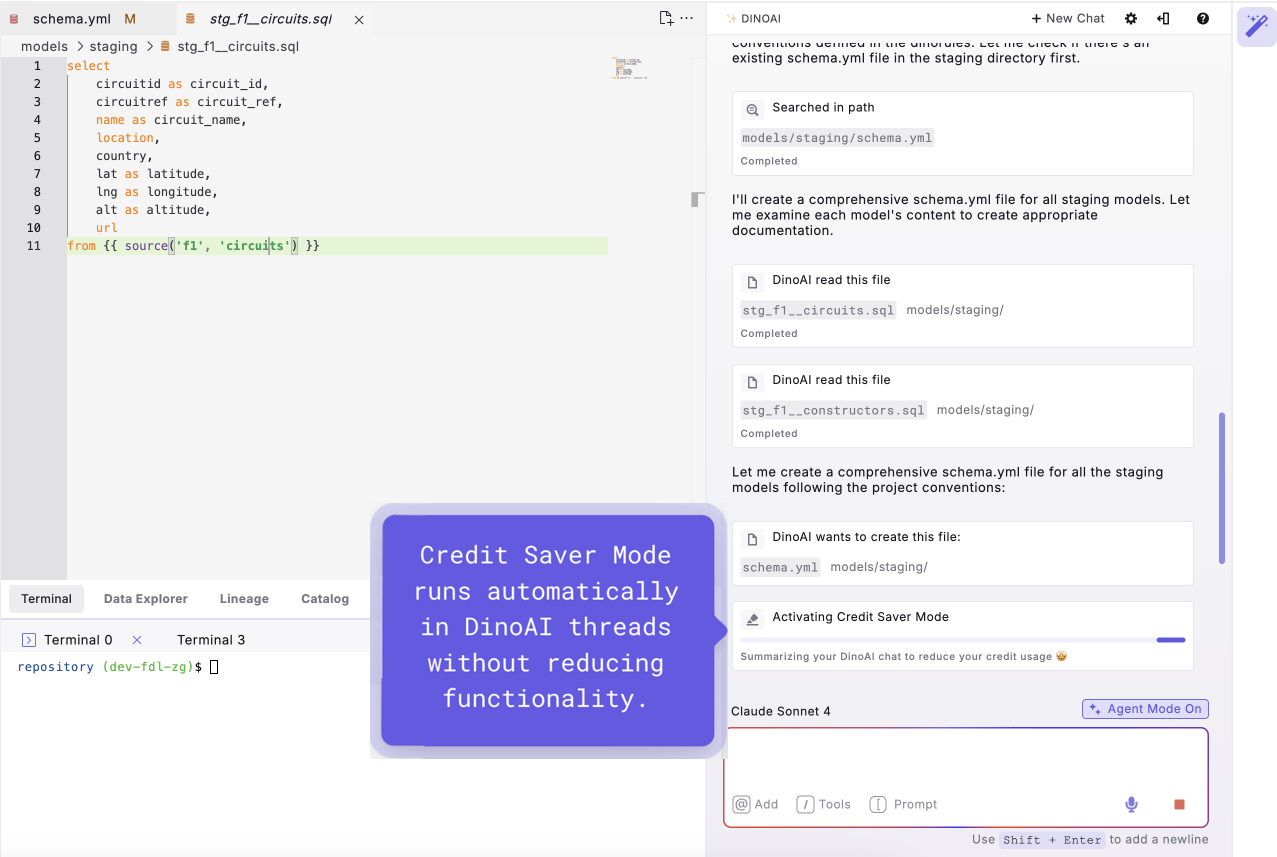
Credit Saver Mode is automatically enabled for all DinoAI interactions to help optimize your credit usage without compromising functionality.
#### How Credit Saver Mode Works
When your conversation thread reaches a certain length, Credit Saver Mode automatically:
1. **Analyzes conversation history** to identify key context and decisions
2. **Creates a summary** of the important information from previous exchanges
3. **Restarts the conversation** with the summarized context
4. **Maintains continuity** while reducing the token count for future interactions
**Automatic Optimization**: Credit Saver Mode runs automatically in the background - you don't need to configure or manage it manually. [See it in action](https://youtu.be/WT9JQz0Wwn4?si=W5hgmrb3ub_no9JR) with this hands-on demonstration.
 **Benefits of Credit Saver Mode**
* **Reduced Credit Consumption**: Keeps token usage optimized for longer conversations
* **Maintained Context**: Preserves important information while removing unnecessary details
* **Seamless Experience**: Works transparently without interrupting your workflow
* **Conversation Continuity**: Allows for extended development sessions without losing context
***
### Best Practices for Credit Usage
To get the most value from your DinoAI credits:
#### Optimize Your Conversations
**Keep Threads Focused:**
* Create new conversations for different topics or tasks
* Avoid mixing unrelated development work in a single thread
* Start fresh conversations when switching between projects/tasks
**Be Specific with Requests:**
* Provide clear, detailed prompts to get better results on the first try
* Add relevant [context](/products/dino-ai/copilot/context/index) and [files](/products/dino-ai/copilot/context/file-context) to avoid back-and-forth clarification
* Remove unnecessary context when switching tasks
* Use [.dinorules](/products/dino-ai/dino-rules) to set consistent preferences
**Leverage Built-in Capabilities:**
* Use DinoAI's [tools and features](/products/dino-ai/tools-and-features/index) appropriately for your tasks
***
### Monitoring Your Usage
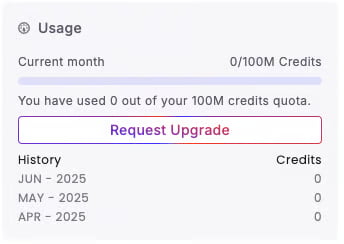
You can view your credit usage and remaining balance in the [DinoAI settings panel](/products/dino-ai/copilot/dinoai-settings). This helps you:
* **Track consumption patterns** across different types of work
* **Plan usage** for important development cycles
* **Optimize workflows** based on credit efficiency
**Benefits of Credit Saver Mode**
* **Reduced Credit Consumption**: Keeps token usage optimized for longer conversations
* **Maintained Context**: Preserves important information while removing unnecessary details
* **Seamless Experience**: Works transparently without interrupting your workflow
* **Conversation Continuity**: Allows for extended development sessions without losing context
***
### Best Practices for Credit Usage
To get the most value from your DinoAI credits:
#### Optimize Your Conversations
**Keep Threads Focused:**
* Create new conversations for different topics or tasks
* Avoid mixing unrelated development work in a single thread
* Start fresh conversations when switching between projects/tasks
**Be Specific with Requests:**
* Provide clear, detailed prompts to get better results on the first try
* Add relevant [context](/products/dino-ai/copilot/context/index) and [files](/products/dino-ai/copilot/context/file-context) to avoid back-and-forth clarification
* Remove unnecessary context when switching tasks
* Use [.dinorules](/products/dino-ai/dino-rules) to set consistent preferences
**Leverage Built-in Capabilities:**
* Use DinoAI's [tools and features](/products/dino-ai/tools-and-features/index) appropriately for your tasks
***
### Monitoring Your Usage
You can view your credit usage and remaining balance in the [DinoAI settings panel](/products/dino-ai/copilot/dinoai-settings). This helps you:
* **Track consumption patterns** across different types of work
* **Plan usage** for important development cycles
* **Optimize workflows** based on credit efficiency
 ***
**Need Help?** If you have questions about credit usage or need to adjust your plan, visit your account settings or contact support for assistance with optimizing your DinoAI usage.
## Related topics
- [DinoAI](/products/dino-ai/index.md)
- [DinoAI Copilot](/products/code-ide/left-panel/copilot.md)
- [Fix with DinoAI](/products/dino-ai/bolt-pipeline-agent/fix-with-dinoai.md)
- [DinoAI Agent](/guides/paradime-101/getting-started-with-the-paradime-ide/dinoai-accelerating-your-analytics-engineering-workflow/dinoai-agent/index.md)
- [DinoAI CLI](/developers/paradime-cli/dinoai-cli.md)
***
**Need Help?** If you have questions about credit usage or need to adjust your plan, visit your account settings or contact support for assistance with optimizing your DinoAI usage.
## Related topics
- [DinoAI](/products/dino-ai/index.md)
- [DinoAI Copilot](/products/code-ide/left-panel/copilot.md)
- [Fix with DinoAI](/products/dino-ai/bolt-pipeline-agent/fix-with-dinoai.md)
- [DinoAI Agent](/guides/paradime-101/getting-started-with-the-paradime-ide/dinoai-accelerating-your-analytics-engineering-workflow/dinoai-agent/index.md)
- [DinoAI CLI](/developers/paradime-cli/dinoai-cli.md)