> ## Documentation Index
> Fetch the complete documentation index at: https://docs.paradime.io/llms.txt
> Use this file to discover all available pages before exploring further.
# Perplexity Tool
> The Perplexity Tool integrates web search capabilities into DinoAI, providing up-to-date information with cited sources for accurate technical assistance.
export const Arcade = ({src, title}) =>
;
The Perplexity Tool integrates Perplexity AI's powerful search capabilities directly into DinoAI, allowing you to access up-to-date information from across the web.
Unlike general AI assistants that rely only on their training data, the Perplexity Tool lets DinoAI search the internet for current information, documentation, and examples.
 ### Capabilities
| Capability | What It Does |
| ----------------------- | ------------------------------------------------------- |
| Web Search | Find current information from across the internet |
| Referenced Answers | Get responses with sources and citations you can verify |
| Technical Documentation | Access the latest documentation for tools like dbt™ |
| Learning Resources | Discover tutorials, examples, and best practices |
### Using the Perplexity Tool
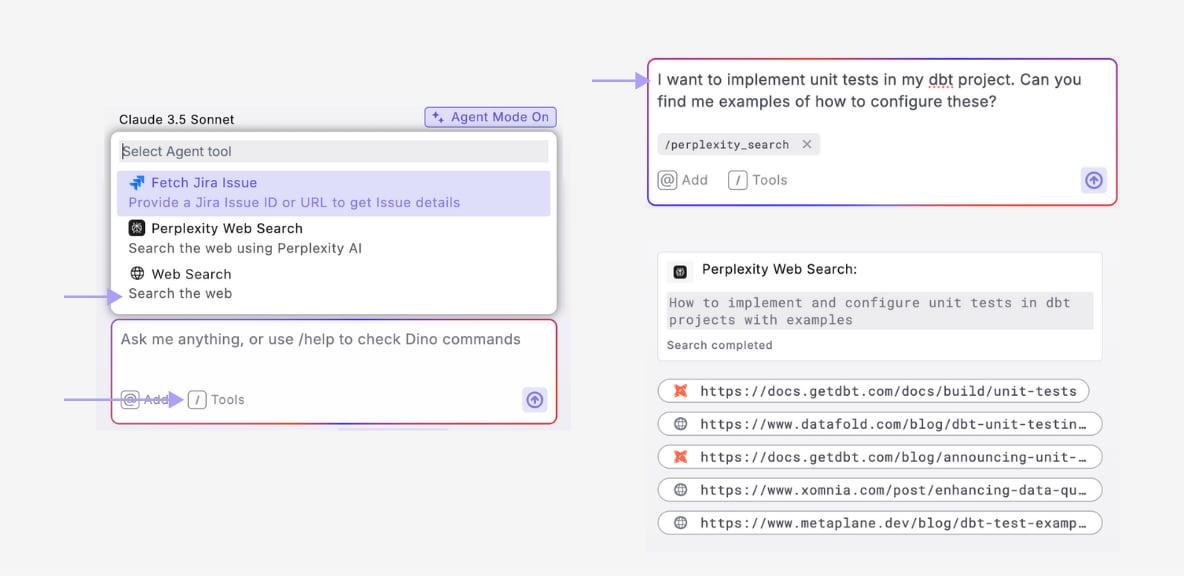
1. **Open DinoAI** and enter your prompt
2. **Select the Perplexity tool** from the tools menu
3. **Press Enter** to send your prompt
* DinoAI generates a search query based on your request
* Searches the web using Perplexity AI
* Analyzes and synthesizes the results
4. **Review the response** with cited sources and references
5. **Click on references** to view original source material
### Example Use Cases
#### Summarizing Documentation
* **Prompt**: *"What are the current best practices for incremental models in dbt?"*
* \+ Add Perplexity tool
* **Result**: Up-to-date information on incremental model strategies with references to community discussions and official guidance
#### Extracting Information
* **Prompt**: *"How can I implement dbt incremental models with Snowflake merge statements?"*
* \+ Add Perplexity tool
* **Result**: Up-to-date information on dbt incremental models with Snowflake merge statements
***
### Combining with Other Tools
The Perplexity Tool becomes even more powerful when combined with other DinoAI capabilities:
1. **Research then Implement**: Use Perplexity to learn about a new feature, then use [Agent Mode](/products/dino-ai/copilot/agent-mode) to implement it
2. **Find and Apply Best Practices**: Research current best practices, then update your existing code to follow them
3. **Troubleshoot with Context**: Look up error messages or issues online, then apply fixes to your code
## Related topics
- [Researching with Perplexity](/products/dino-ai/copilot/use-cases/researching-with-perplexity.md)
- [Tools and Features](/products/dino-ai/tools-and-features/index.md)
- [MCP Server](/products/dino-ai/mcp-server/index.md)
- [Admin Dashboard](/products/dino-ai/admin-dashboard.md)
- [DinoAI Credits](/products/dino-ai/dinoai-credits.md)
### Capabilities
| Capability | What It Does |
| ----------------------- | ------------------------------------------------------- |
| Web Search | Find current information from across the internet |
| Referenced Answers | Get responses with sources and citations you can verify |
| Technical Documentation | Access the latest documentation for tools like dbt™ |
| Learning Resources | Discover tutorials, examples, and best practices |
### Using the Perplexity Tool
1. **Open DinoAI** and enter your prompt
2. **Select the Perplexity tool** from the tools menu
3. **Press Enter** to send your prompt
* DinoAI generates a search query based on your request
* Searches the web using Perplexity AI
* Analyzes and synthesizes the results
4. **Review the response** with cited sources and references
5. **Click on references** to view original source material
### Example Use Cases
#### Summarizing Documentation
* **Prompt**: *"What are the current best practices for incremental models in dbt?"*
* \+ Add Perplexity tool
* **Result**: Up-to-date information on incremental model strategies with references to community discussions and official guidance
#### Extracting Information
* **Prompt**: *"How can I implement dbt incremental models with Snowflake merge statements?"*
* \+ Add Perplexity tool
* **Result**: Up-to-date information on dbt incremental models with Snowflake merge statements
***
### Combining with Other Tools
The Perplexity Tool becomes even more powerful when combined with other DinoAI capabilities:
1. **Research then Implement**: Use Perplexity to learn about a new feature, then use [Agent Mode](/products/dino-ai/copilot/agent-mode) to implement it
2. **Find and Apply Best Practices**: Research current best practices, then update your existing code to follow them
3. **Troubleshoot with Context**: Look up error messages or issues online, then apply fixes to your code
## Related topics
- [Researching with Perplexity](/products/dino-ai/copilot/use-cases/researching-with-perplexity.md)
- [Tools and Features](/products/dino-ai/tools-and-features/index.md)
- [MCP Server](/products/dino-ai/mcp-server/index.md)
- [Admin Dashboard](/products/dino-ai/admin-dashboard.md)
- [DinoAI Credits](/products/dino-ai/dinoai-credits.md)