> ## Documentation Index
> Fetch the complete documentation index at: https://docs.paradime.io/llms.txt
> Use this file to discover all available pages before exploring further.
# Snowflake PrivateLink
> Snowflake PrivateLink: Configure secure Snowflake connections with Paradime for dbt™ projects using AWS PrivateLink. Enhance data security.
AWS PrivateLink is an AWS service for creating private VPC endpoints that allow direct, secure connectivity between your AWS VPCs and the Snowflake VPC without traversing the public Internet.
For additional information refer to the Snowflake docs [here](https://docs.snowflake.com/en/user-guide/admin-security-privatelink#enabling-aws-privatelink).
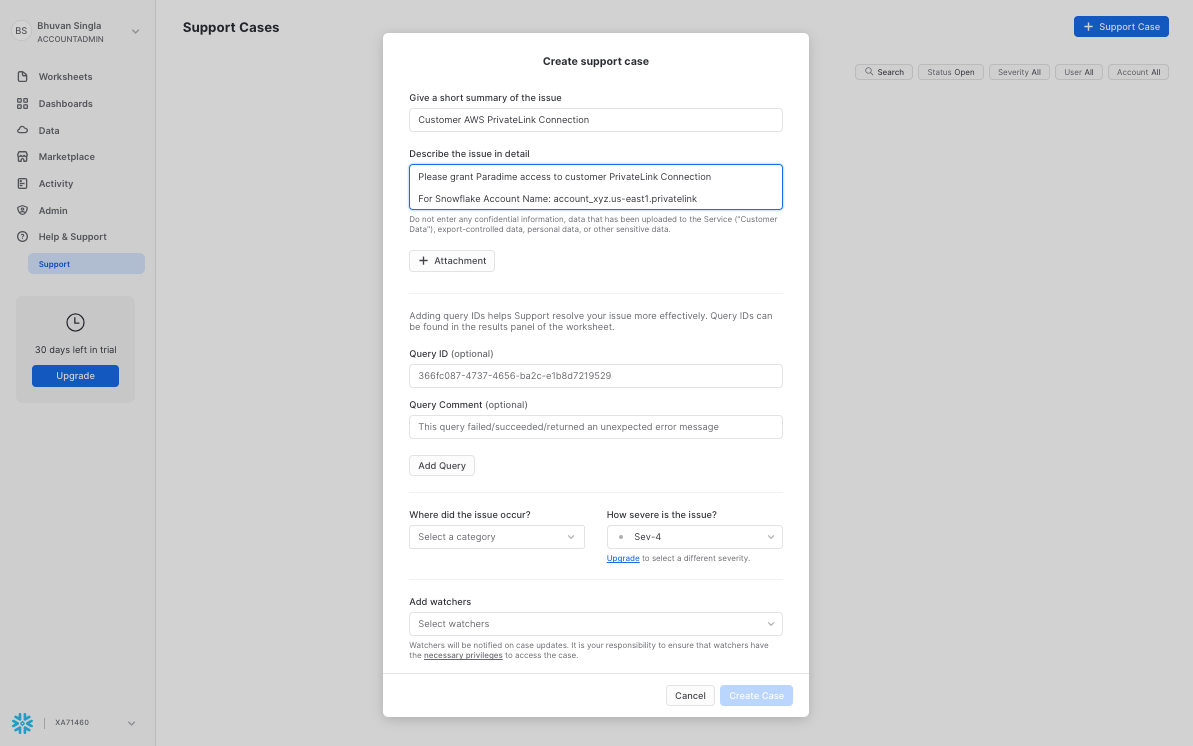
### Open a Snowflake Support Case
In Snowflake, you will firs need to open a Support Case to allow access from the Paradime AWS account. More info [here](https://community.snowflake.com/s/article/HowtosetupPrivatelinktoSnowflakefromCloudServiceVendors).
You will need to provide in your Support case the Paradime AWS account ID. Contact with the Paradime team at [support@paradime.io](mailto:support@paradime.io).
To submit your Support request in Snowflake, you will need to have `ACCOUNTADMIN` to your Snowflake instance.
 ### Retrieve private link configuration
After completing the above step you will need to retrieve your Snowflake private link configuration and share these with the Paradime team to complete the setup.
Run the below command in Snowflake:
```sql theme={"system"}
select SYSTEM$GET_PRIVATELINK_CONFIG();
```
This will return the below information that will need to be shared with the Paradime team to complete the Private Link setup.
```json theme={"system"}
{
"regionless-snowsight-privatelink-url": "",
"privatelink-account-name": "",
"snowsight-privatelink-url": "",
"privatelink-internal-stage": "",
"privatelink-account-url": "",
"privatelink-connection-urls": "",
"privatelink-ocsp-url": "",
"privatelink-vpce-id": ""
}
```
## Related topics
- [AWS PrivateLink](/products/settings/connections/connection-security/aws-privatelink/index.md)
- [Redshift PrivateLink](/products/settings/connections/connection-security/aws-privatelink/redshift-privatelink.md)
- [Connection Security](/products/settings/connections/connection-security/index.md)
- [Snowflake](/products/settings/connections/scheduler-environment/snowflake.md)
### Retrieve private link configuration
After completing the above step you will need to retrieve your Snowflake private link configuration and share these with the Paradime team to complete the setup.
Run the below command in Snowflake:
```sql theme={"system"}
select SYSTEM$GET_PRIVATELINK_CONFIG();
```
This will return the below information that will need to be shared with the Paradime team to complete the Private Link setup.
```json theme={"system"}
{
"regionless-snowsight-privatelink-url": "",
"privatelink-account-name": "",
"snowsight-privatelink-url": "",
"privatelink-internal-stage": "",
"privatelink-account-url": "",
"privatelink-connection-urls": "",
"privatelink-ocsp-url": "",
"privatelink-vpce-id": ""
}
```
## Related topics
- [AWS PrivateLink](/products/settings/connections/connection-security/aws-privatelink/index.md)
- [Redshift PrivateLink](/products/settings/connections/connection-security/aws-privatelink/redshift-privatelink.md)
- [Connection Security](/products/settings/connections/connection-security/index.md)
- [Snowflake](/products/settings/connections/scheduler-environment/snowflake.md)