> ## Documentation Index
> Fetch the complete documentation index at: https://docs.paradime.io/llms.txt
> Use this file to discover all available pages before exploring further.
# Snowflake cost connection
> Snowflake Cost Connection: Integrate Snowflake cost management with Paradime for dbt™ projects. Optimize budget and resource allocation.
export const Arcade = ({src, title}) =>
;
**IP RESTRICTIONS**
Make sure to allow traffic from one of the Paradime IPs in your firewall depending on the data location selected.
👉 See also: [Paradime IP addresses](/developers/ip-restrictions).
## 1. Snowflake setup guide
### Create a Snowflake role and user
Generate a password for the Paradime user and replace the placeholder text `` in the step below.
```sql theme={"system"}
-- 1.### create user and role
use role useradmin;
create user if not exists paradime_cost_user
password = ''
default_role = paradime_cost_role
default_warehouse = paradime_warehouse
comment = 'Used by paradime.io for cost analytics';
create role if not exists paradime_cost_role comment = 'Used by paradime.io for cost analytics';
grant role paradime_cost_role to role sysadmin;
grant role paradime_cost_role to user paradime_cost_user;
```
### Create a Snowflake warehouse
```sql theme={"system"}
-- 2.### create warehouse
use role sysadmin;
create warehouse if not exists paradime_warehouse
warehouse_size=xsmall
auto_suspend=60
initially_suspended=true
comment = 'Used by paradime.io for cost analytics';
grant monitor, operate, usage, modify
on warehouse paradime_warehouse to role paradime_cost_role;
```
### Create S3 integration
Before running this command, you will need to update `STORAGE_AWS_ROLE_ARN` and `STORAGE_ALLOWED_LOCATIONS` with your own region and company token.
You can find the region and company token in the Paradime workspace settings page. [company-and-workspace-token.md](/developers/company-and-workspace-token "mention")
```sql theme={"system"}
-- 3.### Create S3 integration
use role accountadmin;
create or replace storage integration PARADIME_S3_STORAGE_INTEGRATION
type = external_stage
storage_provider = 'S3'
enabled = true
STORAGE_AWS_ROLE_ARN = 'arn:aws:iam::817727247863:role/paradime-snowflake-role--' -- replace company token and region before running this command
STORAGE_ALLOWED_LOCATIONS = ('s3://paradime-s3--/snowflake/'); -- replace company token and region before running this command
grant usage on integration PARADIME_S3_STORAGE_INTEGRATION to role paradime_cost_role;
```
If you have set `PREVENT_UNLOAD_TO_INLINE_URL` to `true`, you can optionally use a named stage. To set this up run the below script. \
\
Before running this command, you will need to update `URL` with your own region and company token. You can find the region and company token in the Paradime workspace settings page. [company-and-workspace-token.md](/developers/company-and-workspace-token "mention")
```sql theme={"system"}
-- 3.### Optional when using a named stage
use role accountadmin;
create stage PARADIME_COST_ANALYTICS.CORE.PARADIME_EXPORT
url='s3://paradime-s3--/snowflake/' -- replace company token and region before running this command
storage_integration = PARADIME_S3_STORAGE_INTEGRATION;
grant usage on stage PARADIME_COST_ANALYTICS.CORE.PARADIME_EXPORT to role paradime_cost_role;
```
### Create a new database and schema for Paradime
```sql theme={"system"}
-- 4. ### create paradime db and schemas and grant access
use role accountadmin;
create or replace database PARADIME_COST_ANALYTICS;
create or replace schema PARADIME_COST_ANALYTICS.CORE;
grant usage on database PARADIME_COST_ANALYTICS to role paradime_cost_role;
grant usage on schema PARADIME_COST_ANALYTICS.CORE to role paradime_cost_role;
```
### Create a new Snowflake file format
```sql theme={"system"}
-- 5.### Create fileformat and grant privileges
use role accountadmin;
create or replace file format PARADIME_COST_ANALYTICS.CORE.PARADIME_JSON_FORMAT
type = JSON
NULL_IF = ();
grant all privileges on file format PARADIME_COST_ANALYTICS.CORE.PARADIME_JSON_FORMAT to paradime_cost_role;
```
### Grant access to Snowflake metadata to the Paradime user
```sql theme={"system"}
-- 6.### grant access to Snowflake metadata
use role accountadmin;
grant imported privileges on database snowflake to role paradime_cost_role;
```
### Enable the Paradime user to manage and monitor Snowflake Warehouses
```sql theme={"system"}
-- 7.### grant access to monitor warehouses
use role accountadmin;
grant monitor usage on account to role paradime_cost_role;
--- ### grant paradime the access to manage warehouses
use role accountadmin;
grant manage warehouses on account to role paradime_cost_role;
--- ### grant paradime the access to manage tasks
use role accountadmin;
grant create TASK on schema PARADIME_COST_ANALYTICS.CORE to role paradime_cost_role;
grant execute TASK on ACCOUNT TO ROLE paradime_cost_role;
```
### Ensure your account has ORGADMIN access
Paradime relies on views from the **`snowflake.organization_usage`** such as the **`snowflake.organization_usage.rate_sheet_daily`** view is used to retrieve your daily rate for each Snowflake service (example the cost per credit for compute resources and cost per terabyte for storage).
To verify if these views are populated in your account, please execute the following SQL statement:
```sql theme={"system"}
--- ### check the rate_sheet_daily view contains data
use role accountadmin;
select * from snowflake.organization_usage.rate_sheet_daily;
```
If records are returned, you're all set 🙌
\-------
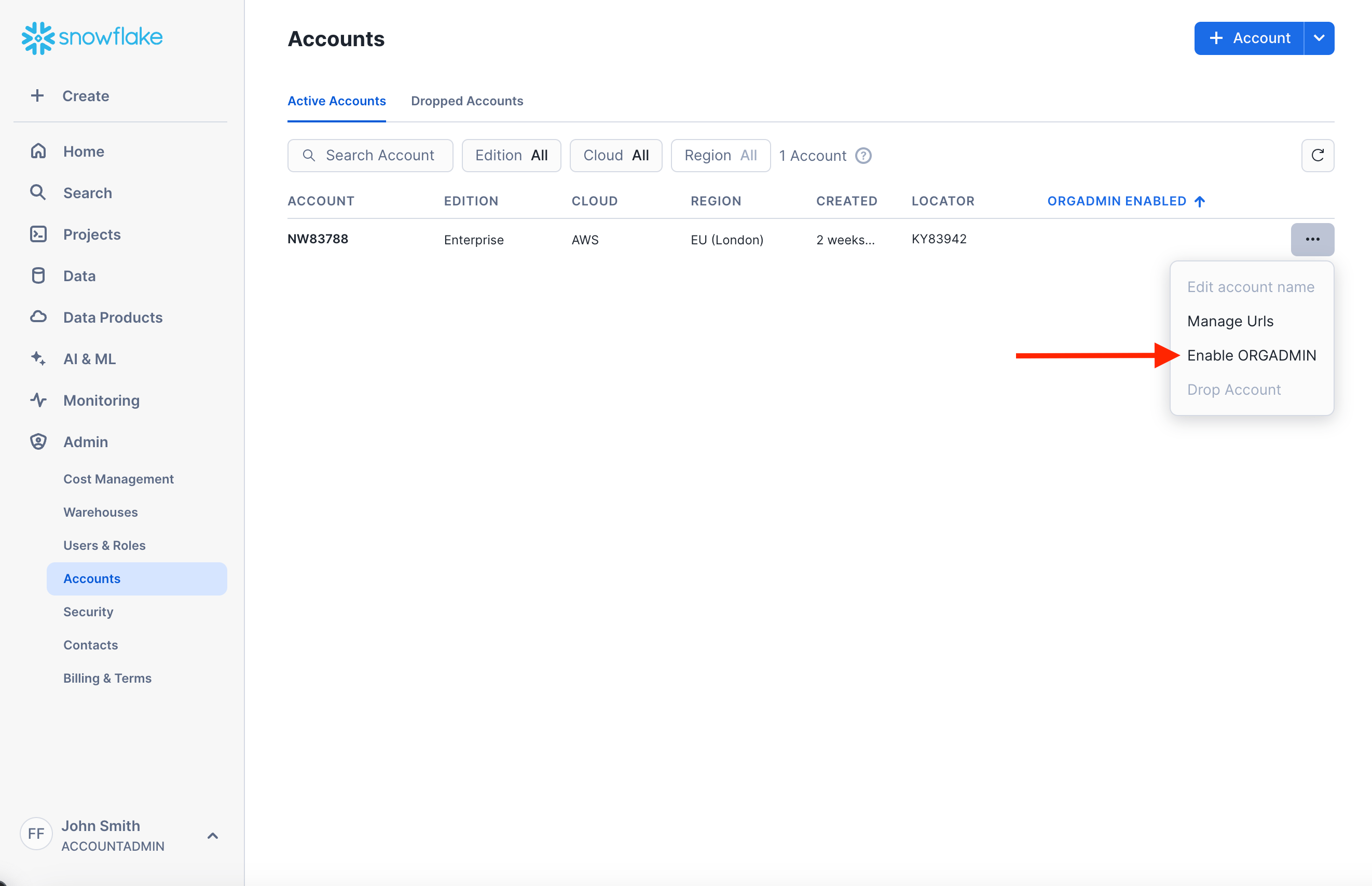
If the SQL statement returns no records, it likely means that the ORGADMIN role is not enabled for the account. To enable it, follow these steps:
1. Log into a Snowflake account within your organization that has the ORGADMIN role enabled (at least one account should have this role).
2. Navigate to the sidebar and click on "Admin" and then "Accounts".
3. Locate the account you want to connect to Paradime enable the ORGADMIN role for that account.
💡 *It can take up to 1 day for these views become populated with data after running this statement*
 #### Purchased your Snowflake credits through a reseller?
If you purchased your Snowflake contract or credits through a reseller, such as the AWS Marketplace, you will not have access to the `organization_usage` views even after executing the steps mentioned above to enable the ORGADMIN role. \
\
Share a copy of your latest Snowflake invoice with the Paradime team (via chat or by emailing [support@paradime.io](mailto:support@paradime.io) so that we can manually input the applicable rates for your account.
### Full script here 👇
```sql lineNumbers theme={"system"}
-- 1.### create user and role
use role useradmin;
create user if not exists paradime_cost_user
password = ''
default_role = paradime_cost_role
default_warehouse = paradime_warehouse
comment = 'Used by paradime.io for cost analytics';
create role if not exists paradime_cost_role comment = 'Used by paradime.io for cost analytics';
grant role paradime_cost_role to role sysadmin;
grant role paradime_cost_role to user paradime_cost_user;
-- 2.### create warehouse
use role sysadmin;
create warehouse if not exists paradime_warehouse
warehouse_size=xsmall
auto_suspend=60
initially_suspended=true
comment = 'Used by paradime.io for cost analytics';
grant monitor, operate, usage, modify
on warehouse paradime_warehouse to role paradime_cost_role;
-- 3.### Create S3 integration
use role accountadmin;
create or replace storage integration PARADIME_S3_STORAGE_INTEGRATION
type = external_stage
storage_provider = 'S3'
enabled = true
STORAGE_AWS_ROLE_ARN = 'arn:aws:iam::817727247863:role/paradime-snowflake-role--' -- replace company token and region before running this command
STORAGE_ALLOWED_LOCATIONS = ('s3://paradime-s3--/snowflake/'); -- replace company token and region before running this command
grant usage on integration PARADIME_S3_STORAGE_INTEGRATION to role paradime_cost_role;
-- 4. ### create paradime db and schemas and grant access
use role accountadmin;
create or replace database PARADIME_COST_ANALYTICS;
create or replace schema PARADIME_COST_ANALYTICS.CORE;
grant usage on database PARADIME_COST_ANALYTICS to role paradime_cost_role;
grant usage on schema PARADIME_COST_ANALYTICS.CORE to role paradime_cost_role;
-- 5.### Create fileformat and grant privileges
use role accountadmin;
create or replace file format PARADIME_COST_ANALYTICS.CORE.PARADIME_JSON_FORMAT
type = JSON
NULL_IF = ();
grant all privileges on file format PARADIME_COST_ANALYTICS.CORE.PARADIME_JSON_FORMAT to paradime_cost_role;
-- 6.### grant access to Snowflake metadata
use role accountadmin;
grant imported privileges on database snowflake to role paradime_cost_role;
-- 7.### grant access to monitor warehouses
use role accountadmin;
grant monitor usage on account to role paradime_cost_role;
--- ### grant paradime the access to manage warehouses
use role accountadmin;
grant manage warehouses on account to role paradime_cost_role;
--- ### grant paradime the access to manage tasks
use role accountadmin;
grant create TASK on schema PARADIME_COST_ANALYTICS.CORE to role paradime_cost_role;
grant execute TASK on ACCOUNT TO ROLE paradime_cost_role;
--- ### check the rate_sheet_daily view contains data
use role accountadmin;
select * from snowflake.organization_usage.rate_sheet_daily;
```
## 2. dbt™️ project setup guide
### Create a macro to manage query comments
To enable Paradime to enrich your Snowflake queries with additional metadata you will need to create a new dbt™️ macro called `get_query_comment.sql` in the macros folder of your project.
```sql title="get_query_comment.sql " lineNumbers theme={"system"}
{% macro get_query_comment(node, extra = {}) %}
{%- set comment_dict = extra -%}
{%- do comment_dict.update(
app='dbt',
dbt_version=dbt_version,
project_name=project_name,
target_name=target.name,
target_database=target.database,
target_schema=target.schema,
invocation_id=invocation_id
) -%}
{%- if node is not none -%}
{%- do comment_dict.update(
node_name=node.name,
node_alias=node.alias,
node_package_name=node.package_name,
node_original_file_path=node.original_file_path,
node_database=node.database,
node_schema=node.schema,
node_id=node.unique_id,
node_resource_type=node.resource_type,
node_meta=node.config.meta,
node_tags=node.tags,
full_refresh=flags.FULL_REFRESH,
which=flags.WHICH,
) -%}
{%- if flags.INVOCATION_COMMAND -%}
{%- do comment_dict.update(
invocation_command=flags.INVOCATION_COMMAND
) -%}
{%- endif -%}
{%- if node.resource_type != ('seed') -%} {# Otherwise this throws an error saying 'Seeds cannot depend on other nodes.' #}
{%- if node.refs is defined -%}
{% set refs = [] %}
{% for ref in node.refs %}
{%- if (dbt_version.split('.')[0] | int > 1)
or (dbt_version.split('.')[0] | int == 1 and dbt_version.split('.')[1] | int >= 5) -%}
{%- do refs.append(ref.name) -%}
{%- else -%}
{%- do refs.append(ref[0]) -%}
{%- endif -%}
{% endfor %}
{%- do comment_dict.update(
node_refs=refs | unique | list
) -%}
{%- endif -%}
{%- endif -%}
{%- if node.resource_type == 'model' -%}
{%- do comment_dict.update(
materialized=node.config.materialized,
) -%}
{%- endif -%}
{%- endif -%}
--- only if using dbt cloud
{%- if env_var('DBT_CLOUD_PROJECT_ID', False) -%}
{%- do comment_dict.update(
dbt_cloud_project_id=env_var('DBT_CLOUD_PROJECT_ID')
) -%}
{%- endif -%}
{%- if env_var('DBT_CLOUD_JOB_ID', False) -%}
{%- do comment_dict.update(
dbt_cloud_job_id=env_var('DBT_CLOUD_JOB_ID')
) -%}
{%- endif -%}
{%- if env_var('DBT_CLOUD_RUN_ID', False) -%}
{%- do comment_dict.update(
dbt_cloud_run_id=env_var('DBT_CLOUD_RUN_ID')
) -%}
{%- endif -%}
{%- if env_var('DBT_CLOUD_RUN_REASON_CATEGORY', False) -%}
{%- do comment_dict.update(
dbt_cloud_run_reason_category=env_var('DBT_CLOUD_RUN_REASON_CATEGORY')
) -%}
{%- endif -%}
{%- if env_var('DBT_CLOUD_RUN_REASON', False) -%}
{%- do comment_dict.update(
dbt_cloud_run_reason=env_var('DBT_CLOUD_RUN_REASON')
) -%}
{%- endif -%}
-- only if using bolt scheduler
{%- if env_var('PARADIME_SCHEDULE_NAME', False) -%}
{%- do comment_dict.update(
paradime_schedule_name=env_var('PARADIME_SCHEDULE_NAME')
) -%}
{%- endif -%}
{%- if env_var('PARADIME_SCHEDULE_RUN_ID', False) -%}
{%- do comment_dict.update(
paradime_schedule_run_id=env_var('PARADIME_SCHEDULE_RUN_ID')
) -%}
{%- endif -%}
{%- if env_var('PARADIME_SCHEDULE_RUN_START_DTTM', False) -%}
{%- do comment_dict.update(
paradime_schedule_run_start_dttm=env_var('PARADIME_SCHEDULE_RUN_START_DTTM')
) -%}
{%- endif -%}
{%- if env_var('PARADIME_SCHEDULE_TRIGGER', False) -%}
{%- do comment_dict.update(
paradime_schedule_trigger=env_var('PARADIME_SCHEDULE_TRIGGER')
) -%}
{%- endif -%}
{%- if env_var('PARADIME_SCHEDULE_GIT_SHA', False) -%}
{%- do comment_dict.update(
paradime_schedule_git_sha=env_var('PARADIME_SCHEDULE_GIT_SHA')
) -%}
{%- endif -%}
{{ return(tojson(comment_dict)) }}
{% endmacro %}
```
### Update your dbt\_project.yml file
This step ensures that with each dbt™️ run, the query comment is appended to the query running in Snowflake.
```yaml title="dbt_project.yml" theme={"system"}
query-comment:
comment: '{{ get_query_comment(node) }}'
append: true
```
## 3. Configured Cost connection in Paradime
#### Add a Snowflake Cost Connection
1. Click **"Settings"** in the **top menu bar** of the Paradime interface.
2. Click **"Connections"** in the **left sidebar**.
3. Click **"Add New"** next to the **Radar Environment**.
4. Select **"Snowflake"** as the connection type.
#### **Step 2: Enter the Required Credentials**
After selecting **Snowflake**, provide the following details:
* **Snowflake** [**Account Identifier**](https://docs.snowflake.com/en/user-guide/admin-account-identifier)
* **Paradime Cost Database**: `PARADIME_COST_ANALYTICS`
Check this guide on [generating an encrypted or unencrypted key pair](https://docs.snowflake.com/en/user-guide/key-pair-auth#configuring-key-pair-authentication) for the Snowflake user connecting to Paradime.
**If using the Key-Pair auth method, simply enter:**
* **Username**: `paradime_cost_user`
* **Private Key:** The Private Key generated and linked to the user. You **must** include the commented lines when adding the Private Key.
* **Passphrase (Optional)**: (Use the passphrase created when generating the encrypted)
**If using the Username & Password auth method, simply enter:**
* **Username**: `paradime_cost_user`
* **Password**: (Use the password generated during setup)
## Related topics
- [Cost connection](/products/settings/connections/cost-connection/index.md)
- [Snowflake Cost Monitoring](/products/radar/cost-management/snowflake-cost-monitoring.md)
- [Snowflake Cost Optimization](/products/radar/cost-management/snowflake-cost-optimization.md)
- [dbt™ Model Query Cost Optimizer — Snowflake](/guides/programmable-agents/dbt-tm-model-query-cost-optimizer-snowflake.md)
- [BigQuery cost connection](/products/settings/connections/cost-connection/bigquery-cost-connection.md)
#### Purchased your Snowflake credits through a reseller?
If you purchased your Snowflake contract or credits through a reseller, such as the AWS Marketplace, you will not have access to the `organization_usage` views even after executing the steps mentioned above to enable the ORGADMIN role. \
\
Share a copy of your latest Snowflake invoice with the Paradime team (via chat or by emailing [support@paradime.io](mailto:support@paradime.io) so that we can manually input the applicable rates for your account.
### Full script here 👇
```sql lineNumbers theme={"system"}
-- 1.### create user and role
use role useradmin;
create user if not exists paradime_cost_user
password = ''
default_role = paradime_cost_role
default_warehouse = paradime_warehouse
comment = 'Used by paradime.io for cost analytics';
create role if not exists paradime_cost_role comment = 'Used by paradime.io for cost analytics';
grant role paradime_cost_role to role sysadmin;
grant role paradime_cost_role to user paradime_cost_user;
-- 2.### create warehouse
use role sysadmin;
create warehouse if not exists paradime_warehouse
warehouse_size=xsmall
auto_suspend=60
initially_suspended=true
comment = 'Used by paradime.io for cost analytics';
grant monitor, operate, usage, modify
on warehouse paradime_warehouse to role paradime_cost_role;
-- 3.### Create S3 integration
use role accountadmin;
create or replace storage integration PARADIME_S3_STORAGE_INTEGRATION
type = external_stage
storage_provider = 'S3'
enabled = true
STORAGE_AWS_ROLE_ARN = 'arn:aws:iam::817727247863:role/paradime-snowflake-role--' -- replace company token and region before running this command
STORAGE_ALLOWED_LOCATIONS = ('s3://paradime-s3--/snowflake/'); -- replace company token and region before running this command
grant usage on integration PARADIME_S3_STORAGE_INTEGRATION to role paradime_cost_role;
-- 4. ### create paradime db and schemas and grant access
use role accountadmin;
create or replace database PARADIME_COST_ANALYTICS;
create or replace schema PARADIME_COST_ANALYTICS.CORE;
grant usage on database PARADIME_COST_ANALYTICS to role paradime_cost_role;
grant usage on schema PARADIME_COST_ANALYTICS.CORE to role paradime_cost_role;
-- 5.### Create fileformat and grant privileges
use role accountadmin;
create or replace file format PARADIME_COST_ANALYTICS.CORE.PARADIME_JSON_FORMAT
type = JSON
NULL_IF = ();
grant all privileges on file format PARADIME_COST_ANALYTICS.CORE.PARADIME_JSON_FORMAT to paradime_cost_role;
-- 6.### grant access to Snowflake metadata
use role accountadmin;
grant imported privileges on database snowflake to role paradime_cost_role;
-- 7.### grant access to monitor warehouses
use role accountadmin;
grant monitor usage on account to role paradime_cost_role;
--- ### grant paradime the access to manage warehouses
use role accountadmin;
grant manage warehouses on account to role paradime_cost_role;
--- ### grant paradime the access to manage tasks
use role accountadmin;
grant create TASK on schema PARADIME_COST_ANALYTICS.CORE to role paradime_cost_role;
grant execute TASK on ACCOUNT TO ROLE paradime_cost_role;
--- ### check the rate_sheet_daily view contains data
use role accountadmin;
select * from snowflake.organization_usage.rate_sheet_daily;
```
## 2. dbt™️ project setup guide
### Create a macro to manage query comments
To enable Paradime to enrich your Snowflake queries with additional metadata you will need to create a new dbt™️ macro called `get_query_comment.sql` in the macros folder of your project.
```sql title="get_query_comment.sql " lineNumbers theme={"system"}
{% macro get_query_comment(node, extra = {}) %}
{%- set comment_dict = extra -%}
{%- do comment_dict.update(
app='dbt',
dbt_version=dbt_version,
project_name=project_name,
target_name=target.name,
target_database=target.database,
target_schema=target.schema,
invocation_id=invocation_id
) -%}
{%- if node is not none -%}
{%- do comment_dict.update(
node_name=node.name,
node_alias=node.alias,
node_package_name=node.package_name,
node_original_file_path=node.original_file_path,
node_database=node.database,
node_schema=node.schema,
node_id=node.unique_id,
node_resource_type=node.resource_type,
node_meta=node.config.meta,
node_tags=node.tags,
full_refresh=flags.FULL_REFRESH,
which=flags.WHICH,
) -%}
{%- if flags.INVOCATION_COMMAND -%}
{%- do comment_dict.update(
invocation_command=flags.INVOCATION_COMMAND
) -%}
{%- endif -%}
{%- if node.resource_type != ('seed') -%} {# Otherwise this throws an error saying 'Seeds cannot depend on other nodes.' #}
{%- if node.refs is defined -%}
{% set refs = [] %}
{% for ref in node.refs %}
{%- if (dbt_version.split('.')[0] | int > 1)
or (dbt_version.split('.')[0] | int == 1 and dbt_version.split('.')[1] | int >= 5) -%}
{%- do refs.append(ref.name) -%}
{%- else -%}
{%- do refs.append(ref[0]) -%}
{%- endif -%}
{% endfor %}
{%- do comment_dict.update(
node_refs=refs | unique | list
) -%}
{%- endif -%}
{%- endif -%}
{%- if node.resource_type == 'model' -%}
{%- do comment_dict.update(
materialized=node.config.materialized,
) -%}
{%- endif -%}
{%- endif -%}
--- only if using dbt cloud
{%- if env_var('DBT_CLOUD_PROJECT_ID', False) -%}
{%- do comment_dict.update(
dbt_cloud_project_id=env_var('DBT_CLOUD_PROJECT_ID')
) -%}
{%- endif -%}
{%- if env_var('DBT_CLOUD_JOB_ID', False) -%}
{%- do comment_dict.update(
dbt_cloud_job_id=env_var('DBT_CLOUD_JOB_ID')
) -%}
{%- endif -%}
{%- if env_var('DBT_CLOUD_RUN_ID', False) -%}
{%- do comment_dict.update(
dbt_cloud_run_id=env_var('DBT_CLOUD_RUN_ID')
) -%}
{%- endif -%}
{%- if env_var('DBT_CLOUD_RUN_REASON_CATEGORY', False) -%}
{%- do comment_dict.update(
dbt_cloud_run_reason_category=env_var('DBT_CLOUD_RUN_REASON_CATEGORY')
) -%}
{%- endif -%}
{%- if env_var('DBT_CLOUD_RUN_REASON', False) -%}
{%- do comment_dict.update(
dbt_cloud_run_reason=env_var('DBT_CLOUD_RUN_REASON')
) -%}
{%- endif -%}
-- only if using bolt scheduler
{%- if env_var('PARADIME_SCHEDULE_NAME', False) -%}
{%- do comment_dict.update(
paradime_schedule_name=env_var('PARADIME_SCHEDULE_NAME')
) -%}
{%- endif -%}
{%- if env_var('PARADIME_SCHEDULE_RUN_ID', False) -%}
{%- do comment_dict.update(
paradime_schedule_run_id=env_var('PARADIME_SCHEDULE_RUN_ID')
) -%}
{%- endif -%}
{%- if env_var('PARADIME_SCHEDULE_RUN_START_DTTM', False) -%}
{%- do comment_dict.update(
paradime_schedule_run_start_dttm=env_var('PARADIME_SCHEDULE_RUN_START_DTTM')
) -%}
{%- endif -%}
{%- if env_var('PARADIME_SCHEDULE_TRIGGER', False) -%}
{%- do comment_dict.update(
paradime_schedule_trigger=env_var('PARADIME_SCHEDULE_TRIGGER')
) -%}
{%- endif -%}
{%- if env_var('PARADIME_SCHEDULE_GIT_SHA', False) -%}
{%- do comment_dict.update(
paradime_schedule_git_sha=env_var('PARADIME_SCHEDULE_GIT_SHA')
) -%}
{%- endif -%}
{{ return(tojson(comment_dict)) }}
{% endmacro %}
```
### Update your dbt\_project.yml file
This step ensures that with each dbt™️ run, the query comment is appended to the query running in Snowflake.
```yaml title="dbt_project.yml" theme={"system"}
query-comment:
comment: '{{ get_query_comment(node) }}'
append: true
```
## 3. Configured Cost connection in Paradime
#### Add a Snowflake Cost Connection
1. Click **"Settings"** in the **top menu bar** of the Paradime interface.
2. Click **"Connections"** in the **left sidebar**.
3. Click **"Add New"** next to the **Radar Environment**.
4. Select **"Snowflake"** as the connection type.
#### **Step 2: Enter the Required Credentials**
After selecting **Snowflake**, provide the following details:
* **Snowflake** [**Account Identifier**](https://docs.snowflake.com/en/user-guide/admin-account-identifier)
* **Paradime Cost Database**: `PARADIME_COST_ANALYTICS`
Check this guide on [generating an encrypted or unencrypted key pair](https://docs.snowflake.com/en/user-guide/key-pair-auth#configuring-key-pair-authentication) for the Snowflake user connecting to Paradime.
**If using the Key-Pair auth method, simply enter:**
* **Username**: `paradime_cost_user`
* **Private Key:** The Private Key generated and linked to the user. You **must** include the commented lines when adding the Private Key.
* **Passphrase (Optional)**: (Use the passphrase created when generating the encrypted)
**If using the Username & Password auth method, simply enter:**
* **Username**: `paradime_cost_user`
* **Password**: (Use the password generated during setup)
## Related topics
- [Cost connection](/products/settings/connections/cost-connection/index.md)
- [Snowflake Cost Monitoring](/products/radar/cost-management/snowflake-cost-monitoring.md)
- [Snowflake Cost Optimization](/products/radar/cost-management/snowflake-cost-optimization.md)
- [dbt™ Model Query Cost Optimizer — Snowflake](/guides/programmable-agents/dbt-tm-model-query-cost-optimizer-snowflake.md)
- [BigQuery cost connection](/products/settings/connections/cost-connection/bigquery-cost-connection.md)