> ## Documentation Index
> Fetch the complete documentation index at: https://docs.paradime.io/llms.txt
> Use this file to discover all available pages before exploring further.
# Redshift
> Paradime Redshift Connection: Integrate Redshift with Paradime for dbt™ projects. Enhance data management and querying.
**IP RESTRICTIONS**
Make sure to allow traffic from one of the Paradime IPs in your firewall depending on the data location selected.
👉 See also: [Paradime IP addresses](/developers/ip-restrictions).
## Add Code IDE Connection
You will be prompted to add a Development connection during the onboarding, or you can add more connections by completing the following steps:
1. Click **Settings** in the top menu bar of the Paradime interface to access **Account Settings**
2. In the left sidebar, click "**Connections**"
3. Click "**Add New**" next to the Code IDE section
4. Select "Redshift"
## Using Username & Password
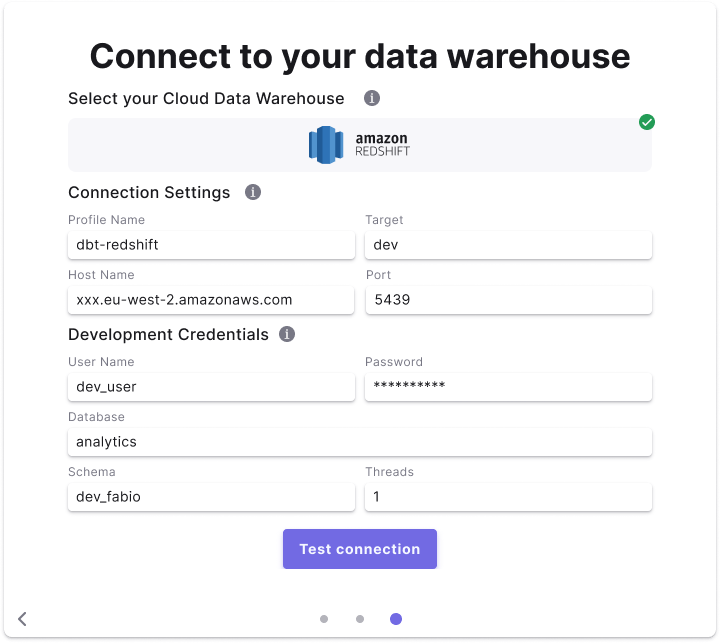 ### Field Details
Below are list of fields and example to create a connection.
**Field access levels:**
* 🏢 **`Workspace level`** fields are set by the the workspace `Admin` and not configurable for by user
* 👥 **`User level`** fields are set by each user (`Admin`/`Developer`) when setting the Development connection.
| Field | Description | Example | Level |
| ------------ | ----------------------------------------------------------------------------------------------------------------------------------------------- | --------------------------------- | ------------------ |
| Profile Name | The profile name set in your `dbt_project.yaml` . See more [here](https://docs.getdbt.com/docs/core/connect-data-platform/connection-profiles). | **`dbt-redshift`** | 🏢 Workspace level |
| Target | The target name used to identify the connection. See more [here](https://docs.getdbt.com/reference/dbt-jinja-functions/target). | **`dev`** | 🏢 Workspace level |
| Host Name | The hostname of the Redshift database to connect to. | **`xxx.eu-west-2.amazonaws.com`** | 🏢 Workspace level |
| Port | Usually `5439` for Redshift. | **`5439`** | 🏢 Workspace level |
| Database | The name of your Redshift production database. | **`analytics`** | 👥 User level |
| Username | The username created with access to the development database. | **`dev_user`** | 👥 User level |
| Password | The password set for the user created in Redshift. | **`password_xyz`** | 👥 User level |
| Schema | The default schema used to build dbt™️ objects at runtime. | **`dbt_john`** | 👥 User level |
| Threads | The number of threads used in this connection. See more [here](https://docs.getdbt.com/docs/running-a-dbt-project/using-threads). | **`8`** | 👥 User level |
## Using IAM
### Field Details
Below are list of fields and example to create a connection.
**Field access levels:**
* 🏢 **`Workspace level`** fields are set by the the workspace `Admin` and not configurable for by user
* 👥 **`User level`** fields are set by each user (`Admin`/`Developer`) when setting the Development connection.
| Field | Description | Example | Level |
| ------------ | ----------------------------------------------------------------------------------------------------------------------------------------------- | --------------------------------- | ------------------ |
| Profile Name | The profile name set in your `dbt_project.yaml` . See more [here](https://docs.getdbt.com/docs/core/connect-data-platform/connection-profiles). | **`dbt-redshift`** | 🏢 Workspace level |
| Target | The target name used to identify the connection. See more [here](https://docs.getdbt.com/reference/dbt-jinja-functions/target). | **`dev`** | 🏢 Workspace level |
| Host Name | The hostname of the Redshift database to connect to. | **`xxx.eu-west-2.amazonaws.com`** | 🏢 Workspace level |
| Port | Usually `5439` for Redshift. | **`5439`** | 🏢 Workspace level |
| Database | The name of your Redshift production database. | **`analytics`** | 👥 User level |
| Username | The username created with access to the development database. | **`dev_user`** | 👥 User level |
| Password | The password set for the user created in Redshift. | **`password_xyz`** | 👥 User level |
| Schema | The default schema used to build dbt™️ objects at runtime. | **`dbt_john`** | 👥 User level |
| Threads | The number of threads used in this connection. See more [here](https://docs.getdbt.com/docs/running-a-dbt-project/using-threads). | **`8`** | 👥 User level |
## Using IAM
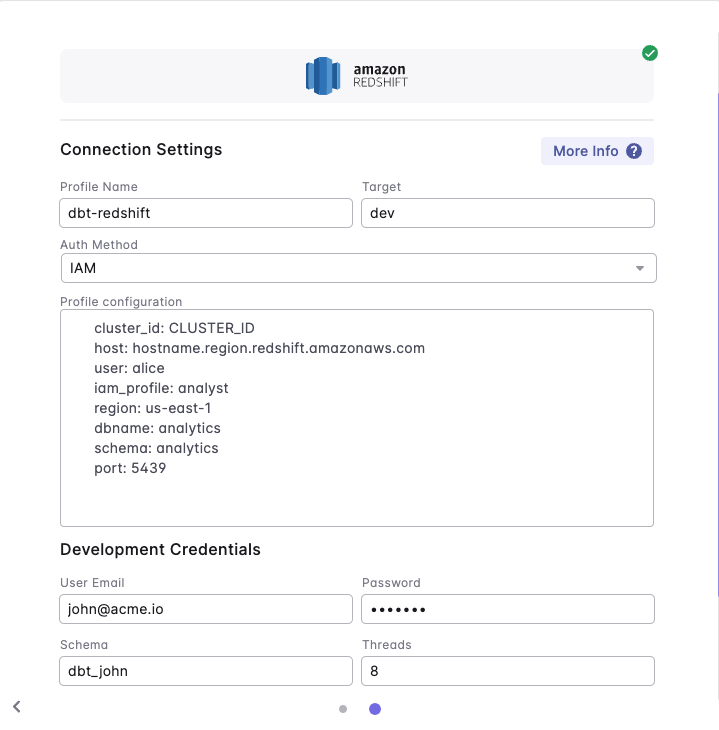 ### Field Details
Below are list of fields and example to create a connection.
**Field access levels:**
* 🏢 **`Workspace level`** fields are set by the the workspace `Admin` and not configurable for by user
* 👥 **`User level`** fields are set by each user (`Admin`/`Developer`) when setting the Development connection.
| Field | Description | Example | Level |
| --------------------- | ------------------------------------------------------------------------------------------------------------------------------------------------------------------------------------------------------------------------------- | ----------------------------------------------------------------------------------------------------------------------------------------------------------------------- | ------------------ |
| Profile Name | The profile name set in your `dbt_project.yaml` . See more [here](https://docs.getdbt.com/docs/core/connect-data-platform/connection-profiles). | **`dbt-redshift`** | 🏢 Workspace level |
| Target | The target name used to identify the connection. See more [here](https://docs.getdbt.com/reference/dbt-jinja-functions/target). | **`dev`** | 🏢 Workspace level |
| Profile Configuration | This is the coplete profile configurations for dbt. Which will include host name, port plus optional fields. See more [here](https://docs.getdbt.com/docs/core/connect-data-platform/redshift-setup#specifying-an-iam-profile). | `cluster_id: CLUSTER_ID host: hostname.region.redshift.amazonaws.com user: alice iam_profile: analyst region: us-east-1 dbname: analytics schema: analytics port: 5439` | 🏢 Workspace level |
| User Email | The username created with access to the development database. | **`John@acme.io`** | 👥 User level |
| Password | The password set for the user created in Redshift. | **`password_xyz`** | 👥 User level |
| Schema | The default schema used to build dbt™️ objects at runtime. | **`dbt_john`** | 👥 User level |
| Threads | The number of threads used in this connection. See more [here](https://docs.getdbt.com/docs/running-a-dbt-project/using-threads). | **`8`** | 👥 User level |
## Related topics
- [Redshift](/products/settings/connections/scheduler-environment/redshift.md)
- [Redshift Tools](/products/dino-ai/tools-and-features/warehouse-tool/redshift-tools.md)
- [Redshift PrivateLink](/products/settings/connections/connection-security/aws-privatelink/redshift-privatelink.md)
- [Security model](/resources/other-important-stuff/security-model.md)
### Field Details
Below are list of fields and example to create a connection.
**Field access levels:**
* 🏢 **`Workspace level`** fields are set by the the workspace `Admin` and not configurable for by user
* 👥 **`User level`** fields are set by each user (`Admin`/`Developer`) when setting the Development connection.
| Field | Description | Example | Level |
| --------------------- | ------------------------------------------------------------------------------------------------------------------------------------------------------------------------------------------------------------------------------- | ----------------------------------------------------------------------------------------------------------------------------------------------------------------------- | ------------------ |
| Profile Name | The profile name set in your `dbt_project.yaml` . See more [here](https://docs.getdbt.com/docs/core/connect-data-platform/connection-profiles). | **`dbt-redshift`** | 🏢 Workspace level |
| Target | The target name used to identify the connection. See more [here](https://docs.getdbt.com/reference/dbt-jinja-functions/target). | **`dev`** | 🏢 Workspace level |
| Profile Configuration | This is the coplete profile configurations for dbt. Which will include host name, port plus optional fields. See more [here](https://docs.getdbt.com/docs/core/connect-data-platform/redshift-setup#specifying-an-iam-profile). | `cluster_id: CLUSTER_ID host: hostname.region.redshift.amazonaws.com user: alice iam_profile: analyst region: us-east-1 dbname: analytics schema: analytics port: 5439` | 🏢 Workspace level |
| User Email | The username created with access to the development database. | **`John@acme.io`** | 👥 User level |
| Password | The password set for the user created in Redshift. | **`password_xyz`** | 👥 User level |
| Schema | The default schema used to build dbt™️ objects at runtime. | **`dbt_john`** | 👥 User level |
| Threads | The number of threads used in this connection. See more [here](https://docs.getdbt.com/docs/running-a-dbt-project/using-threads). | **`8`** | 👥 User level |
## Related topics
- [Redshift](/products/settings/connections/scheduler-environment/redshift.md)
- [Redshift Tools](/products/dino-ai/tools-and-features/warehouse-tool/redshift-tools.md)
- [Redshift PrivateLink](/products/settings/connections/connection-security/aws-privatelink/redshift-privatelink.md)
- [Security model](/resources/other-important-stuff/security-model.md)