> ## Documentation Index
> Fetch the complete documentation index at: https://docs.paradime.io/llms.txt
> Use this file to discover all available pages before exploring further.
# Snowflake
> Paradime Snowflake Connection: Connect Snowflake with Paradime for dbt™ projects. Ensure efficient data management and querying.
**IP RESTRICTIONS**
Make sure to allow traffic from one of the Paradime IPs in your firewall depending on the data location selected.
👉 See also: [Paradime IP addresses](/developers/ip-restrictions).
## Suggested permissions
This set of permissions will enable users in Paradime to read from and create tables and views when running dbt™️ from the Paradime terminal in you Snowflake database.
The role connected in Paradime for should have the below permissions for each database where your source data lives and where you want to materialize your models. Make sure to
```sql theme={"system"}
-- grant permission to allow role to read from your source database
grant usage on database <your_databse_name> to role <snowflake_role>;
grant usage on future schemas in database <your_databse_name> to role <snowflake_role>;
grant select on future tables in database <your_databse_name> to role <snowflake_role>;
grant select on future views in database <your_databse_name> to role <snowflake_role>;
grant usage on all schemas in database <your_databse_name> to role <snowflake_role>;
grant select on all tables in database <your_databse_name> to role <snowflake_role>;
grant select on all views in database <your_databse_name> to role <snowflake_role>;
-- grant permission to allow role to write to your dev database
grant all on database <your_databse_name> to role <snowflake_role>;
```
## Add Development Connection
You will be prompted to add a Development connection during the onboarding, or you can add more connections by going executing the following instructions:
1. Click **Settings** in the top menu bar of the Paradime interface to access **Account Settings**
2. In the left sidebar, click "**Connections**"
3. Click "**Add New**" next to the Code IDE section
4. Select "Snowflake"
## Using Username & Password
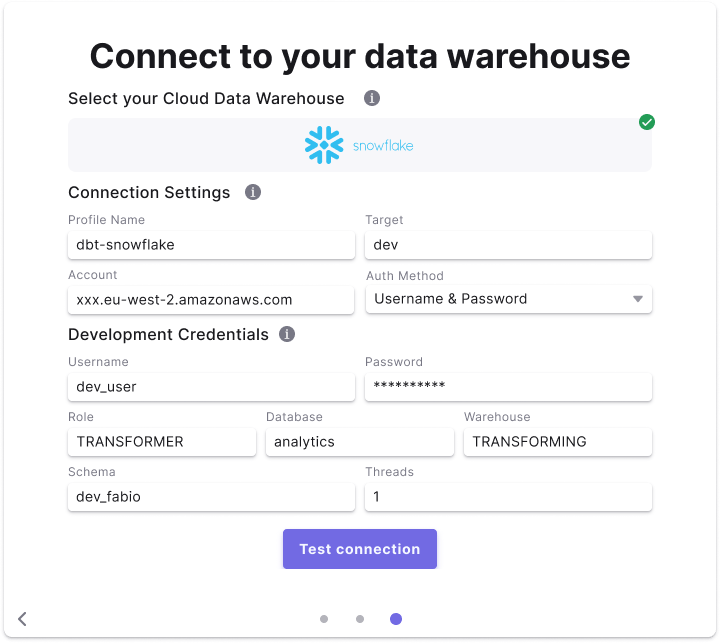 ### Field Details
Below are list of fields and example to create a connection.
**Field access levels:**
* 🏢 **`Workspace level`** fields are set by the the workspace `Admin` and not configurable for by user
* 👥 **`User level`** fields are set by each user (`Admin`/`Developer`) when setting the Development connection.
| Field | Description | Example | Level |
| ------------ | ----------------------------------------------------------------------------------------------------------------------------------------------- | --------------------------- | ------------------ |
| Profile Name | The profile name set in your `dbt_project.yaml` . See more [here](https://docs.getdbt.com/docs/core/connect-data-platform/connection-profiles). | **`dbt-snowflake`** | 🏢 Workspace level |
| Target | The target name used to identify the connection. See more [here](https://docs.getdbt.com/reference/dbt-jinja-functions/target). | **`dev`** | 🏢 Workspace level |
| Account | The Snowflake account to connect to as per [Snowflake's documentation.](https://docs.snowflake.com/en/user-guide/admin-account-identifier) | **`vj71689.eu-west-2.aws`** | 🏢 Workspace level |
| Role | The role to assume when running queries as the specified user. | **`transformer`** | 👥 User level |
| Database | The name of your Snowflake development database. | **`analytics`** | 👥 User level |
| Warehouse | The virtual warehouse to use for running queries. | **`transforming`** | 👥 User level |
| Username | The username of the user. | **`john_user`** | 👥 User level |
| Password | The password set for the user | **`password_xyz`** | 👥 User level |
| Dataset | The default dataset used to build dbt™️ objects at runtime. | **`dbt_john`** | 👥 User level |
| Threads | The number of threads used in this connection. See more [here](https://docs.getdbt.com/docs/running-a-dbt-project/using-threads). | **`8`** | 👥 User level |
## Using Snowflake OAuth
Check our Tutorial on how to setup Snowflake OAuth in your Snowflake account. Once this connection is configured, each user will be redirected to Snowflake and asked to authenticate their connection.
### Field Details
Below are list of fields and example to create a connection.
**Field access levels:**
* 🏢 **`Workspace level`** fields are set by the the workspace `Admin` and not configurable for by user
* 👥 **`User level`** fields are set by each user (`Admin`/`Developer`) when setting the Development connection.
| Field | Description | Example | Level |
| ------------ | ----------------------------------------------------------------------------------------------------------------------------------------------- | --------------------------- | ------------------ |
| Profile Name | The profile name set in your `dbt_project.yaml` . See more [here](https://docs.getdbt.com/docs/core/connect-data-platform/connection-profiles). | **`dbt-snowflake`** | 🏢 Workspace level |
| Target | The target name used to identify the connection. See more [here](https://docs.getdbt.com/reference/dbt-jinja-functions/target). | **`dev`** | 🏢 Workspace level |
| Account | The Snowflake account to connect to as per [Snowflake's documentation.](https://docs.snowflake.com/en/user-guide/admin-account-identifier) | **`vj71689.eu-west-2.aws`** | 🏢 Workspace level |
| Role | The role to assume when running queries as the specified user. | **`transformer`** | 👥 User level |
| Database | The name of your Snowflake development database. | **`analytics`** | 👥 User level |
| Warehouse | The virtual warehouse to use for running queries. | **`transforming`** | 👥 User level |
| Username | The username of the user. | **`john_user`** | 👥 User level |
| Password | The password set for the user | **`password_xyz`** | 👥 User level |
| Dataset | The default dataset used to build dbt™️ objects at runtime. | **`dbt_john`** | 👥 User level |
| Threads | The number of threads used in this connection. See more [here](https://docs.getdbt.com/docs/running-a-dbt-project/using-threads). | **`8`** | 👥 User level |
## Using Snowflake OAuth
Check our Tutorial on how to setup Snowflake OAuth in your Snowflake account. Once this connection is configured, each user will be redirected to Snowflake and asked to authenticate their connection.
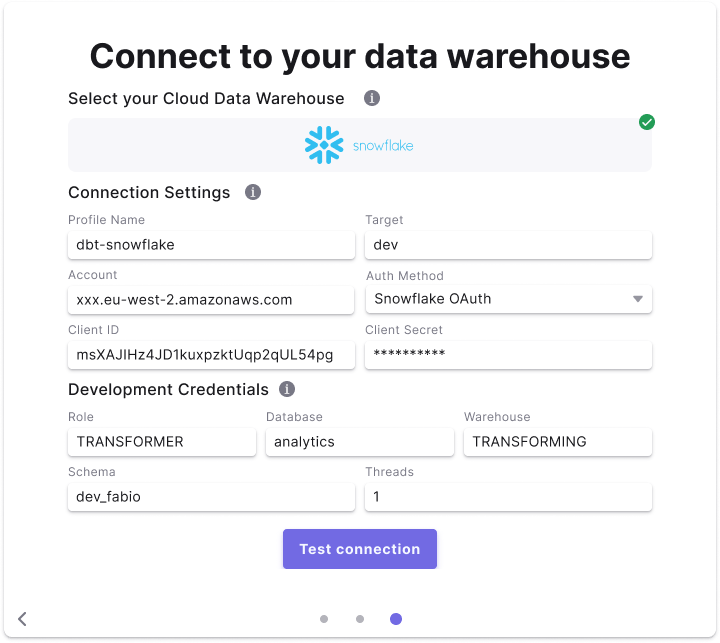 ### Fields Details
Below are list of fields and example to create a connection.
**Field access levels:**
* 🏢 **`Workspace level`** fields are set by the the workspace `Admin` and not configurable for by user
* 👥 **`User level`** fields are set by each user (`Admin`/`Developer`) when setting the Development connection.
| Field | Description | Example | Level |
| ------------- | ----------------------------------------------------------------------------------------------------------------------------------------------- | -------------------------------------------------- | ------------------ |
| Profile Name | The profile name set in your `dbt_project.yaml` . See more [here](https://docs.getdbt.com/docs/core/connect-data-platform/connection-profiles). | **`dbt-snowflake`** | 🏢 Workspace level |
| Target | The target name used to identify the connection. See more [here](https://docs.getdbt.com/reference/dbt-jinja-functions/target). | **`dev`** | 🏢 Workspace level |
| Account | The Snowflake account to connect to as per [Snowflake's documentation.](https://docs.snowflake.com/en/user-guide/admin-account-identifier) | **`vj71689.eu-west-2.aws`** | 🏢 Workspace level |
| Client ID | The Client ID generated when setting up the OAuth credentials. | **`UPWBLFUTwT7hJ+JDbNthut3rF3w=`** | 🏢 Workspace level |
| Client Secret | The Client Secret generated when setting up the OAuth credentials. | **`7FMKYoOP9+KUh2qqVHXfsZStUJLpiaa/ojFmvGwr06E=`** | 🏢 Workspace level |
| Role | The role to assume when running queries as the specified user. | **`transformer`** | 👥 User level |
| Database | The name of your Snowflake development database. | **`analytics`** | 👥 User level |
| Warehouse | The virtual warehouse to use for running queries. | **`transforming`** | 👥 User level |
| Dataset | The default dataset used to build dbt™️ objects at runtime. | **`dbt_john`** | 👥 User level |
| Threads | The number of threads used in this connection. See more [here](https://docs.getdbt.com/docs/running-a-dbt-project/using-threads). | **`8`** | 👥 User level |
## Using Key-Pair authentication
In Paradime you can use Key-Pair authentication method to enabled users to connect their development environment using a Private Key and optionally a Private Key Passphrase.
After [generating an encrypted or unencrypted key pair](https://docs.snowflake.com/en/user-guide/key-pair-auth#configuring-key-pair-authentication),, you will need to set the `rsa_public_key` for the Snowflake user connecting to Paradime.
```sql theme={"system"}
alter user johnsmith set rsa_public_key='MIIBIjANBgkqh...';
```
### Fields Details
Below are list of fields and example to create a connection.
**Field access levels:**
* 🏢 **`Workspace level`** fields are set by the the workspace `Admin` and not configurable for by user
* 👥 **`User level`** fields are set by each user (`Admin`/`Developer`) when setting the Development connection.
| Field | Description | Example | Level |
| ------------- | ----------------------------------------------------------------------------------------------------------------------------------------------- | -------------------------------------------------- | ------------------ |
| Profile Name | The profile name set in your `dbt_project.yaml` . See more [here](https://docs.getdbt.com/docs/core/connect-data-platform/connection-profiles). | **`dbt-snowflake`** | 🏢 Workspace level |
| Target | The target name used to identify the connection. See more [here](https://docs.getdbt.com/reference/dbt-jinja-functions/target). | **`dev`** | 🏢 Workspace level |
| Account | The Snowflake account to connect to as per [Snowflake's documentation.](https://docs.snowflake.com/en/user-guide/admin-account-identifier) | **`vj71689.eu-west-2.aws`** | 🏢 Workspace level |
| Client ID | The Client ID generated when setting up the OAuth credentials. | **`UPWBLFUTwT7hJ+JDbNthut3rF3w=`** | 🏢 Workspace level |
| Client Secret | The Client Secret generated when setting up the OAuth credentials. | **`7FMKYoOP9+KUh2qqVHXfsZStUJLpiaa/ojFmvGwr06E=`** | 🏢 Workspace level |
| Role | The role to assume when running queries as the specified user. | **`transformer`** | 👥 User level |
| Database | The name of your Snowflake development database. | **`analytics`** | 👥 User level |
| Warehouse | The virtual warehouse to use for running queries. | **`transforming`** | 👥 User level |
| Dataset | The default dataset used to build dbt™️ objects at runtime. | **`dbt_john`** | 👥 User level |
| Threads | The number of threads used in this connection. See more [here](https://docs.getdbt.com/docs/running-a-dbt-project/using-threads). | **`8`** | 👥 User level |
## Using Key-Pair authentication
In Paradime you can use Key-Pair authentication method to enabled users to connect their development environment using a Private Key and optionally a Private Key Passphrase.
After [generating an encrypted or unencrypted key pair](https://docs.snowflake.com/en/user-guide/key-pair-auth#configuring-key-pair-authentication),, you will need to set the `rsa_public_key` for the Snowflake user connecting to Paradime.
```sql theme={"system"}
alter user johnsmith set rsa_public_key='MIIBIjANBgkqh...';
```
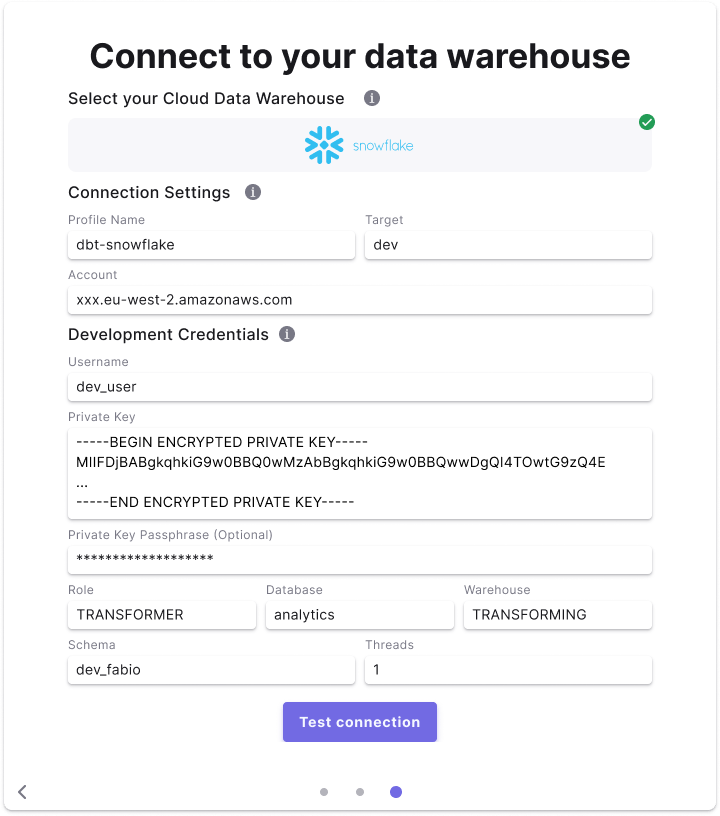 ### Fields Details
Below are list of fields and example to create a connection.
**Field access levels:**
* 🏢 **`Workspace level`** fields are set by the the workspace `Admin` and not configurable for by user
* 👥 **`User level`** fields are set by each user (`Admin`/`Developer`) when setting the Development connection.
| Field | Description | Example | Level |
| --------------------------------- | ----------------------------------------------------------------------------------------------------------------------------------------------- | ----------------------------------------------------------------------------------------------------------------- | ------------------ |
| Profile Name | The profile name set in your `dbt_project.yaml` . See more [here](https://docs.getdbt.com/docs/core/connect-data-platform/connection-profiles). | **`dbt-snowflake`** | 🏢 Workspace level |
| Target | The target name used to identify the connection. See more [here](https://docs.getdbt.com/reference/dbt-jinja-functions/target). | **`dev`** | 🏢 Workspace level |
| Account | The Snowflake account to connect to as per [Snowflake's documentation.](https://docs.snowflake.com/en/user-guide/admin-account-identifier) | **`vj71689.eu-west-2.aws`** | 🏢 Workspace level |
| Role | The role to assume when running queries as the specified user. | **`transformer`** | 👥 User level |
| Database | The name of your Snowflake development database. | **`analytics`** | 👥 User level |
| Warehouse | The virtual warehouse to use for running queries. | **`transforming`** | 👥 User level |
| Username | The username of the user. | **`john_user`** | 👥 User level |
| Private Key | The Private Key generated and linked to the user. You **must** include the commented lines when adding the Private Key. | **`-----BEGIN ENCRYPTED PRIVATE KEY----- < private key content here > -----END ENCRYPTED PRIVATE KEY-----`** | 👥 User level |
| Private Key Passphrase (Optional) | The Passphrase created when generating the encrypted key | **`passphrase_xyz`** | 👥 User level |
| Dataset | The default dataset used to build dbt™️ objects at runtime. | **`dbt_john`** | 👥 User level |
| Threads | The number of threads used in this connection. See more [here](https://docs.getdbt.com/docs/running-a-dbt-project/using-threads). | **`8`** | 👥 User level |
## Related topics
- [Snowflake](/products/settings/connections/scheduler-environment/snowflake.md)
- [Snowflake Storage](/integrations/snowflake-storage.md)
- [Snowflake Tools](/products/dino-ai/tools-and-features/warehouse-tool/snowflake-tools.md)
- [Snowflake OAuth](/products/settings/connections/connection-security/snowflake-oauth.md)
### Fields Details
Below are list of fields and example to create a connection.
**Field access levels:**
* 🏢 **`Workspace level`** fields are set by the the workspace `Admin` and not configurable for by user
* 👥 **`User level`** fields are set by each user (`Admin`/`Developer`) when setting the Development connection.
| Field | Description | Example | Level |
| --------------------------------- | ----------------------------------------------------------------------------------------------------------------------------------------------- | ----------------------------------------------------------------------------------------------------------------- | ------------------ |
| Profile Name | The profile name set in your `dbt_project.yaml` . See more [here](https://docs.getdbt.com/docs/core/connect-data-platform/connection-profiles). | **`dbt-snowflake`** | 🏢 Workspace level |
| Target | The target name used to identify the connection. See more [here](https://docs.getdbt.com/reference/dbt-jinja-functions/target). | **`dev`** | 🏢 Workspace level |
| Account | The Snowflake account to connect to as per [Snowflake's documentation.](https://docs.snowflake.com/en/user-guide/admin-account-identifier) | **`vj71689.eu-west-2.aws`** | 🏢 Workspace level |
| Role | The role to assume when running queries as the specified user. | **`transformer`** | 👥 User level |
| Database | The name of your Snowflake development database. | **`analytics`** | 👥 User level |
| Warehouse | The virtual warehouse to use for running queries. | **`transforming`** | 👥 User level |
| Username | The username of the user. | **`john_user`** | 👥 User level |
| Private Key | The Private Key generated and linked to the user. You **must** include the commented lines when adding the Private Key. | **`-----BEGIN ENCRYPTED PRIVATE KEY----- < private key content here > -----END ENCRYPTED PRIVATE KEY-----`** | 👥 User level |
| Private Key Passphrase (Optional) | The Passphrase created when generating the encrypted key | **`passphrase_xyz`** | 👥 User level |
| Dataset | The default dataset used to build dbt™️ objects at runtime. | **`dbt_john`** | 👥 User level |
| Threads | The number of threads used in this connection. See more [here](https://docs.getdbt.com/docs/running-a-dbt-project/using-threads). | **`8`** | 👥 User level |
## Related topics
- [Snowflake](/products/settings/connections/scheduler-environment/snowflake.md)
- [Snowflake Storage](/integrations/snowflake-storage.md)
- [Snowflake Tools](/products/dino-ai/tools-and-features/warehouse-tool/snowflake-tools.md)
- [Snowflake OAuth](/products/settings/connections/connection-security/snowflake-oauth.md)