> ## Documentation Index
> Fetch the complete documentation index at: https://docs.paradime.io/llms.txt
> Use this file to discover all available pages before exploring further.
# Starburst/Trino
> Integrate Trino with Paradime to enable dbt™ development
Trino (formerly PrestoSQL) is a distributed SQL query engine designed to query large data sets distributed over one or more heterogeneous data sources. As a development environment in Paradime, Trino enables dbt™️ development from Paradime's Code IDE.
**IP RESTRICTIONS**
Make sure to allow traffic from one of the Paradime IPs in your firewall depending on the data location selected.
👉 See also: [Paradime IP addresses](/developers/ip-restrictions).
### Authentication Methods
Trino supports multiple authentication methods. Set `method` to one of these values:
* `LDAP` - Username and password authentication via LDAP. See [LDAP authentication docs](https://trino.io/docs/current/security/ldap.html).
* `JWT` - JSON Web Token authentication. See [JWT authentication docs](https://trino.io/docs/current/security/jwt.html).
* `oauth_console` - Open Authentication (OAuth) with authentication URL printed to the console. See [OAuth 2.0 authentication docs](https://trino.io/docs/current/security/oauth2.html).
### Setup Instructions
1. Click **Settings** in the top menu bar of the Paradime interface to access **Account Settings**
2. In the left sidebar, click "**Connections**"
3. Click "**Add New**" next to the Code IDE section
4. Select "**Trino**"
5. In the **Profile Configuration** field, add the following parameters based on your authentication method. Reference the [**Profile Fields Reference**](/products/settings/connections/development-environment/starburst-trino#profile-fields-reference) section below for additional context and configurations:
```yaml theme={"system"}
method: ldap # Authentication method type
user: analyst@company.com # Username in required format
password: ldap_pass_123 # LDAP authentication password
host: analytics.galaxy.starburst.io # Trino server hostname
database: analytics # Target catalog name
port: 443 # Server port number
```
See [LDAP authentication docs](https://trino.io/docs/current/security/ldap.html) for additional support
```yaml theme={"system"}
method: jwt # Authentication method type
jwt_token: eyJIsInR5cCI6IkpXVCJ9 # Valid JWT token string
host: analytics.galaxy.starburst.io # Trino server hostname
database: analytics # Target catalog name
port: 443 # Server port number
```
See [JWT authentication docs](https://trino.io/docs/current/security/jwt.html) for additional support
```yaml theme={"system"}
method: oauth_console # Authentication method type
host: analytics.galaxy.starburst.io # Trino cluster hostname without http(s)://
catalog: dbt_target_catalog #Catalog name in Trino cluster
schema: db_schema #Default schema where dbt will build objects.
port: 443 #Trino server port number
```
See [OAuth 2.0 authentication docs](https://trino.io/docs/current/security/oauth2.html) for additional support
After adding the configuration, ensure it's properly formatted using a YAML formatter like [YAML Formatter](https://jsonformatter.org/yaml-formatter).
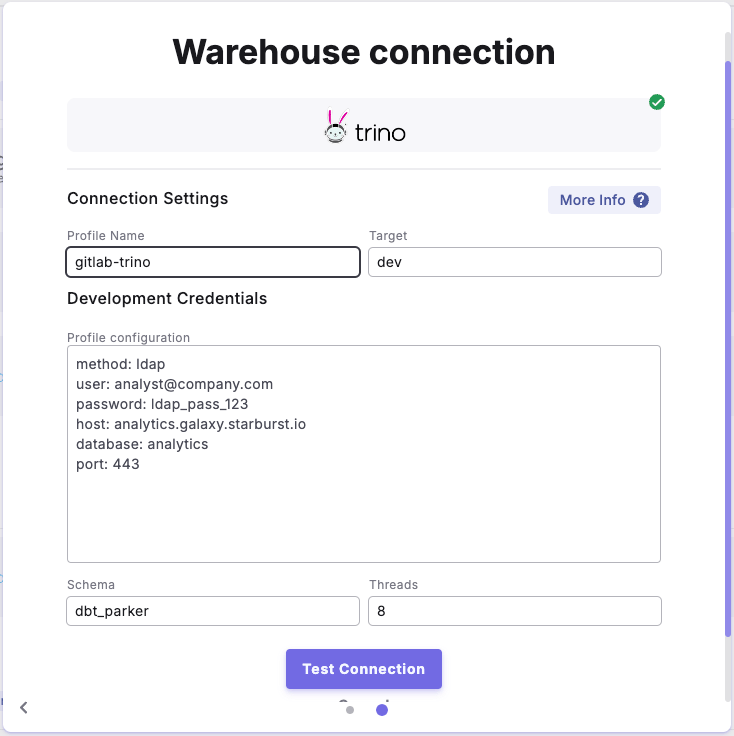
6. Provide a dbt™ **Profile Name** (This should match with the profile name set in your `dbt_project.yml`).
7. In the **Target** field, enter "**dev**". This is the default target your dbt project will use for development work.
8. The "**Schema**" field is pre-configured, but you can change it to specify the schema where dbt will build objects.
9. The "**Threads**" value is pre-configured to 1, but you can adjust this number to specify how many parallel operations your dbt project can run.
***
### Example Profile Configuration
 ***
### Profile Fields Reference
| Field | Description | Example | Default Value | Required |
| ------------------- | ------------------------------------------------------------------------------------------------------------------------------------------------------------------------- | ---------------------------------------------------------------------------------------------------------------------------------------------- | ------------- | -------- |
| type | Specifies Trino connection type | `trino` | None | ✅ |
| method | Authentication method (ldap, kerberos, jwt, etc.) | `idap` | None | ✅ |
| user | The username (of the account) to log in to your cluster. When connecting to Starburst Galaxy clusters, you must include the role of the user as a suffix to the username. | Format for Starburst Enterprise or Trino: • `user.name`• `user.name@mydomain.com` Format for Starburst Galaxy: • `user.name@mydomain.com/role` | None | ✅ |
| password | Authentication password (for LDAP) | `your_password` | None | ✅ |
| host | Trino cluster hostname. Don't include the `http://` or `https://` prefix. | `analytics.galaxy.starturst.io` | None | ✅ |
| catalog | Catalog name in Trino cluster | `analytics_catalog` | None | ✅ |
| schema | Default schema where dbt will build objects. This is configured in the UI "Schema" field | `reporting` | None | ✅ |
| port | Trino server port number | `443` | `443` | ✅ |
| threads | Number of concurrent operations.This is configured in the UI "Threads" field | `4` | `1` | ❌ |
| roles | Catalog-specific role assignments | `system: analyst` | None | ❌ |
| session\_properties | Custom Trino session settings | `query_max_run_time: 4h` | None | ❌ |
| http\_scheme | Connection protocol (http/https) | `https` | `http` | ❌ |
## Related topics
- [Starburst/Trino](/products/settings/connections/scheduler-environment/starburst-trino.md)
- [Scheduler environment](/products/settings/connections/scheduler-environment/index.md)
- [DinoAI Background Agent environment](/products/settings/connections/dinoai-background-agent-environment/index.md)
- [Code IDE environment](/products/settings/connections/development-environment/index.md)
***
### Profile Fields Reference
| Field | Description | Example | Default Value | Required |
| ------------------- | ------------------------------------------------------------------------------------------------------------------------------------------------------------------------- | ---------------------------------------------------------------------------------------------------------------------------------------------- | ------------- | -------- |
| type | Specifies Trino connection type | `trino` | None | ✅ |
| method | Authentication method (ldap, kerberos, jwt, etc.) | `idap` | None | ✅ |
| user | The username (of the account) to log in to your cluster. When connecting to Starburst Galaxy clusters, you must include the role of the user as a suffix to the username. | Format for Starburst Enterprise or Trino: • `user.name`• `user.name@mydomain.com` Format for Starburst Galaxy: • `user.name@mydomain.com/role` | None | ✅ |
| password | Authentication password (for LDAP) | `your_password` | None | ✅ |
| host | Trino cluster hostname. Don't include the `http://` or `https://` prefix. | `analytics.galaxy.starturst.io` | None | ✅ |
| catalog | Catalog name in Trino cluster | `analytics_catalog` | None | ✅ |
| schema | Default schema where dbt will build objects. This is configured in the UI "Schema" field | `reporting` | None | ✅ |
| port | Trino server port number | `443` | `443` | ✅ |
| threads | Number of concurrent operations.This is configured in the UI "Threads" field | `4` | `1` | ❌ |
| roles | Catalog-specific role assignments | `system: analyst` | None | ❌ |
| session\_properties | Custom Trino session settings | `query_max_run_time: 4h` | None | ❌ |
| http\_scheme | Connection protocol (http/https) | `https` | `http` | ❌ |
## Related topics
- [Starburst/Trino](/products/settings/connections/scheduler-environment/starburst-trino.md)
- [Scheduler environment](/products/settings/connections/scheduler-environment/index.md)
- [DinoAI Background Agent environment](/products/settings/connections/dinoai-background-agent-environment/index.md)
- [Code IDE environment](/products/settings/connections/development-environment/index.md)