> ## Documentation Index
> Fetch the complete documentation index at: https://docs.paradime.io/llms.txt
> Use this file to discover all available pages before exploring further.
# Clickhouse
ClickHouse is an open-source column-oriented database management system that enables high-performance real-time data analysis. As a DinoAI agent environment in Paradime, ClickHouse enables running dbt™ models and queries during DinoAI background agent sessions.
**IP RESTRICTIONS**
Make sure to allow traffic from one of the Paradime IPs in your firewall depending on the data location selected.
👉 See also: [Paradime IP addresses](https://docs.paradime.io/app-help/developers/ip-restrictions).
#### Setup Instructions
1. Click **Settings** in the top menu bar of the Paradime interface to access **Account Settings**
2. In the left sidebar, click **Connections**
3. Click **Add New** next to the **DinoAI Background Agent Environment** section
4. Select **ClickHouse**
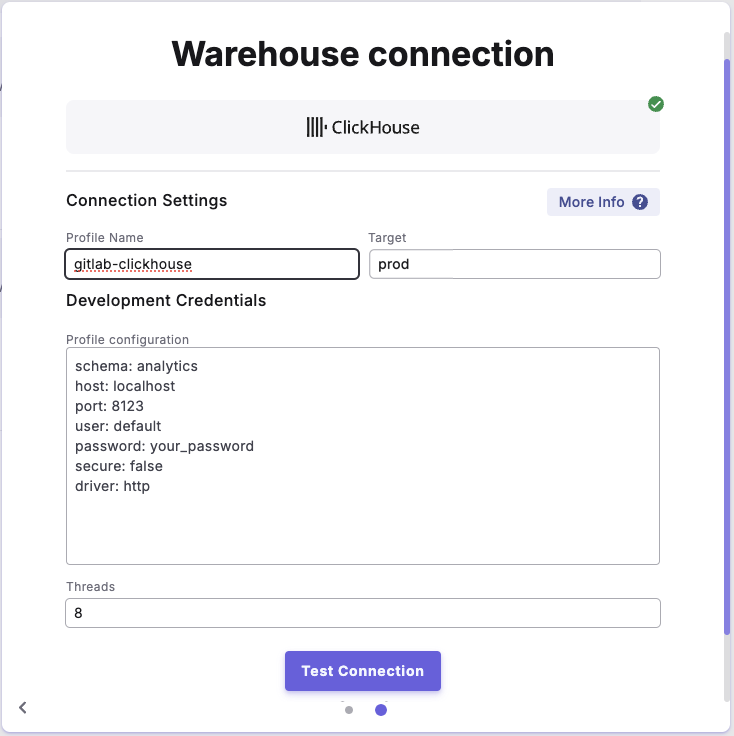
5. In the **Profile Configuration** field, add at least these required parameters. For additional configuration options, see the Profile Fields Reference section below.
```yaml theme={"system"}
schema: dbt_transformations # DinoAI agent database
host: clickhouse.internal.company.com # Internal hostname
port: 9000 # Native protocol port
user: dbt_user # Database user
password: clickhouse_pass_456 # User password
secure: false # Internal traffic
driver: native # Native protocol
```
After adding the configuration, ensure it's properly formatted using a YAML formatter like [YAML Formatter](https://jsonformatter.org/yaml-formatter).
6. Provide a dbt™ **Profile Name** (this should match the profile name set in your `dbt_project.yml`).
7. In the **Target** field, enter **`dinoai`**. This is the target your dbt™ project will use during DinoAI background agent sessions.
8. The **Threads** value is pre-configured to 1, but you can adjust this to specify how many parallel operations your dbt™ project can run.
***
#### Example Profile Configuration
 ***
#### Profile Fields Reference
| Field | Description | Default Value | Required |
| ------------------------------- | ----------------------------------------------------------------------- | --------------------------------------- | -------- |
| `schema` | ClickHouse database name for models. Configured in the UI Schema field. | None | `✅` |
| `driver` | Connection protocol (http or native) | `http` | ❌ |
| `host` | ClickHouse server hostname | `localhost` | ❌ |
| `port` | Connection port number | http: `8123/8443` · native: `9000/9440` | ❌ |
| `user` | Database user name | None | `✅` |
| `password` | Database user password | None | `✅` |
| `cluster` | Name of ClickHouse cluster for distributed operations | None | ❌ |
| `verify` | Whether to validate TLS certificate | `True` | ❌ |
| `secure` | Enable TLS/HTTPS connections | `False` | ❌ |
| `retries` | Number of connection retry attempts | None | ❌ |
| `compression` | Type of data compression to use | `False` | ❌ |
| `connect_timeout` | Seconds to wait for connection | `10` | ❌ |
| `send_receive_timeout` | Seconds to wait for data transfer | `300` (5 minutes) | ❌ |
| `cluster_mode` | Settings for replicated databases | `False` | ❌ |
| `use_lw_deletes` | Enable lightweight delete operations | `False` | ❌ |
| `check_exchange` | Check support for atomic table exchange | `True` | ❌ |
| `local_suffix` | Suffix for local table names | `_local` | ❌ |
| `local_db_prefix` | Prefix for local database names | None | ❌ |
| `allow_automatic_deduplication` | Enable automatic data deduplication | `False` | ❌ |
## Related topics
- [Clickhouse](/products/settings/connections/development-environment/clickhouse.md)
- [ClickHouse Tools](/products/dino-ai/tools-and-features/warehouse-tool/clickhouse-tools.md)
- [Scheduler environment](/products/settings/connections/scheduler-environment/index.md)
- [Data Warehouse Tools](/products/dino-ai/tools-and-features/warehouse-tool/index.md)
***
#### Profile Fields Reference
| Field | Description | Default Value | Required |
| ------------------------------- | ----------------------------------------------------------------------- | --------------------------------------- | -------- |
| `schema` | ClickHouse database name for models. Configured in the UI Schema field. | None | `✅` |
| `driver` | Connection protocol (http or native) | `http` | ❌ |
| `host` | ClickHouse server hostname | `localhost` | ❌ |
| `port` | Connection port number | http: `8123/8443` · native: `9000/9440` | ❌ |
| `user` | Database user name | None | `✅` |
| `password` | Database user password | None | `✅` |
| `cluster` | Name of ClickHouse cluster for distributed operations | None | ❌ |
| `verify` | Whether to validate TLS certificate | `True` | ❌ |
| `secure` | Enable TLS/HTTPS connections | `False` | ❌ |
| `retries` | Number of connection retry attempts | None | ❌ |
| `compression` | Type of data compression to use | `False` | ❌ |
| `connect_timeout` | Seconds to wait for connection | `10` | ❌ |
| `send_receive_timeout` | Seconds to wait for data transfer | `300` (5 minutes) | ❌ |
| `cluster_mode` | Settings for replicated databases | `False` | ❌ |
| `use_lw_deletes` | Enable lightweight delete operations | `False` | ❌ |
| `check_exchange` | Check support for atomic table exchange | `True` | ❌ |
| `local_suffix` | Suffix for local table names | `_local` | ❌ |
| `local_db_prefix` | Prefix for local database names | None | ❌ |
| `allow_automatic_deduplication` | Enable automatic data deduplication | `False` | ❌ |
## Related topics
- [Clickhouse](/products/settings/connections/development-environment/clickhouse.md)
- [ClickHouse Tools](/products/dino-ai/tools-and-features/warehouse-tool/clickhouse-tools.md)
- [Scheduler environment](/products/settings/connections/scheduler-environment/index.md)
- [Data Warehouse Tools](/products/dino-ai/tools-and-features/warehouse-tool/index.md)