> ## Documentation Index
> Fetch the complete documentation index at: https://docs.paradime.io/llms.txt
> Use this file to discover all available pages before exploring further.
# BigQuery
> Integrate Bigquery with Paradime to enables deploying dbt™ in production with Bolt
**IP RESTRICTIONS**
Make sure to allow traffic from one of the Paradime IPs in your firewall depending on the data location selected.
👉 See also: [Paradime IP addresses](/developers/ip-restrictions).
We advise creating a new BigQuery Service Account and grant the suggested access required to create tables and views your Production BigQuery project.
## Create a service account
To create a service account in BigQuery, follow the detailed steps in [Google Cloud's Creating and managing service account keys](https://cloud.google.com/iam/docs/creating-managing-service-account-keys#iam-service-account-keys-delete-console).
### Required permissions
This set of permissions will enable Paradime to read from and create tables and views when running production jobs in you BigQuery project.
```
BigQuery Data Editor
BigQuery User
```
## Add Scheduler Connection
To add the BigQuery Production connection, follow these instructions:
1. Click **Settings** in the top menu bar of the Paradime interface to access **Account Settings**
2. In the left sidebar, click "**Connections**"
3. Click "**Add New**" next to the **Bolt Schedules** section
4. Select "**Bigquery**"
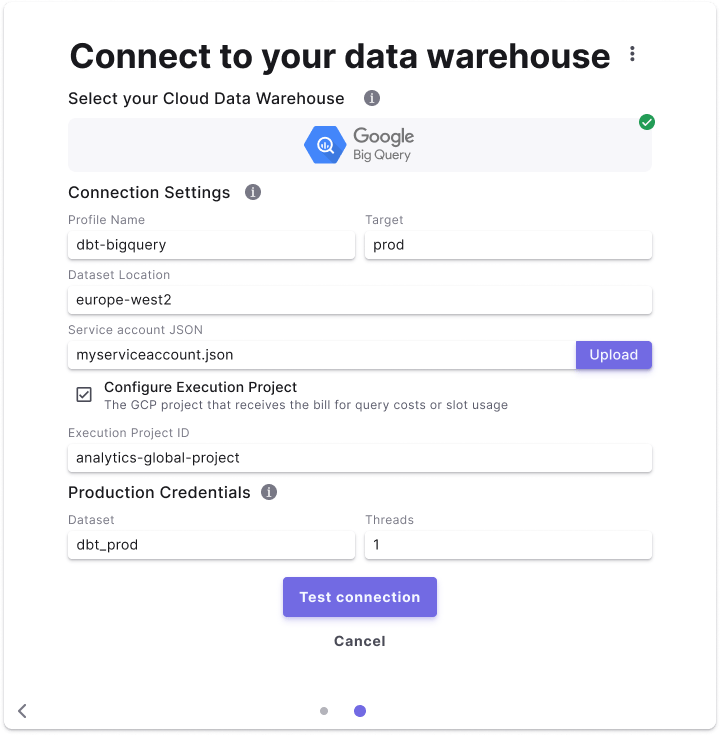 ### Fields Details
Below are list of fields and example to create a connection.
| Field | Description | Example |
| ----------------------------------- | ------------------------------------------------------------------------------------------------------------------------------------------------------------------------------------------------------------------------------------------------------------------------------------------------- | ----------------------------------------- |
| Profile Name | The profile name set in your `dbt_project.yaml` . See more [here](https://docs.getdbt.com/docs/core/connect-data-platform/connection-profiles). | **`dbt-bigquery`** |
| Target | The target name used to identify the connection. See more [here](https://docs.getdbt.com/reference/dbt-jinja-functions/target). | **`prod`** |
| Dataset Location | The location of BigQuery datasets can be configured using the location configuration in a BigQuery profile. Location can be either a multi-regional location (e.g. `EU`, `US`), or a regional location (e.g. `europe-west2` ). See more [here](https://cloud.google.com/bigquery/docs/locations). | **`US`** |
| Service AccountService Account JSON | The service account JSON file created for this service user. | **`service_account_user.json`** |
| Execution Project ID (Optional) | You can specify an Execution Project ID to bill for query execution, instead of the project where you materialize your resources. See more [here](https://docs.getdbt.com/docs/core/connect-data-platform/bigquery-setup#execution-project). | (Optional) **`analytics-global-project`** |
| Dataset | The default dataset used to build dbt™️ objects at runtime. | **`dbt_prod`** |
| Threads | The number of threads used in this connection. See more [here](https://docs.getdbt.com/docs/running-a-dbt-project/using-threads). | **`8`** |
## Related topics
- [BigQuery](/products/settings/connections/development-environment/bigquery.md)
- [Get Started](/products/radar/getting-started.md)
- [Real-time Alerting](/products/radar/real-time-alerting.md)
- [BigQuery Tools](/products/dino-ai/tools-and-features/warehouse-tool/bigquery-tools.md)
### Fields Details
Below are list of fields and example to create a connection.
| Field | Description | Example |
| ----------------------------------- | ------------------------------------------------------------------------------------------------------------------------------------------------------------------------------------------------------------------------------------------------------------------------------------------------- | ----------------------------------------- |
| Profile Name | The profile name set in your `dbt_project.yaml` . See more [here](https://docs.getdbt.com/docs/core/connect-data-platform/connection-profiles). | **`dbt-bigquery`** |
| Target | The target name used to identify the connection. See more [here](https://docs.getdbt.com/reference/dbt-jinja-functions/target). | **`prod`** |
| Dataset Location | The location of BigQuery datasets can be configured using the location configuration in a BigQuery profile. Location can be either a multi-regional location (e.g. `EU`, `US`), or a regional location (e.g. `europe-west2` ). See more [here](https://cloud.google.com/bigquery/docs/locations). | **`US`** |
| Service AccountService Account JSON | The service account JSON file created for this service user. | **`service_account_user.json`** |
| Execution Project ID (Optional) | You can specify an Execution Project ID to bill for query execution, instead of the project where you materialize your resources. See more [here](https://docs.getdbt.com/docs/core/connect-data-platform/bigquery-setup#execution-project). | (Optional) **`analytics-global-project`** |
| Dataset | The default dataset used to build dbt™️ objects at runtime. | **`dbt_prod`** |
| Threads | The number of threads used in this connection. See more [here](https://docs.getdbt.com/docs/running-a-dbt-project/using-threads). | **`8`** |
## Related topics
- [BigQuery](/products/settings/connections/development-environment/bigquery.md)
- [Get Started](/products/radar/getting-started.md)
- [Real-time Alerting](/products/radar/real-time-alerting.md)
- [BigQuery Tools](/products/dino-ai/tools-and-features/warehouse-tool/bigquery-tools.md)