> ## Documentation Index
> Fetch the complete documentation index at: https://docs.paradime.io/llms.txt
> Use this file to discover all available pages before exploring further.
# DuckDB
> Integrate Duckdb with Paradime to enables deploying dbt™ in production with Bolt
**IP RESTRICTION**
Make sure to allow traffic from one of the Paradime IPs in your firewall depending on the data location selected.
👉 See also: [Paradime IP addresses](/developers/ip-restrictions).
## Add Scheduler Connection
To add the DuckDB Scheduler connection, follow these instructions:
1. Click **Settings** in the top menu bar of the Paradime interface to access **Account Settings**
2. In the left sidebar, click "**Connections**"
3. Click "**Add New**" next to the **Bolt Schedules** section
4. Select "duckDB" and fill out the corresponding fields.
## Configuration for a DuckDB Connection
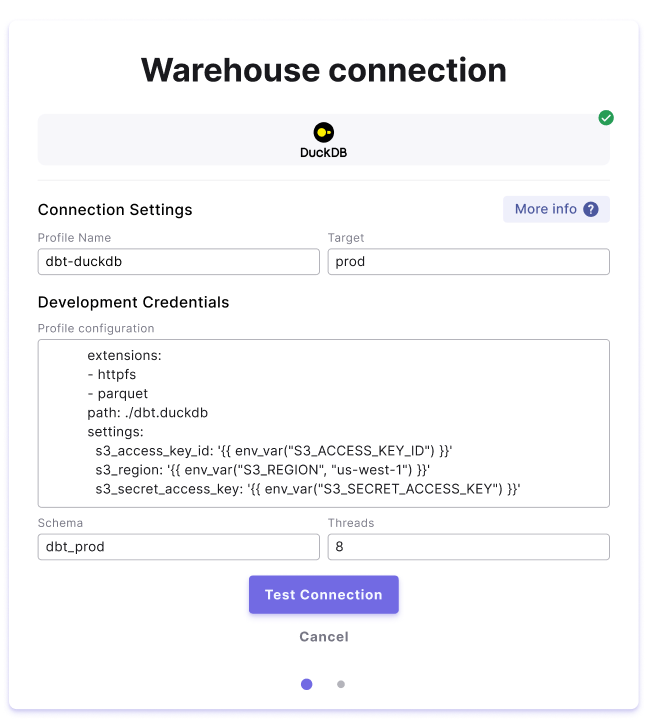
In the Scheduler connection setup screen, you will need to fill in the form with the details of the connection you want to use to run dbt™️ models against a DuckDB database.
In this example we are connecting to `s3` to read/write `parquet` files using an AWS access key and secret, these secrets can be stored in the [user environment variable settings](/products/settings/environment-variables/code-ide-env-variables).
 ### Field Details
Below are list of fields and example to create a connection.
| Field | Description | Example | Level |
| --------------------- | ----------------------------------------------------------------------------------------------------------------------------------------------------------------------------------------------------------------------------------------------------------------------------------------------------------------------------------------------------------------------------------------------------------------------------------------------------------- | -------------------------------------------------------------------------------------------------------------------------------------------------------------------------------------------------------------------------------------- | ------------------ |
| Profile Name | The profile name set in your `dbt_project.yaml` . See more [here](https://docs.getdbt.com/docs/core/connect-data-platform/connection-profiles). | **`dbt-duckdb`** | 🏢 Workspace level |
| Target | The target name used to identify the connection. See more [here](https://docs.getdbt.com/reference/dbt-jinja-functions/target). | **`prod`** | 🏢 Workspace level |
| Profile Configuration | • Here is where you can define the path to the DuckDB database where the dbt™️ will run.• Additionally you will be able to configure any supported [DuckDB extensions](https://duckdb.org/docs/extensions/overview) by listing them in the `extensions`• You can also set any additional [DuckDB configuration options](https://duckdb.org/docs/sql/configuration) via the `settings` field, including options that are supported in any loaded extensions. | `extensions: - httpfs - parquet path: ./dbt.duckdb settings: s3_access_key_id: '{{ env_var("S3_ACCESS_KEY_ID") }}' s3_region: '{{ env_var("S3_REGION", "us-west-1") }}' s3_secret_access_key: '{{ env_var("S3_SECRET_ACCESS_KEY") }}'` | 👥 User level |
| Schema | The default schema used to build dbt™️ objects at runtime. | **`dbt_prod`** | 👥 User level |
| Threads | The number of threads used in this connection. See more [here](https://docs.getdbt.com/docs/running-a-dbt-project/using-threads). | **`8`** | 👥 User level |
For additional supporting docs see [DuckDB SQL reference](https://motherduck.com/docs/category/duckdb-sql-reference).
## Related topics
- [DuckDB](/products/settings/connections/development-environment/duckdb.md)
- [DuckDB Tool](/products/dino-ai/tools-and-features/warehouse-tool/duckdb-tool.md)
- [Harlequin](/integrations/harlequin.md)
- [MotherDuck](/products/settings/connections/development-environment/motherduck.md)
### Field Details
Below are list of fields and example to create a connection.
| Field | Description | Example | Level |
| --------------------- | ----------------------------------------------------------------------------------------------------------------------------------------------------------------------------------------------------------------------------------------------------------------------------------------------------------------------------------------------------------------------------------------------------------------------------------------------------------- | -------------------------------------------------------------------------------------------------------------------------------------------------------------------------------------------------------------------------------------- | ------------------ |
| Profile Name | The profile name set in your `dbt_project.yaml` . See more [here](https://docs.getdbt.com/docs/core/connect-data-platform/connection-profiles). | **`dbt-duckdb`** | 🏢 Workspace level |
| Target | The target name used to identify the connection. See more [here](https://docs.getdbt.com/reference/dbt-jinja-functions/target). | **`prod`** | 🏢 Workspace level |
| Profile Configuration | • Here is where you can define the path to the DuckDB database where the dbt™️ will run.• Additionally you will be able to configure any supported [DuckDB extensions](https://duckdb.org/docs/extensions/overview) by listing them in the `extensions`• You can also set any additional [DuckDB configuration options](https://duckdb.org/docs/sql/configuration) via the `settings` field, including options that are supported in any loaded extensions. | `extensions: - httpfs - parquet path: ./dbt.duckdb settings: s3_access_key_id: '{{ env_var("S3_ACCESS_KEY_ID") }}' s3_region: '{{ env_var("S3_REGION", "us-west-1") }}' s3_secret_access_key: '{{ env_var("S3_SECRET_ACCESS_KEY") }}'` | 👥 User level |
| Schema | The default schema used to build dbt™️ objects at runtime. | **`dbt_prod`** | 👥 User level |
| Threads | The number of threads used in this connection. See more [here](https://docs.getdbt.com/docs/running-a-dbt-project/using-threads). | **`8`** | 👥 User level |
For additional supporting docs see [DuckDB SQL reference](https://motherduck.com/docs/category/duckdb-sql-reference).
## Related topics
- [DuckDB](/products/settings/connections/development-environment/duckdb.md)
- [DuckDB Tool](/products/dino-ai/tools-and-features/warehouse-tool/duckdb-tool.md)
- [Harlequin](/integrations/harlequin.md)
- [MotherDuck](/products/settings/connections/development-environment/motherduck.md)