> ## Documentation Index
> Fetch the complete documentation index at: https://docs.paradime.io/llms.txt
> Use this file to discover all available pages before exploring further.
# Environment Variables
> Manage variables across four scope: Workspace, Bolt Schedules, Code IDE and DinoAI Background Agent.
export const Arcade = ({src, title}) =>
;
## Environment Variables
Paradime organises environment variables into **four scopes**, each surfaced as a tab under **Settings → Workspaces → Environment Variables**:
| Tab | Who manages it | Where it applies |
| --------------------------- | -------------------- | ------------------------------------------------- |
| **Workspace** | Admins | Overlays into Bolt schedules **and** the Code IDE |
| **Bolt Schedules** | Admins | All Bolt schedules in the workspace |
| **Code IDE** | Each user, their own | The user's own Code IDE session |
| **DinoAI Background Agent** | Admins | DinoAI background agent sessions (isolated scope) |
### Workspace
**Admin-managed** variables inherited by every user and every Bolt schedule in the workspace. Use this tab for values shared across the whole workspace — a region, a default profile path, non-secret connection metadata — instead of duplicating the same variable in the Bolt Schedules and Code IDE tabs.
* Variables here are **overlaid** into both Bolt schedule runs and the Code IDE. More specific scopes win on name collisions (see Precedence Hierarchy).
* DinoAI Background Agent is a **separate scope** — the Workspace overlay does not apply.
* After a Workspace variable is added, updated, renamed or removed, Paradime automatically redeploys your Bolt schedules so running schedules pick up the change.
### Bolt Schedules
Workspace-wide variables available to **every Bolt schedule**. They are layered on top of Workspace variables, and a per-schedule override (UI or YAML) can override them in turn.
* Scoped to Bolt schedules (production jobs) only. **Not** visible in the Code IDE.
* Per-schedule overrides take precedence — set them in the [schedule's UI override column](/products/bolt/creating-schedules/schedules-environment-variables), or in [YAML using `env_overrides`.](/products/bolt/creating-schedules/schedules-as-code/configuration-reference#environment-variable-overrides) See the full ordering in Precedence Hierarchy.
### Code IDE
**Per-user** variables for the Code IDE when running dbt™, Python, and CLI commands. Each user manages their own set, visible only inside their own Code IDE session.
* Scoped to the Code IDE development environment only. They do not affect Bolt schedules or the DinoAI Background Agent.
* Layered on top of Workspace variables — on name collision, the user's Code IDE value **wins** for that user's session.
***
### DinoAI Background Agent
Workspace-scoped variables used by the DinoAI background agent when it executes dbt™, Python, and CLI commands during agent sessions.
* **Isolated scope:** Workspace variables are **not** overlaid here, and Bolt / Code IDE variables are not visible to the agent. Set everything the agent needs directly in this tab.
***
## Adding Variables
The flow is the same for all four scopes:
1. From any page in the Paradime application, click **Settings**.
2. Navigate to **Workspaces → Environment Variables**.
3. Open the relevant tab: **Workspace**, **Bolt Schedules**, **Code IDE**, or **Agent**.
4. Click **Add New**.
5. Enter the **Key** name and **Value**, then click the Save icon (💾).
**Validation rules**
* Key must match `^[a-zA-Z_][a-zA-Z0-9_]*$` (letters, digits and underscores; cannot start with a digit).
* Value cannot contain whitespace.
## Precedence Hierarchy
When the same variable name is set in more than one scope, the **most specific** scope wins. The diagram shows how each runtime context resolves its effective environment:
Higher in the stack = higher precedence. The bottom layer is overlaid first; each layer above can override matching keys from the layers below it.
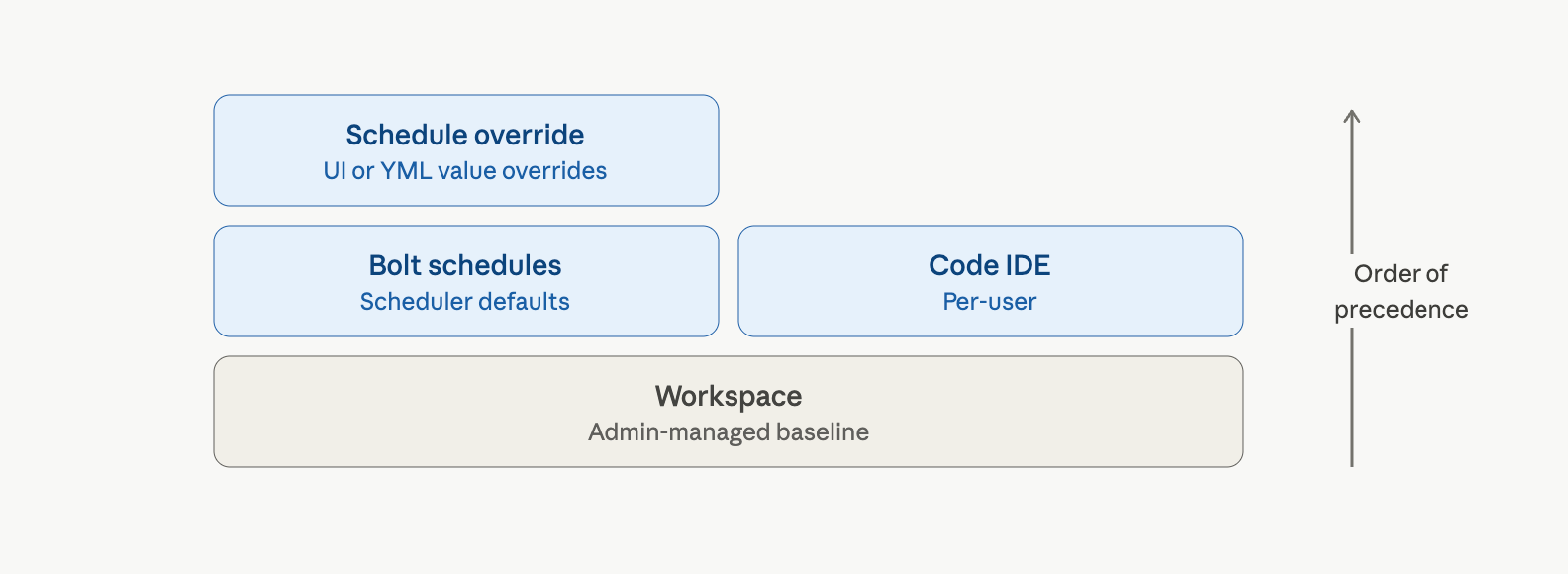 The **DinoAI Background Agent** scope is **not** part of this stack. It is an isolated scope — Workspace variables are not overlaid onto it, and Bolt / Code IDE variables are not visible to the agent. The agent sees only the variables set in the **Agent** tab.
**Merge rules in plain English**
* **Bolt schedule runs** — Workspace is overlaid first, then Bolt Schedules keys override matching Workspace keys, then **Schedule-level overrides** (set per schedule in the UI, or in YAML via `env_overrides`) override everything else.
* **Code IDE** — Workspace is overlaid first, then the user's Code IDE variables override matching Workspace keys. Bolt Schedules variables and Schedule-level overrides do **not** apply in the IDE.
* **DinoAI Background Agent** — uses only the Agent variables. The Workspace overlay does **not** apply, and Bolt / Code IDE variables are not visible to the agent.
💡 Use **Workspace** for values genuinely shared across users and Bolt runs (e.g. a default region, a shared profile path). Put production-only values in **Bolt Schedules**, developer-specific values in **Code IDE**, and credentials the DinoAI agent needs in **DinoAI Background Agent**.
## Related topics
- [GitHub](/products/bolt/ci-cd/turbo-ci/github.md)
- [6. Environment Variables Override](/products/bolt/creating-schedules/schedules-environment-variables.md)
- [Runtime environment variables](/products/bolt/special-environment-variables/runtime-environment-variables.md)
- [Audit environment variables](/products/bolt/special-environment-variables/audit-environment-variables.md)
- [Special Environment Variables](/products/bolt/special-environment-variables/index.md)
The **DinoAI Background Agent** scope is **not** part of this stack. It is an isolated scope — Workspace variables are not overlaid onto it, and Bolt / Code IDE variables are not visible to the agent. The agent sees only the variables set in the **Agent** tab.
**Merge rules in plain English**
* **Bolt schedule runs** — Workspace is overlaid first, then Bolt Schedules keys override matching Workspace keys, then **Schedule-level overrides** (set per schedule in the UI, or in YAML via `env_overrides`) override everything else.
* **Code IDE** — Workspace is overlaid first, then the user's Code IDE variables override matching Workspace keys. Bolt Schedules variables and Schedule-level overrides do **not** apply in the IDE.
* **DinoAI Background Agent** — uses only the Agent variables. The Workspace overlay does **not** apply, and Bolt / Code IDE variables are not visible to the agent.
💡 Use **Workspace** for values genuinely shared across users and Bolt runs (e.g. a default region, a shared profile path). Put production-only values in **Bolt Schedules**, developer-specific values in **Code IDE**, and credentials the DinoAI agent needs in **DinoAI Background Agent**.
## Related topics
- [GitHub](/products/bolt/ci-cd/turbo-ci/github.md)
- [6. Environment Variables Override](/products/bolt/creating-schedules/schedules-environment-variables.md)
- [Runtime environment variables](/products/bolt/special-environment-variables/runtime-environment-variables.md)
- [Audit environment variables](/products/bolt/special-environment-variables/audit-environment-variables.md)
- [Special Environment Variables](/products/bolt/special-environment-variables/index.md)