> ## Documentation Index
> Fetch the complete documentation index at: https://docs.paradime.io/llms.txt
> Use this file to discover all available pages before exploring further.
# BitBucket
> BitBucket Import: Integrate BitBucket repositories for dbt™ projects into Paradime. Simplify project management and collaboration.
You must use the `git@...` or `ssh:...` version of your git URL, not the `https://...` version. Paradime uses the SSH protocol to clone repositories, so Paradime will be unable to clone repos supplied with the HTTP protocol.
### BitBucket Cloud
We advise creating a service account user in your Bitbucket account like **`paradime.bitbucket.maintainer@yourcompany.com`** with write access to the repository and let this user own the SSH key.
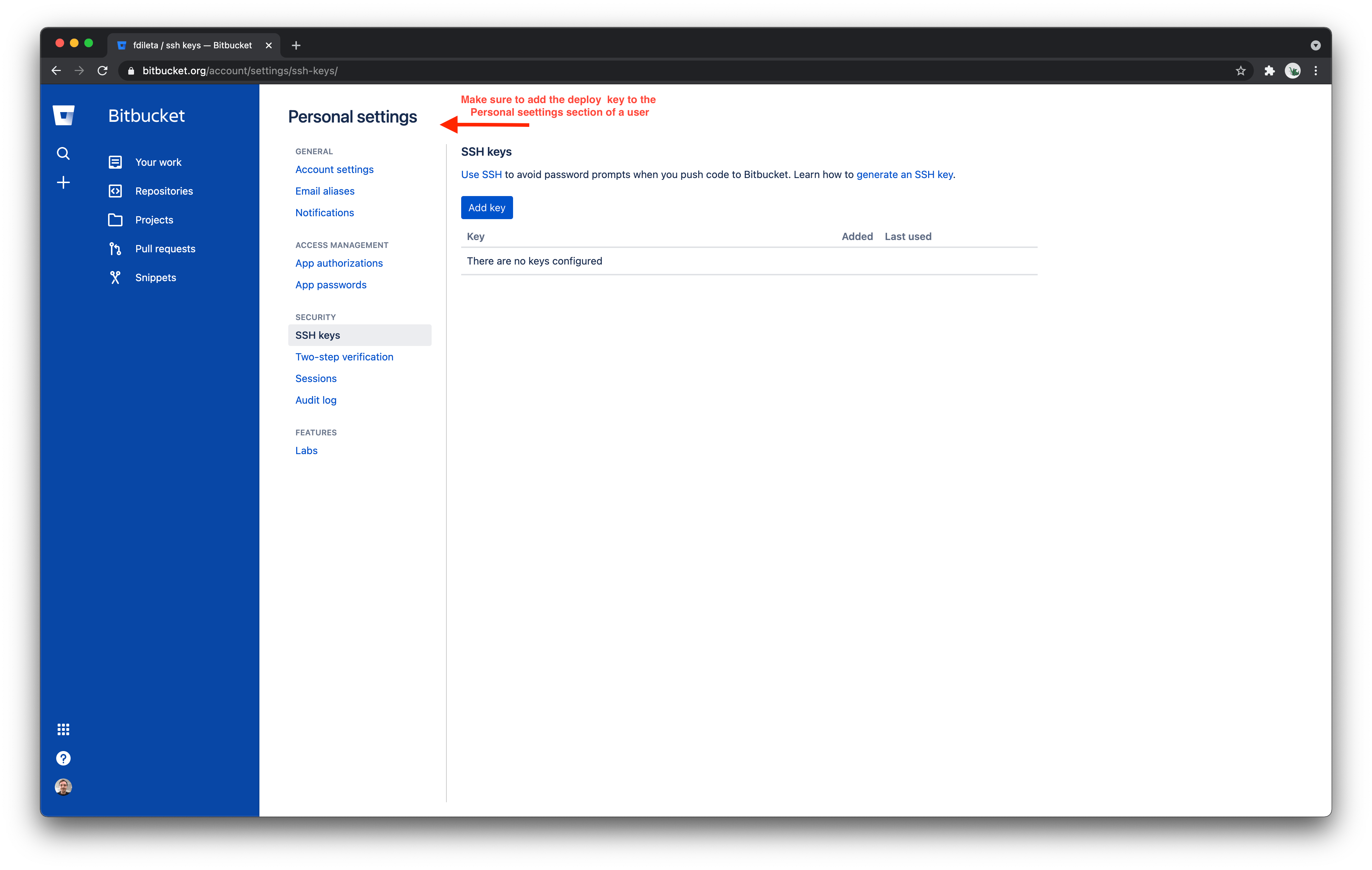
To add a deploy key to a BitBucket Cloud user account, navigate to the "SSH keys" tab in the Personal Settings page of your BitBucket Cloud account.
Next, click the "Add key" button and paste in the deploy key generated by Paradime for your repository. After saving this SSH key, Paradime will be able to read and write files in your BitBucket repository.
 ### BitBucket Server
Bitbucket Server **support** `SSH access key for system use` to have Read/Write access.
To add a Deploy key to a Bitbucket Server repository, navigate to the Settings tab of the repository. Click on Access keys and then Add key.
Make sure to choose the Read/Write permission, paste the Key generated by Paradime and click Add Key. Paradime will be able to read and write files in your BitBucket repository.
[https://confluence.atlassian.com/bitbucketserver/ssh-access-keys-for-system-use-776639781.html](https://confluence.atlassian.com/bitbucketserver/ssh-access-keys-for-system-use-776639781.html)
## Related topics
- [BitBucket](/products/bolt/ci-cd/turbo-ci/bitbucket.md)
- [Using BitBucket Pipelines](/products/bolt/ci-cd/continuous-deployment-with-bolt/using-bitbucket-pipelines.md)
- [Column-Level Lineage Diff [deprecated]](/products/bolt/ci-cd/lineage-diff-deprecated/index.md)
- [Column-Level Lineage Diff](/products/bolt/ci-cd/lineage-diff/index.md)
- [Importing a repository](/products/settings/git-repositories/importing-a-repository/index.md)
### BitBucket Server
Bitbucket Server **support** `SSH access key for system use` to have Read/Write access.
To add a Deploy key to a Bitbucket Server repository, navigate to the Settings tab of the repository. Click on Access keys and then Add key.
Make sure to choose the Read/Write permission, paste the Key generated by Paradime and click Add Key. Paradime will be able to read and write files in your BitBucket repository.
[https://confluence.atlassian.com/bitbucketserver/ssh-access-keys-for-system-use-776639781.html](https://confluence.atlassian.com/bitbucketserver/ssh-access-keys-for-system-use-776639781.html)
## Related topics
- [BitBucket](/products/bolt/ci-cd/turbo-ci/bitbucket.md)
- [Using BitBucket Pipelines](/products/bolt/ci-cd/continuous-deployment-with-bolt/using-bitbucket-pipelines.md)
- [Column-Level Lineage Diff [deprecated]](/products/bolt/ci-cd/lineage-diff-deprecated/index.md)
- [Column-Level Lineage Diff](/products/bolt/ci-cd/lineage-diff/index.md)
- [Importing a repository](/products/settings/git-repositories/importing-a-repository/index.md)