> ## Documentation Index
> Fetch the complete documentation index at: https://docs.paradime.io/llms.txt
> Use this file to discover all available pages before exploring further.
# GitHub
> GitHub Import: Import GitHub repositories for dbt™ projects into Paradime. Enhance project management and collaboration.
You must use the `git@...` or `ssh:...` version of your git URL, not the `https://...` version. Paradime uses the SSH protocol to clone repositories, so Paradime will be unable to clone repos supplied with the HTTP protocol.
We advise creating a service account user in your GitHub account like **`paradime.github.maintainer@yourcompany.com`** with write access to the repository and let this user own the deploy key.
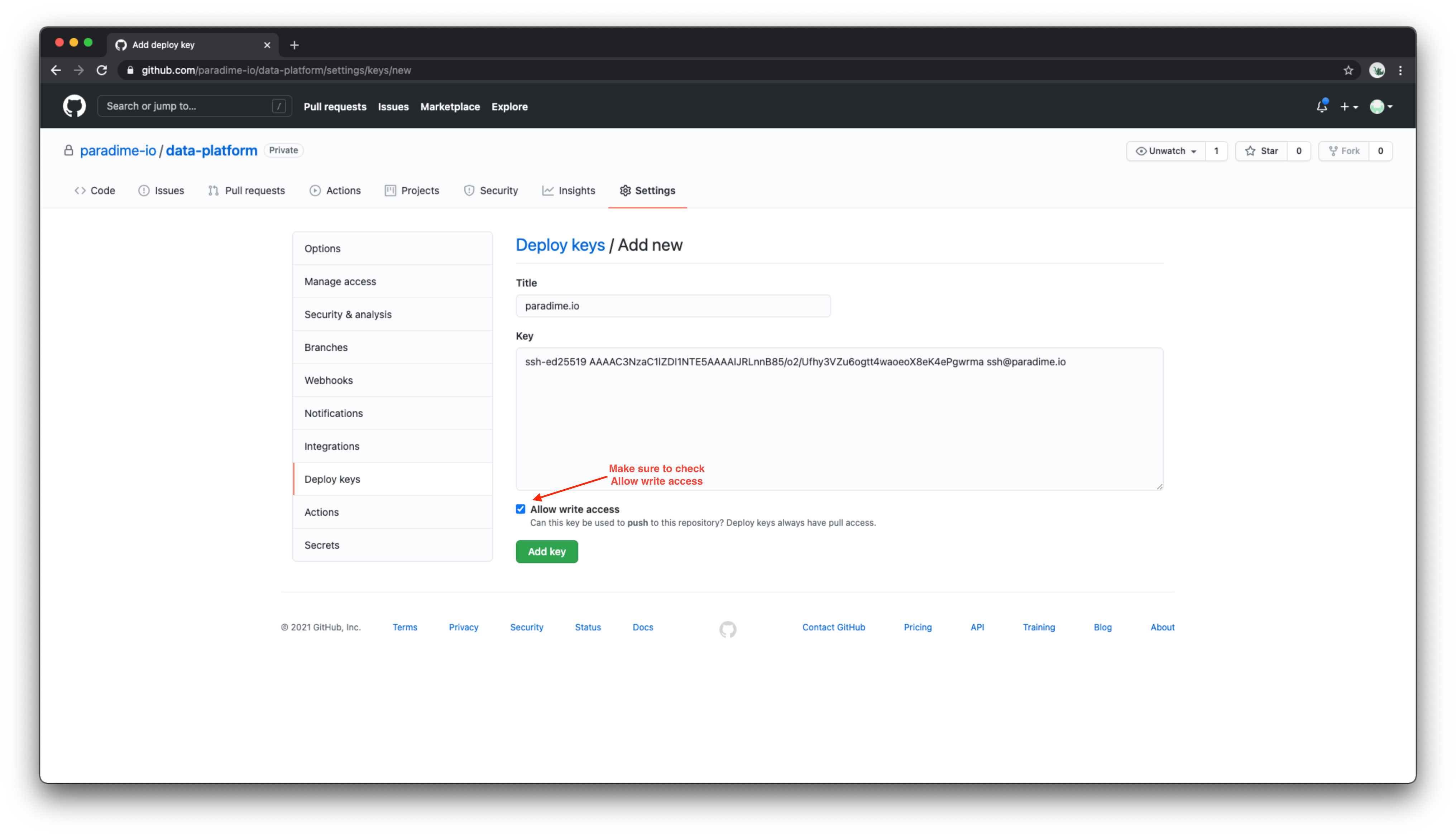
To add a deploy key to a GitHub account, navigate to the Deploy keys tab of the settings page in your GitHub repository.
After supplying a name for the deploy key and pasting in your deploy key (generated by Paradime), be sure to check the *"Allow write access"* checkbox. After adding this key, Paradime will be able to read and write files in your dbt™️ project.
[https://docs.github.com/en/developers/overview/managing-deploy-keys#deploy-keys](https://docs.github.com/en/developers/overview/managing-deploy-keys#deploy-keys)
 ## Related topics
- [GitHub](/integrations/github.md)
- [Column-Level Lineage Diff](/products/bolt/ci-cd/lineage-diff/index.md)
- [GitHub Merge Queue](/guides/working-with-git/github-merge-queue.md)
- [GitHub PR Management Tool](/products/dino-ai/tools-and-features/github-pr-management-tool.md)
## Related topics
- [GitHub](/integrations/github.md)
- [Column-Level Lineage Diff](/products/bolt/ci-cd/lineage-diff/index.md)
- [GitHub Merge Queue](/guides/working-with-git/github-merge-queue.md)
- [GitHub PR Management Tool](/products/dino-ai/tools-and-features/github-pr-management-tool.md)