

Prerequisites
- A Paradime workspace with a warehouse connection and a dbt™ project. The agent works best with documented mart models.
- The Workspace Admin role, to create API keys and agent environment variables.
- Python 3.11 or later, and git.
- Optional, for Report a problem: a Linear workspace, the key of the team that gets the reports, and a Linear personal API key.
How it works
- One conversation is one agent session. The app starts a run with
triggerDinoaiAgentRun, sends follow-ups to the same session withsendDinoaiAgentMessage, and reads the run withdinoaiAgentRunevery second. The agent keeps the context between questions. - The app sends a response contract. At the start of each session, the app tells the agent to put each chart in a fenced
vizblock that holds one JSON object with the rows and the SQL. The app parses the blocks and draws the charts. - The app shows live progress. It reads the run’s
stepsto list each tool call while the agent works, such as a catalog search or a SQL query. - The app needs no warehouse credentials. Paradime runs the agent, its tools, and the warehouse connection. The app only needs an API key.
Steps
1
Run the demo
Clone the repository and start the app in demo mode. Demo mode replays recorded answers and needs no credentials.Select a starter question. If the tests pass and an answer with charts shows, your Python setup is correct.
2
Create an API key
- Go to Settings > API Keys and select Generate API Key.
- Enter a name, for example
ask-your-data app. - Select the DinoAI agent API capability. The app needs nothing else.
- Select the workspace that the app uses, then generate the key.
- Select Copy credentials. This copies the key, the API endpoint, and the workspace UID.
3
Create the agents
The repository has two agent definitions in
agent/:Create each agent one of two ways:
- In the Agent UI: open DinoAI Agent > Agents > New agent > Start from scratch, and copy the role, goal, backstory, and tool allowlist from the YAML file. Create
analytics-feedbackfirst, so that you can select it in the analyst’s Squad. Select Deploy > Just here. Copy each agent’s slug from the page address (.../agent/builder/edit/<slug>?uuid=...). An agent created in the UI gets a generated slug, such asstakeholder-5029ee. See Build an agent in the UI. - As code: copy both files to
.dinoai/agents/in your dbt™ repository and merge them into the default branch. The slug is the file name. See YAML configuration.
4
Connect Linear for the feedback agent (optional)
Skip this step if you don’t use Report a problem.
- In Linear, create a personal API key as a user that can create issues in the target team.
- In Paradime, go to Settings > Workspace Settings > Environment Variables, open the Agent tab, and add
LINEAR_API_KEYwith the Linear key as its value.
5
Give the analyst a read-only warehouse role
- In your warehouse, create a role or service user that can only read the mart schemas.
- In Paradime, go to Settings > Environments, select Agent, and create an environment with that connection.
- Select the environment in the analyst’s Environment field, or set
environment: <environment slug>in its YAML file.
This step is optional for a test, but do it before real users get access.
6
Configure the app
Copy the settings template:Fill in the values from the steps above:Then describe your data in
ANALYST_CONTEXT (the key marts, the metrics and their definitions, the fiscal calendar) and set ANALYST_STARTER_QUESTIONS. Good context makes answers faster, because the agent spends less time on discovery..streamlit/secrets.toml is in .gitignore. Never commit it.7
Test and run the app
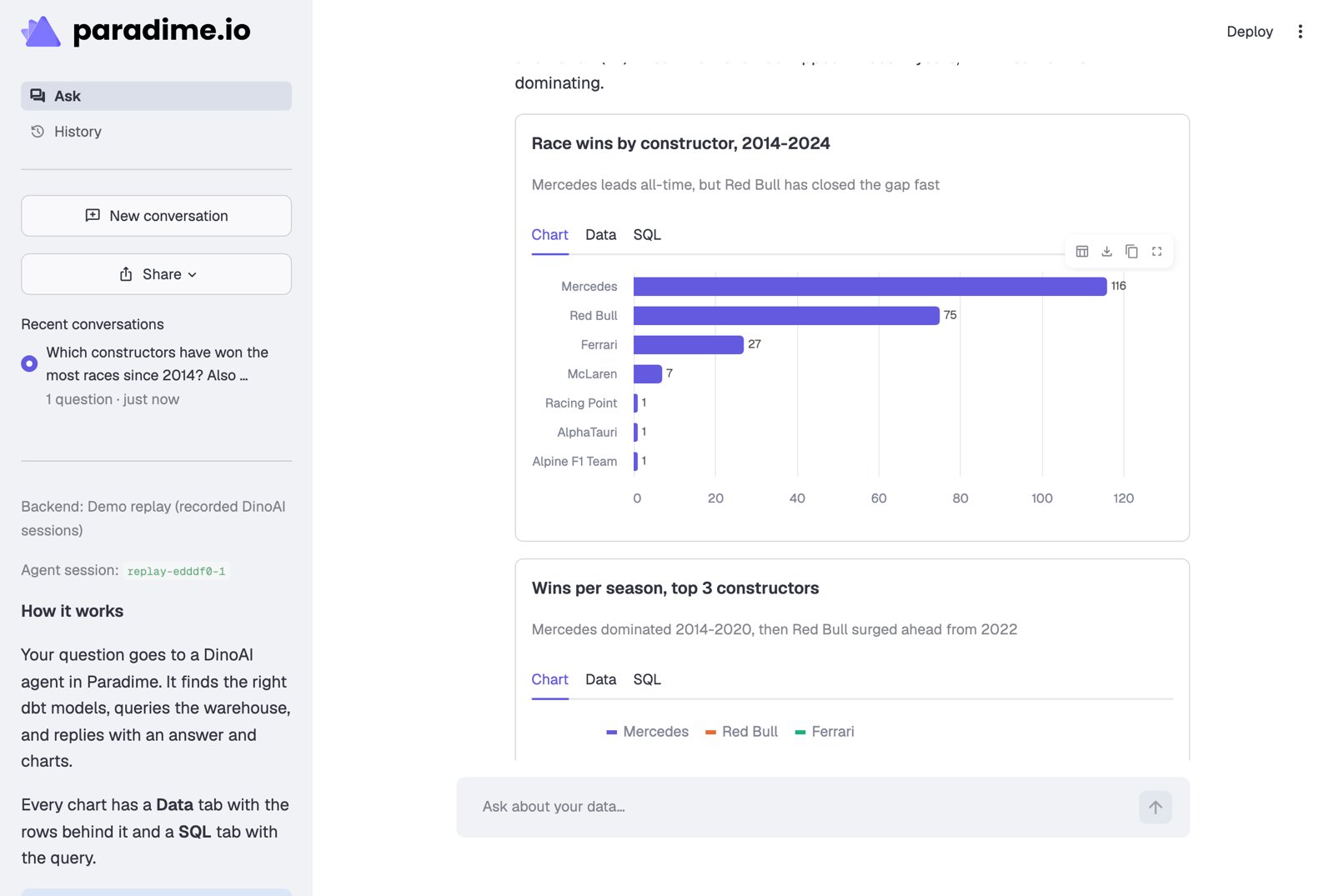
python scripts/smoke_test.py --report tests Report a problem end to end. It creates a real Linear issue.Ask a question in the app. The status box lists the agent’s steps, and after about a minute the answer shows with charts. Each chart has a Data tab with the rows and a SQL tab with the query. The sidebar shows the agent session ID: open the session in Paradime to see every tool call. If the run fails at start-up, check the agent slug and the environment slug.
Report a problem with an agent squad
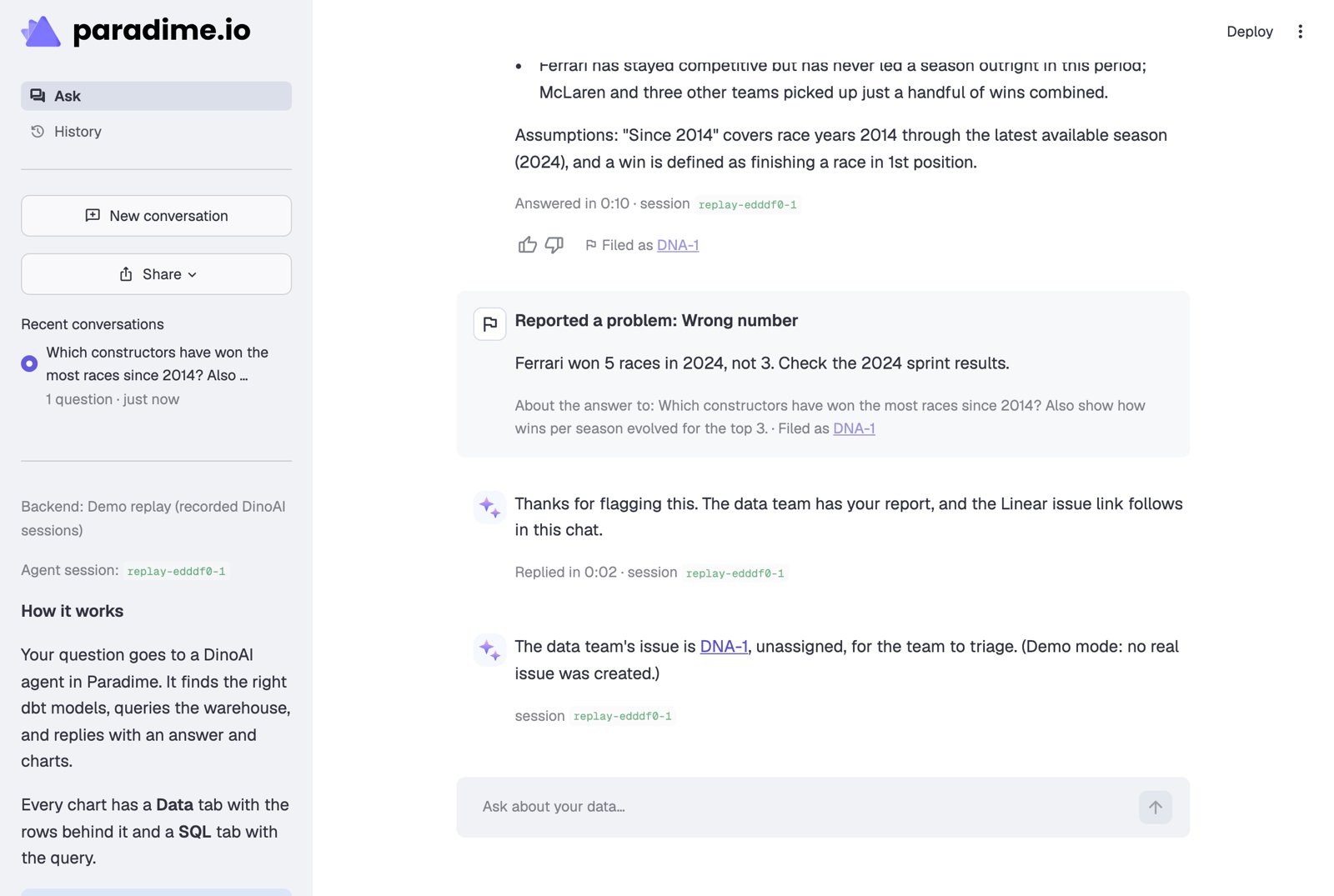
A reader can report a wrong answer. The app sends the report to the conversation’s own session. The analyst hands it to the feedback agent withinvoke_agent and its own session ID as callback_session_id. The feedback agent files a Linear issue, or comments on an open one about the same answer, then calls notify_parent_session. The callback wakes the analyst, which posts the issue link in the chat.
Build your own bot
The same pattern works for other bots, such as a support assistant or a data-quality triage bot. Define the agent with only the tools it needs, then call the API with the Python SDK (paradime-io 6.8 or later):
- Messages arrive complete. The API has no streaming. Read the run in a loop, and use
steps(withsteps_after) to show progress. - Keep the output format out of the agent definition. Put “who you are” and “which tools” in the agent, and the reply format in your first message. Then the format and its parser change together.
- Track turns. Before you send a follow-up, count the messages. Right after you send, the run can still report the previous turn’s
COMPLETED, so wait until it is active again or new messages stop. - Plan for an expired session. The agent pod doesn’t live forever. If Paradime refuses a follow-up, start a new session with a summary of the conversation.
- Leave out local links. Paradime’s API firewall blocks a request body with a link to a local address, such as
http://localhost:8501/....
Before real users
- Sign-in. The app has no authentication. Turn on Streamlit’s OIDC sign-in (
st.login) or put the app behind your SSO proxy. The API key stays on the server. - Read-only access. Give the analyst a read-only agent environment.
- Budget. Each question is an agent turn that uses DinoAI credits. Set a cap for background agents, and optionally for each agent, in Settings > Budget & Consumption > DinoAI Credits.
- Conversation storage. Conversations are JSON files in
.threads/on the app server. Keep that folder on a persistent disk, or use a database for more than one server.
Next steps
Run an agent from a webhook
Start an agent when another tool sends an event.
Agent API reference
The GraphQL mutations and queries, and the Python SDK.