

main safe from accidental or unauthorized changes. This guide sets up branch protection in GitHub, enforces it organization-wide, and verifies that direct pushes are blocked.
Prerequisites
- Admin access to your GitHub repository.
- For organization-wide rules, admin access to your GitHub organization.
- A CI/CD workflow already configured if you plan to require status checks.
Steps
1
Add a basic branch protection rule
- Navigate to your repository on GitHub.
- Click Settings in the top navigation bar.
- In the left sidebar, click Branches.
- Under Branch protection rules, click Add rule.
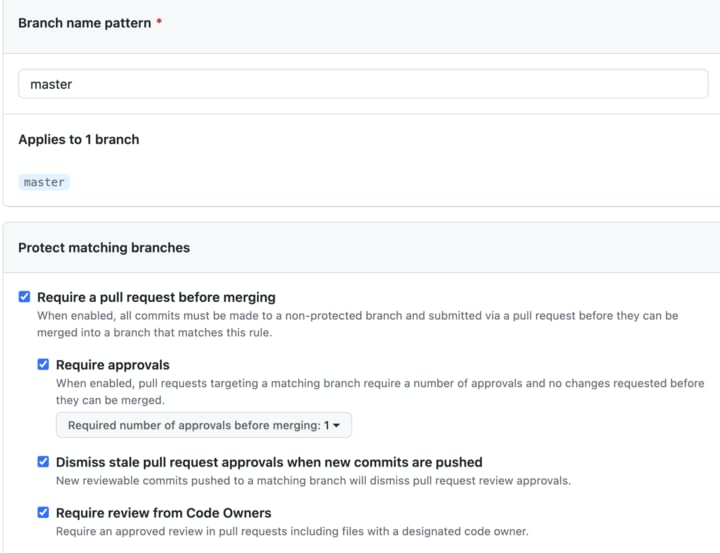
- In the Branch name pattern field, enter
main(or your default branch name). - Check the following options:
- Require a pull request before merging
- Require approvals (set the number of required reviewers, typically at least 1)
- Dismiss stale pull request approvals when new commits are pushed
- Require status checks to pass before merging
- Require branches to be up to date before merging

2
Tighten advanced protection settings
For stronger protection:
- Enable Include administrators to apply the rules to everyone.
- Check Restrict who can push to matching branches if you want only specific teams or people to merge PRs.
- Enable Allow force pushes only for specific people or teams, and only if absolutely necessary.
3
Enforce protection organization-wide
To apply consistent protection across all repositories, use organization repository rules:
- Navigate to your GitHub organization.
- Click Settings in the top navigation menu.
- In the left sidebar, click Repository rules.
- Click New rule.
- Name your rule (for example, “Main Branch Protection”).
- Under Branch protections, configure the same settings as above.
- Set the rule to apply to all repositories, or to repositories matching specific criteria (such as visibility or topics).
- Click Create rule.
Using GitHub Enterprise policies (for enterprise accounts): Go to your enterprise account settings, navigate to Policies > Repository, scroll to Branch protection rules, enable Require branch protection rules, configure the default settings, and save.
4
Verify the protection works
Confirm that direct pushes are rejected and that PRs enforce your requirements.Try pushing directly to Then create a branch, commit, and open a pull request:Create the PR in the GitHub UI, then attempt to merge it without meeting the requirements. The merge should be blocked.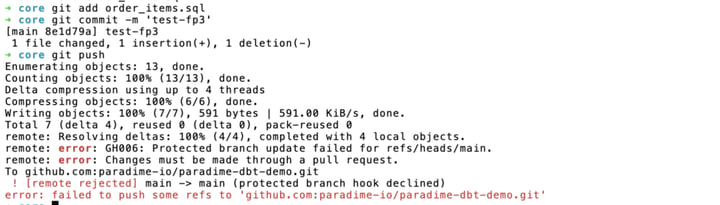
main from a local repository. This should be rejected with an error message:You know protection is working when a direct push to
main is rejected and a PR cannot be merged until reviews and status checks pass. If a push still succeeds, verify that Include administrators and Do not allow bypassing the above settings are both enabled, and review organization rules for conflicting exceptions.Best practices
- Protect all production branches (
main,production, and similar). - Require at least one review for every PR.
- Configure required status checks for your CI/CD pipelines.
- Consider requiring signed commits for additional security.
- Regularly audit branch protection settings across repositories.
- Document your branch protection strategy for team reference.
Next steps
Set up a GitHub merge queue
Batch and test PRs together before they merge to main.
Sign your commits
Add SSH-based commit signing for verified commits.
Use read-only branches
Prevent edits to protected branches inside the Code IDE.
Connect a GitHub repository
Set up your repository connection in Paradime.