

GitHub’s merge queue orders the merges into your branch. It’s separate from the Bolt merge queue, which makes Paradime’s on-merge runs take turns after the merges.
Prerequisites
- Repository admin permissions.
- A Paradime Bolt Turbo CI schedule configured.
- Paradime API credentials set in your GitHub repository secrets.
- A CI/CD workflow already configured, with required status checks defined for the repository.
Steps
1
Create a merge queue workflow
Create a new GitHub Actions workflow file (for example, Key configuration points:
.github/workflows/merge-queue-ci.yml) that triggers on merge_group events:- Trigger: the
merge_groupevent runs the workflow when PRs are added to the merge queue. - Concurrency: prevents multiple instances of the same workflow from running simultaneously.
- Schedule name: replace
YOUR_TURBO_CI_SCHEDULE_NAMEwith your actual Turbo CI schedule name. - Secrets: ensure all required API credentials are configured in repository secrets.
2
Configure repository settings
Navigate to your repository’s Settings → General → Pull Requests: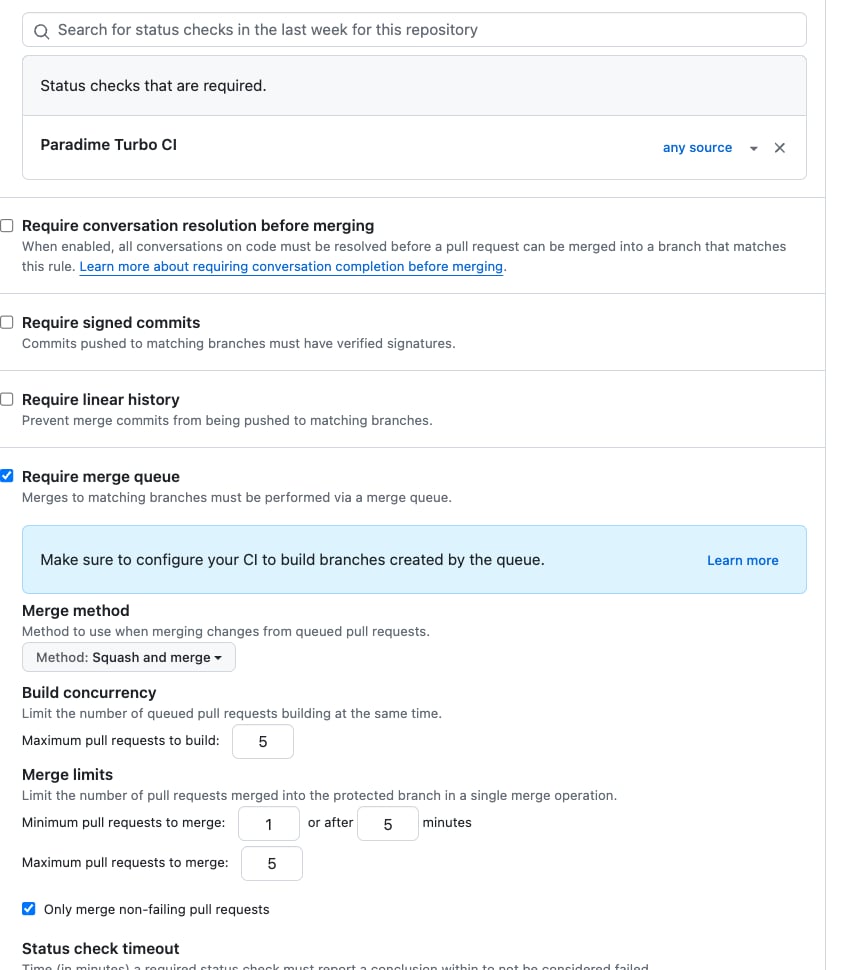
- Enable merge queue:
- Check Require merge queue.
- Configure merge queue settings for your needs:
- Merge method: choose squash, merge commit, or rebase.
- Build concurrency: set the maximum number of PRs to test simultaneously.
- Merge queue grouping: configure batching behavior.
- Configure required status checks:
- Go to Settings → Branches.
- Edit the branch protection rule for the main branch.
- Add Paradime Turbo CI as a required status check.
You know the merge queue is working when adding a PR to the queue triggers a Paradime Turbo CI run against a temporary merge commit, and the PR merges only after that check passes. If the workflow never runs, confirm the
merge_group trigger is configured and the workflow is listed as a required check.How it works
- PR creation: a developer creates a pull request.
- Queue addition: when ready to merge, the PR is added to the merge queue.
- Batch testing: GitHub creates a temporary merge commit combining the PR with the target branch.
- CI execution: the merge queue workflow runs against this temporary commit.
- Merge decision: if tests pass, the PR is automatically merged; if they fail, the PR is removed from the queue and the developer is notified.
Best practices
- Keep tests fast: optimize merge queue workflows for speed and use dependency caching.
- Run in parallel: structure jobs to run in parallel where possible.
- Require reviews: combine the merge queue with required code reviews and comprehensive branch protection rules.
- Limit status checks: only require essential checks to avoid bottlenecks.
- Set clear guidelines: establish when to use the merge queue versus a direct merge, monitor queue status, and notify the team when the queue is blocked.
Troubleshooting
Workflow not triggering- Verify the
merge_grouptrigger is correctly configured. - Check that the workflow file is in the correct location.
- Ensure branch protection rules include the workflow as a required check.
- Confirm all required secrets are configured.
- Verify the schedule name matches your Turbo CI configuration.
- Check that the API endpoint and credentials are correct.
- Review concurrency settings.
- Optimize workflow performance.
- Consider adjusting batch size settings.
Next steps
Protect the main branch on GitHub
Require pull requests and reviews before merging to main.
Sign your commits
Add SSH-based commit signing for verified commits.
Connect a GitHub repository
Set up your repository connection in Paradime.
Version control in the Code IDE
How commits, branches, and pushes work in Paradime.