# Using Your Project as Context to Set Up .dinorules

Formalize your team's coding standards by analyzing existing project patterns and automatically generating comprehensive .dinorules.

Creating effective .dinorules from scratch can be challenging when you don't know what standards to define or how to articulate your team's existing patterns. Rather than starting with a blank file, you can analyze your current dbt™ project to identify established conventions and use those insights to build comprehensive rules.

DinoAI can examine your existing models, YAML files, and project structure to automatically generate .dinorules that capture your team's actual practices.

{% embed url="<https://www.youtube.com/watch?v=UnugV57KKlE>" %}

***

### Example Prompt

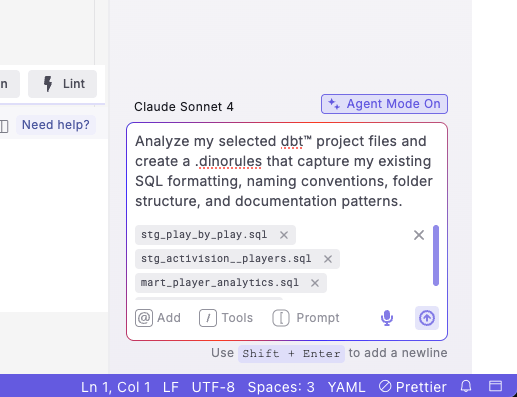
> Analyze my selected dbt™ project files and create a .dinorules that capture my existing SQL formatting, naming conventions, folder structure, and documentation patterns.

{% hint style="info" %}
**Recommended**: Add [context](https://docs.paradime.io/app-help/documentation/dino-ai/context) by selecting multiple files that represent your best practices - include well-structured models from different folders (staging, marts), your dbt\_project.yml, and existing schema files.
{% endhint %}

<figure><img src="https://2337193041-files.gitbook.io/~/files/v0/b/gitbook-x-prod.appspot.com/o/spaces%2FHET0AD04uHMgdeLAjptq%2Fuploads%2F8rKCCZhhQE3Qj505GqKT%2Fimage.png?alt=media&#x26;token=d9dbb52e-629b-4ef7-bab1-4efa6c612944" alt=""><figcaption></figcaption></figure>

***

### Step-by-Step Instructions

1. **Open DinoAI** by clicking the DinoAI icon (🪄) in the right panel
2. **Select Agent Mode** if it's not already selected
3. **Add files as context** using the "@" icon in the DinoAI panel. Select representative files from different folders:
   1. Staging models (e.g., stg\_customers.sql, stg\_orders.sql)
   2. Intermediate models (e.g., int\_customer\_orders.sql)
   3. Marts models (e.g., dim\_customers.sql, fct\_sales.sql)
   4. Your dbt\_project.yml file
   5. Existing schema.yml files from each folder
4. **Enter your prompt** requesting .dinorules creation based on selected files
5. **Review the generated .dinorules** file preview
6. **Accept the changes** to create the file in your project root
7. **Test the rules** by generating new models to ensure they follow the established patterns

{% hint style="info" %}
**Note**: For best results, select files that represent your team's current best practices rather than legacy code that might not follow your preferred standards
{% endhint %}

#### Example Output

DinoAI will generate a comprehensive .dinorules file like this:

<details>

<summary>Example .dinorules file</summary>

```
Project Context
- Domain: E-commerce analytics
- Data Stack: dbt™ with Snowflake
- Project Structure: source → staging → intermediate → marts hierarchy

SQL Formatting Standards (Based on Analyzed Files)
- Keywords: Always uppercase (SELECT, FROM, WHERE, etc.)
- Indentation: 4 spaces, no tabs
- Comma Style: Trailing commas in SELECT statements
- Aliasing: Always alias tables (use 'u' for users, 'o' for orders)
- CTEs: Prefer CTEs over subqueries for readability
- Comments: Add comments for complex business logic

Naming Conventions (Extracted from Current Models)
- Models: snake_case with prefixes (stg_, int_, dim_, fct_)
- Columns: snake_case, descriptive names
- Tables: Singular nouns (user, not users)
- Primary Keys: Always end with '_id' (user_id, order_id)

Folder Structure and Materializations
- staging/: Views only, basic transformations
- intermediate/: Views, complex business logic
- marts/: Tables or incremental, final business models
- All models tagged by domain and layer

Documentation Requirements
- All models require descriptions
- Business-critical columns need descriptions
- Primary keys need unique and not_null tests
- Foreign keys need relationships tests

Business Logic Patterns
- Always use UTC for timestamps
- Standardize null handling with COALESCE
- Use consistent date formatting (YYYY-MM-DD)
- Apply consistent rounding rules (2 decimal places for currency)

Quality Standards
- All models must compile without warnings
- Use consistent test patterns across similar model types
- Maintain referential integrity through proper testing
```

</details>

***

### How It Works

After you enter your prompt:

1. **File Analysis**: DinoAI analyzes the structure and patterns in your selected files
2. **Pattern Recognition**: It identifies consistent naming conventions, SQL formatting styles, and organizational patterns
3. **Rule Generation**: It creates a .dinorules file that codifies these discovered patterns
4. **Standard Application**: The generated rules ensure future AI-generated code matches your established standards

***

### Key Benefits

* **Consistency**: Ensures all future AI-generated code matches your existing standards
* **Team Alignment**: Codifies implicit knowledge that experienced team members understand
* **Efficiency**: Creates comprehensive rules without starting from scratch

***

**Example Use Cases**

* **New Project Setup**: Establish standards when transitioning from manual to AI-assisted development
* **Team Onboarding**: Document implicit conventions for new team members
* **Standard Formalization**: Convert organic patterns into explicit rules

{% hint style="info" %}
**Tip**: Consider updating your .dinorules periodically as your project evolves and new best practices emerge. The file can be modified to reflect changing team standards.
{% endhint %}