

CI - dbt build check starts only after the CI - lint check passes, so Paradime does not build models for a pull request that fails linting.
Prerequisites
- The Paradime GitHub app installed on your dbt™ repository. Chains work only with the app.
- Turbo CI set up: a CI environment, the custom schema macro, and a production schedule to defer to.
- Two Turbo CI schedules for the same base branch, for example
CI - lintandCI - dbt build. To create them, see Run several Turbo CI checks on a pull request. - The Admin or Developer role in Paradime, to edit Bolt schedules.
Steps
1
Choose the order of the steps
The first step of the chain starts when a pull request opens or gets a new commit. Each later step starts after the step before it finishes. Put the fastest and cheapest check first:
CI - lintrunspre-commiton the changed files.CI - dbt buildbuilds and tests the changed models.
paradime_turbo_ci_pr_ followed by the pull request number). A later step can use the tables that an earlier step built.2
Link the later step to the step before it
In Bolt, open the 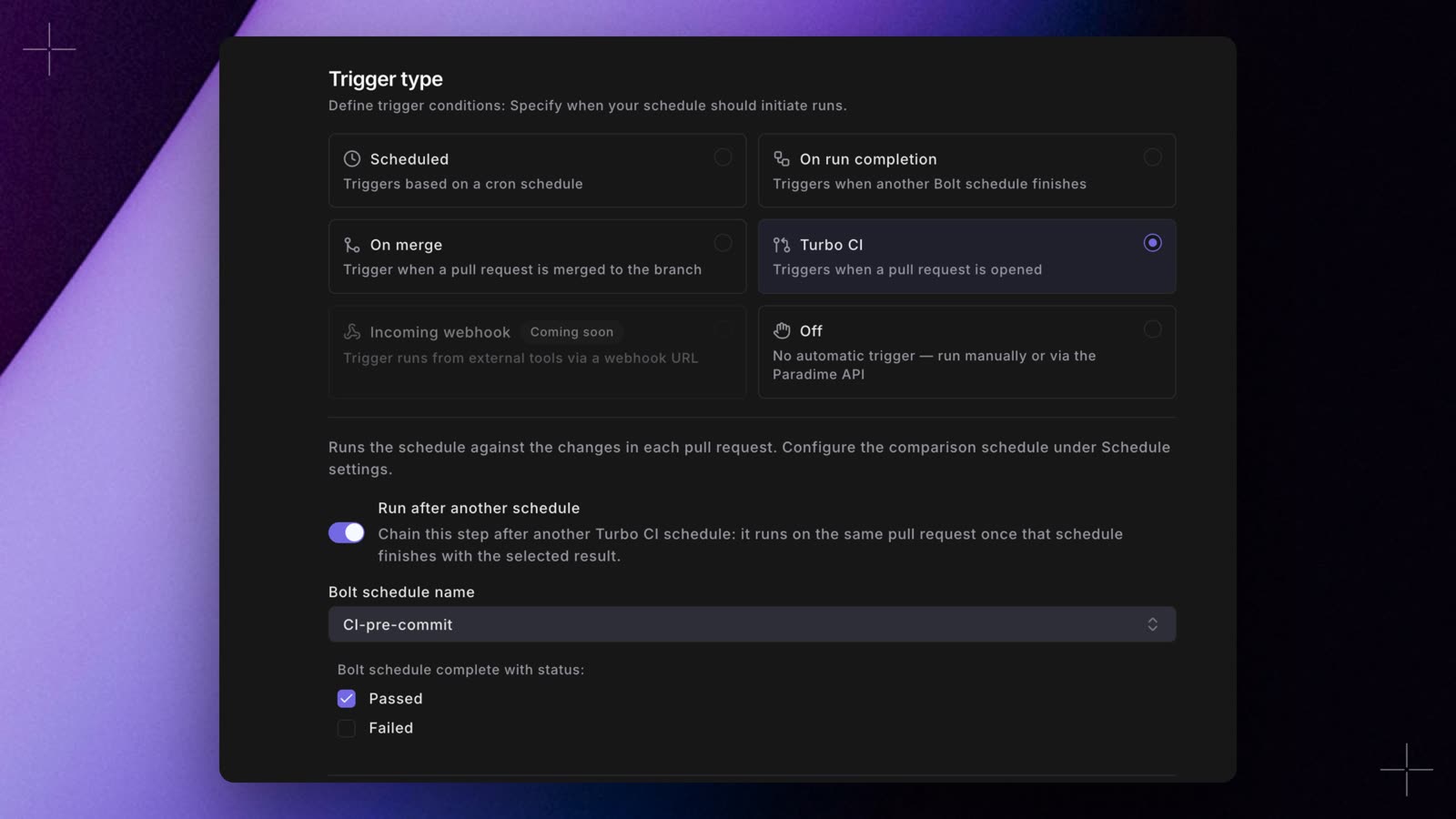
CI - dbt build schedule and select Edit. In Trigger type, keep Turbo CI selected, then:- Turn on Run after another schedule.
- In Bolt schedule name, select
CI - lint. The list shows only the schedules in the current workspace. - Under Bolt schedule complete with status:, select Passed.
3
Add more steps (optional)
Link each extra step in the same way, and select the step that comes before it. If two steps run after the same step, both start at the same time when that step finishes.
4
Require only the overall check on GitHub
In your GitHub repository, go to Settings > Branches and edit the protection rule for your base branch. Under Require status checks to pass before merging, require
Paradime Turbo CI only.Paradime Turbo CI holds the result of the whole chain. Do not require the Paradime Turbo CI / <schedule name> checks: their names change when you edit the chain, and GitHub blocks the merge while a required check is missing.5
Push a commit to a pull request
Change a model in your dbt™ project folder, then open a pull request or push a commit to an open one. The pull request must not be a draft.
On the pull request,
Paradime Turbo CI / CI - dbt build stays queued with Waiting for CI - lint until the lint check passes, and then it runs. If the lint check fails, the build check shows Skipped: CI - lint failed, and Paradime Turbo CI fails with 0 of 2 passed · failed: CI - lint.If both checks start at the same time, the link is not in place. Open CI - dbt build and make sure that Run after another schedule is on and names CI - lint, then push a new commit.Re-run a failed step
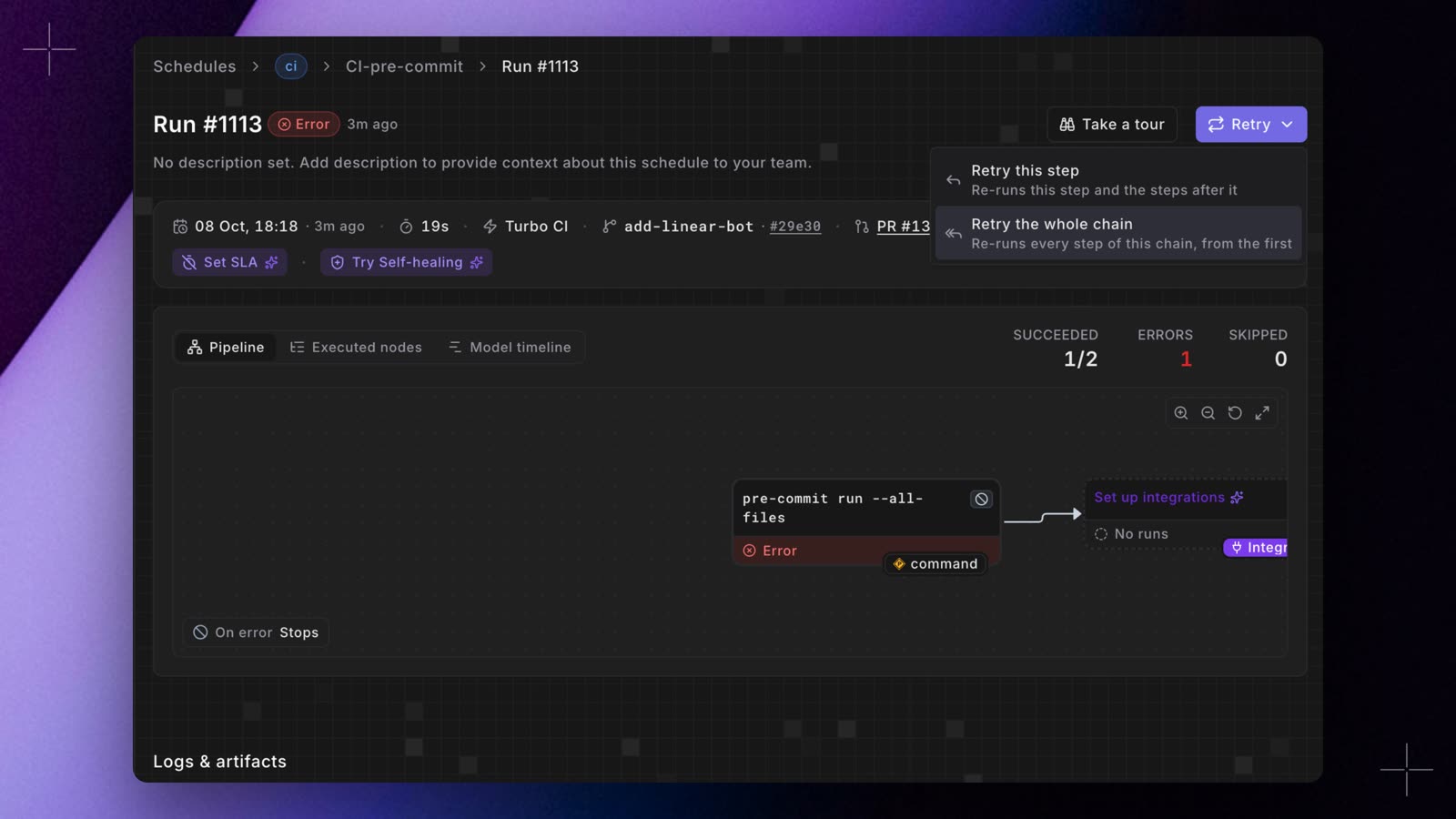
If a step fails for a reason outside your code, for example a warehouse timeout, run the failed step and the steps after it again on the same commit. The steps before it keep their results.- From GitHub: select Re-run on the check of the failed step. If you select Re-run on a skipped step, Paradime runs the failed step before it first.
- From Paradime: open the run of the failed step, select Retry, and then Retry this step. To run all the steps again from the first one, select Retry the whole chain.
How the chain behaves
- A new commit restarts the chain. Paradime cancels the steps that run on the previous commit and starts again from the first step.
- A failure stops the chain. The steps after the failed step are skipped. If other steps of the same chain are running, Paradime cancels them.
- Closing the pull request stops the chain. Converting it to a draft also cancels its runs. When you reopen it, or mark it ready for review, the chain starts again.
- A suspended step is skipped, and so are the steps after it.
- A chain can run for 12 hours. After that, Paradime cancels the steps that are still running.
Set it up in YAML
If you manage your schedules as code, addrun_after to each later step. This file defines the same two-step chain:
paradime_schedules.yml
on with or without quotes. Keep the quotes if you validate the file with a Paradime CLI older than 6.9.0, which reads a bare on as the boolean true and rejects the file.
Run paradime schedule verify (Paradime CLI 6.8.0 or later) before you commit. It checks the file, adds a slug to each new schedule, and adds the matching schedule_slug under run_after. Paradime reads chains from your deployed schedules, so a pull request that changes a chain applies after it merges and Bolt deploys your schedules. See Manage schedules as code.
Next steps
Run several jobs when a pull request merges
Deploy your changes, then run the jobs that depend on the deploy.
Chains reference
Every rule for pull request and merge chains, and what GitHub shows.
Run after another schedule
The trigger settings that link one step to the next.
Retry a run
How Retry works for chain steps and for other runs.
Troubleshooting
- Both checks start at the same time. The later step has no link, or its link names a schedule that is not a Turbo CI schedule for the same Git branch. If you use YAML, the change applies only after it merges and Bolt deploys your schedules.
- A step never starts. The step before it did not finish with the status you selected, or it was skipped. Open the check of the step before it to see its result.
- Re-run does nothing. A step of the chain is still running, the pull request has a newer commit, or the pull request is closed or a draft. On the run page in Paradime, Retry shows the reason.