# Thoughtspot

This feature provides a comprehensive impact analysis of dbt™ changes on your ThoughtSpot environment. When you open a pull request (PR) in your dbt™ project, you can visualize the downstream effects of your changes across various ThoughtSpot assets.

### Key Benefits:

1. Identify which dbt™ model changes are impacting your Tableau assets.
2. Proactively communicate which ThoughtSpot worksheets and calculated columns are affected by your dbt™ changes before going into production.
3. Discover which Liveboards (dashboards) and Answers (saved questions) might be impacted by the changes.

### Prerequisites:

1. Complete [Lineage Diff setup prerequisites](https://docs.paradime.io/app-help/documentation/bolt/ci-cd/lineage-diff/..#setup-instructions)
2. Connect Tableau to Paradime via the [Thoughtspot integration](https://docs.paradime.io/app-help/documentation/integrations/dashboards/thoughtspot)

## How to Use <a href="#how-turbo-ci-works" id="how-turbo-ci-works"></a>

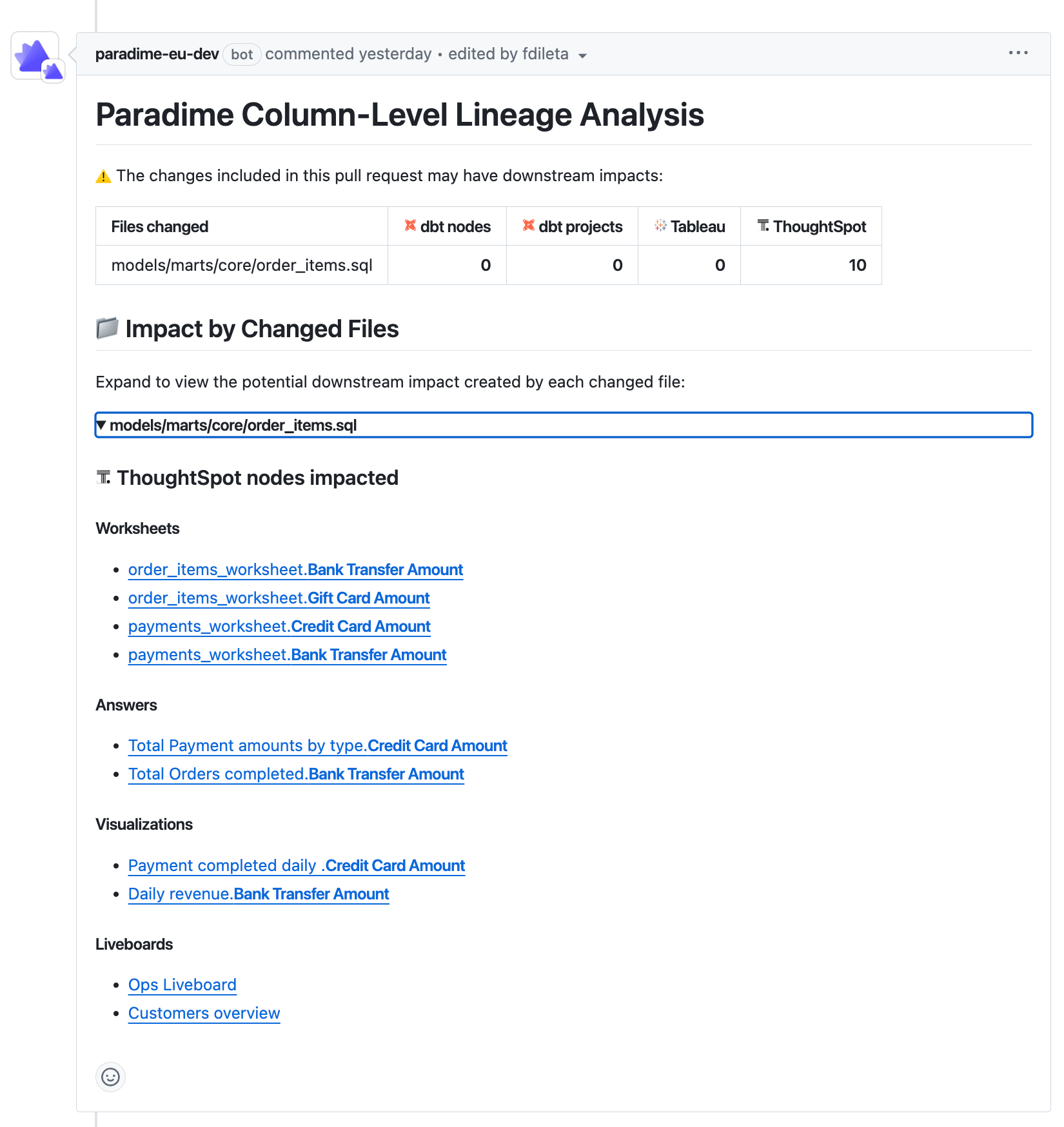
When a PR is opened in GitHub, an automated comment is generated listing all downstream ThoughtSpot nodes (Worksheets, Answers, Liveboards, etc.) that would be impacted.

Using the links available in the "ThoughtSpot Nodes Impacted" section, you can confidently investigate each node within ThoughtSpot before merging the PR changes into production.
<figure><img src="https://2337193041-files.gitbook.io/~/files/v0/b/gitbook-x-prod.appspot.com/o/spaces%2FHET0AD04uHMgdeLAjptq%2Fuploads%2Fd5yOKM4bIU4JKKCn5oSp%2Fthoughtspot.png?alt=media&#x26;token=934e228b-8900-4123-b49a-238609c6387b" alt=""><figcaption></figcaption></figure>


---

# Agent Instructions: Querying This Documentation

If you need additional information that is not directly available in this page, you can query the documentation dynamically by asking a question.

Perform an HTTP GET request on the current page URL with the `ask` query parameter:

```
GET https://docs.paradime.io/app-help/documentation/bolt/ci-cd/lineage-diff/thoughtspot.md?ask=<question>
```

The question should be specific, self-contained, and written in natural language.
The response will contain a direct answer to the question and relevant excerpts and sources from the documentation.

Use this mechanism when the answer is not explicitly present in the current page, you need clarification or additional context, or you want to retrieve related documentation sections.
