

Prerequisites
- A DinoAI Copilot session open in the Code IDE.
- Representative dbt™ files that reflect your best practices (well-structured models,
dbt_project.yml, and schema files).
Steps
1
Open DinoAI in Agent Mode
Open DinoAI from the icon in the right panel and select Agent Mode if it is not already selected.
2
Add representative files as context
Add files as context using the @ icon in the DinoAI panel. Select files from different folders that represent your best practices, for example: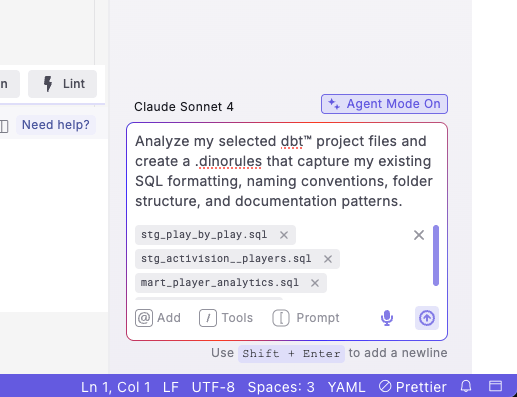
- Staging models (such as
stg_customers.sql,stg_orders.sql) - Intermediate models (such as
int_customer_orders.sql) - Marts models (such as
dim_customers.sql,fct_sales.sql) - Your
dbt_project.ymlfile - Existing
schema.ymlfiles from each folder
For best results, select files that represent your team’s current best practices rather than legacy code that might not follow your preferred standards.
3
Enter your prompt
Ask DinoAI to create a .dinorules file based on the selected files.Example prompt:
Analyze my selected dbt™ project files and create a .dinorules that captures my existing SQL formatting, naming conventions, folder structure, and documentation patterns.
4
Review the generated .dinorules
Review the generated .dinorules file preview.
Example .dinorules file
Example .dinorules file
5
Accept and test the rules
Accept the changes to create the file in your project root, then test the rules by generating new models and confirming they follow the established patterns.
You’ll know it worked when a .dinorules file appears in your project root and newly generated models follow your naming, formatting, and documentation conventions. If the rules feel generic, add more representative files as context and regenerate.
Update your .dinorules periodically as your project evolves and new best practices emerge. The file can be modified any time to reflect changing team standards.
Next steps
Provide context with PDFs
Add specs and reports as context alongside your rules.
Generate documentation
Let DinoAI document models in line with your standards.
All DinoAI use cases
Browse every DinoAI Copilot workflow.
DinoAI Copilot reference
Context, tools, and features that power these workflows.