

Prerequisites
- A DinoAI Copilot session open in the Code IDE.
- Access to the Perplexity tool in DinoAI.
Steps
1
Open DinoAI
Open DinoAI from the icon in the right panel.
2
Select the Perplexity tool
Choose the Perplexity tool from the tools menu.
3
Write a clear, specific prompt
Describe what you want to learn or implement. Being specific about your use case (for example, your data warehouse type or project structure) produces more relevant results.Example prompt: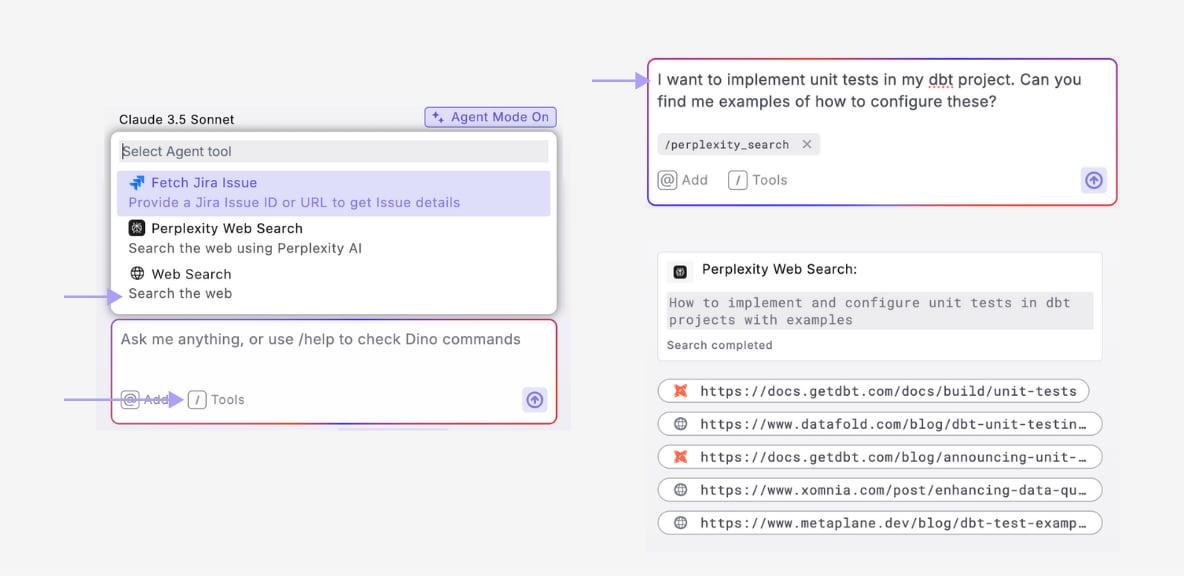
I want to implement unit tests in my dbt™ project. Can you find me examples of how to configure these?
4
Review the cited response
Read the synthesized answer along with its citations and references to the original sources.
5
Ask follow-up questions
Refine the results with follow-up prompts to get more specific information or code examples.
You’ll know it worked when DinoAI returns an answer with cited sources you can open. If the response is too generic, add detail about your warehouse, project structure, or exact goal and ask again.
Next steps
Provide context with PDFs
Feed specs and reports to DinoAI as context for your models.
Debug failed dbt™ commands
Send terminal errors to DinoAI for targeted fixes.
All DinoAI use cases
Browse every DinoAI Copilot workflow.
DinoAI Copilot reference
Context, tools, and features that power these workflows.