

Unlike general AI assistants that rely only on their training data, the Perplexity Tool lets DinoAI search the internet for current information, documentation, and examples.
Capabilities
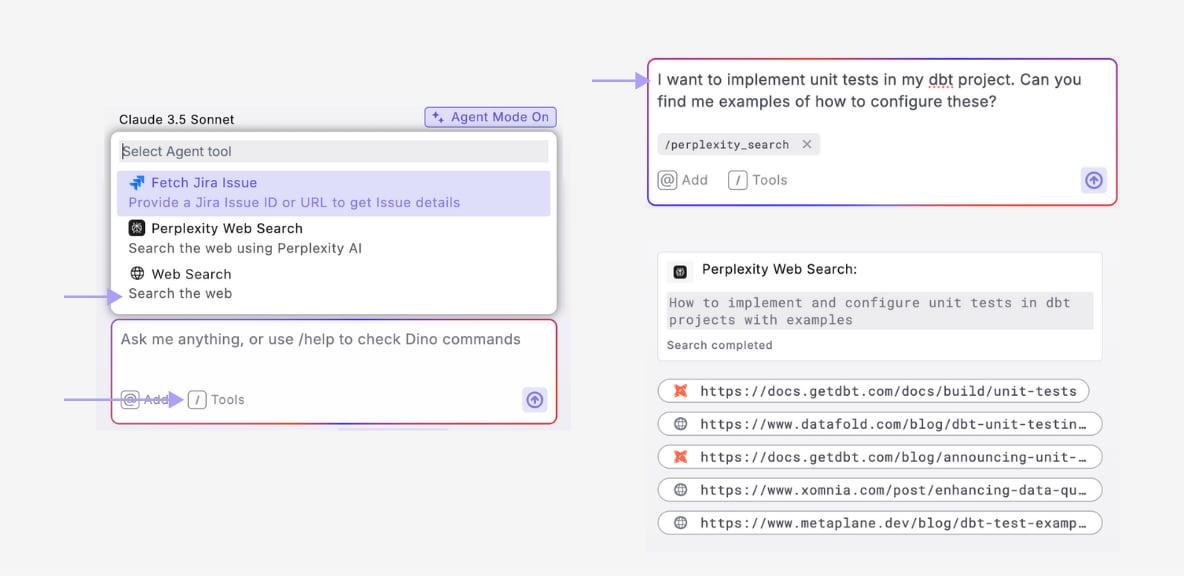
Using the Perplexity Tool
- Open DinoAI and enter your prompt
- Select the Perplexity tool from the tools menu
- Press Enter to send your prompt
- DinoAI generates a search query based on your request
- Searches the web using Perplexity AI
- Analyzes and synthesizes the results
- Review the response with cited sources and references
- Click on references to view original source material
Example Use Cases
Summarizing Documentation
- Prompt: “What are the current best practices for incremental models in dbt?”
- + Add Perplexity tool
- Result: Up-to-date information on incremental model strategies with references to community discussions and official guidance
Extracting Information
- Prompt: “How can I implement dbt incremental models with Snowflake merge statements?”
- + Add Perplexity tool
- Result: Up-to-date information on dbt incremental models with Snowflake merge statements
Combining with Other Tools
The Perplexity Tool becomes even more powerful when combined with other DinoAI capabilities:- Research then Implement: Use Perplexity to learn about a new feature, then use Agent Mode to implement it
- Find and Apply Best Practices: Research current best practices, then update your existing code to follow them
- Troubleshoot with Context: Look up error messages or issues online, then apply fixes to your code