

Prerequisites
- A DinoAI Copilot session open in the Code IDE.
- An active git branch with committed changes that differ from your main branch.
Steps
1
Open DinoAI
Open DinoAI from the icon in the right panel.
2
Open the prompt shortcut
Open the prompt picker with the prompt button (
[) in the DinoAI panel. If you don’t already have a .dinoprompts file, Paradime offers to create one for you.3
Select the pre-built prompt
Choose the pre-built prompt Generate a pull request description.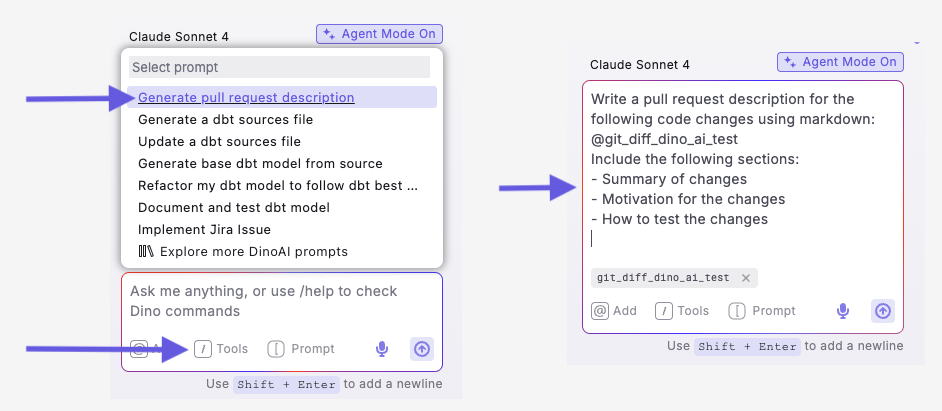
This prompt is pre-configured in your .dinoprompts file and can be updated to match your team’s standards. It automatically uses
{{ git_diff_dinoai_test }} to include all changes between your current branch and main.4
Review the generated description
Review the generated description with all sections included.
5
Copy into your git platform and open the PR
Copy the markdown output, paste it into your git platform (for example, GitHub), and create your pull request using the generated description.
{{ git_diff_dinoai_test }}, analyzes all modified, added, and removed code to understand the scope, and generates a description with summaries, detailed change lists, and context for reviewers.
Example output
DinoAI generates professional pull request descriptions like this to copy and paste into your git platform:You’ll know it worked when DinoAI returns a structured description covering the actual files and changes on your branch. If the output is empty or generic, confirm your branch has committed changes that differ from main.
Next steps
Fix errors with Jira
Track and resolve errors as Jira issues from DinoAI.
Set up .dinorules from your project
Codify your team’s conventions for consistent output.
All DinoAI use cases
Browse every DinoAI Copilot workflow.
DinoAI Copilot reference
Context, tools, and features that power these workflows.