

get_lineage and get_exposures. You add it to DinoAI Code Review as a custom reviewer. Paradime then runs it on every pull request (or merge request on GitLab), posts its findings as one review, and can block the merge with the Paradime Code Review check.
Tracking work in Jira instead of Linear? Follow the Jira variant of this guide. The two differ only in the ticket tool (
get_jira_issue instead of get_linear_issue) and the ticket wording.Prerequisites
- DinoAI Code Review on for your company, and the repository on GitHub with the Paradime GitHub App or on GitLab with the GitLab connection (gitlab.com or GitLab Self-Managed).
- Linear connected. The agent calls
get_linear_issueto read the linked ticket. If the pull request has no Linear link, the agent says so under SCOPE and continues. - The Admin, Workspace Admin, or Workspace Settings Admin role, to add a reviewer.
- Familiarity with programmable agents.
Steps
1
Create the agent
In the Agent app, open Agents, select New agent, and start from the Goal:Backstory:Model: leave Auto selected.Allowed tools (everything else is refused, see the Tools Reference):
dbt-model-reviewer template (or Start from scratch). Fill in the builder fields with the content below. See Build an agent in the UI for a tour of the builder.Name: pr-reviewer-e2eRole:run_terminal_commandread_file,search_files_and_directories,ripgrep_searchget_linear_issueget_lineage,get_exposuresrun_sql_query
You don’t write how to post the review. Paradime sends the agent the pull request details, the diff summary, and the findings format, and it posts the findings itself. See Custom reviewers.
get_lineage and get_exposures (dbt™ Discovery tools) ground the IMPACT check in the real dependency graph, including dashboards, instead of a text search.2
Deploy the agent
Select Deploy and choose where the agent lives. Just here saves it to the workspace and makes it live at once. Open a pull request commits it to your repository as
.dinoai/agents/pr-reviewer-e2e.yml, so it is governed as code. An agent deployed with a pull request is available as a reviewer after that pull request merges. See Creating Agents in the App.3
Add it as a custom reviewer
In the Agent app, select Code review, then New reviewer:
- Name:
End-to-end reviewer. - Target branches: your production branch, for example
main. - Reviewer agent: select Custom reviewer, then select
pr-reviewer-e2ein Agent. - When to review: Automatic.
- Block merging on findings: on.
- Select Create reviewer.
4
Make the check required
To block a merge while findings are open, require the Paradime Code Review check on the target branch:
- GitHub: add Paradime Code Review as a required status check in the branch protection rule or ruleset.
- GitLab: turn on Pipelines must succeed in the project’s merge request settings.
5
Open a pull request and read the review
Open a pull request into
main that changes a model. DinoAI reacts in a few minutes with a review headed DinoAI review · End-to-end reviewer:- the summary starts with the SCOPE, CODE, TESTS, DOCS, and IMPACT lines;
- each finding is an inline comment on the changed line;
- the Paradime Code Review check fails while findings are open.
@paradime in its thread. See Mentions.On a pull request with full coverage that matches its Linear ticket, the review reports no findings and the Paradime Code Review check passes. On a pull request missing tests or docs, TESTS or DOCS reads FAIL, each problem is an inline finding, and the check fails. If no review appears, open Code review and check Recent reviews, then see Why didn’t DinoAI review my pull request?.
How it works
On each push to a pull request intomain, Paradime starts a session with pr-reviewer-e2e, checked out at the head commit. The first message carries the pull request details, the description (where the Linear id is), the changed files, and earlier findings. The agent reads the diff with git, reads the ticket with get_linear_issue, and works through the five checks. For IMPACT it walks the dependency graph with get_lineage from each changed model and checks get_exposures for dashboards and apps that consume them, so “this change breaks the revenue dashboard” is a graph fact, not a guess. Its final message ends with a findings block, which Paradime posts as one review with inline comments and the Paradime Code Review check.
Delegate test-writing (optional)
Instead of only flagging missing tests, let the reviewer fix them: addtest-maintainer to this agent’s Squad in the builder and invoke_agent to its allowed tools. The reviewer then delegates to the dbt™ test maintainer, which writes and validates the tests on the pull request branch and reports back through notify_parent_session before the review is composed.
Run it from a GitHub Actions workflow instead (optional)
If DinoAI Code Review is not on for your company, or you want the trigger in your own workflow, run the agent from GitHub Actions. The workflow triggers the agent through the API, posts the agent’s verdict as a pull request comment, and fails its own check on aREJECT verdict. Use either Code Review or the workflow on a repository, not both, so a pull request doesn’t get two reviews.
For the workflow version, change the agent’s Goal so it writes a verdict, add post_slack_message to its allowed tools, and set its Slack channel on the Output step (for example #pr-reviews). You also need an account API key with the DinoAI agent API capability, and admin access to the repository on GitHub to add Actions secrets.
Goal for the workflow version:
1
Store Paradime credentials as GitHub secrets
Generate an account API key with the DinoAI agent API capability. Copy the API Endpoint shown when the key is generated, the key itself (it starts with
prdm_cmp_), and the workspace_token of the workspace the agent lives in (see Company & workspace token).In your dbt™ repo on GitHub, go to Settings → Secrets and variables → Actions and add three repository secrets:2
Add the GitHub Actions workflow
Create Then add the trigger script as
.github/workflows/dinoai-pr-review.yml in your dbt™ repo. The workflow runs on every PR when it is opened, updated, or marked ready for review:.github/workflows/dinoai-pr-review.yml
scripts/pr_review_e2e.py. It reads the PR event payload, computes the changed-file list and any linked Linear issue, triggers the agent, waits for the run to finish, posts the full review as a PR comment, and exits non-zero on a REJECT verdict so the check fails:scripts/pr_review_e2e.py
Authentication uses an account API key (
api_secret starting with prdm_cmp_ plus workspace_uid), which requires paradime-io 6.0.0 or later. See Install and authenticate the Paradime Python SDK.3
Read the verdict
Open a PR. The workflow triggers the agent, and when the run completes the full review lands in two places: as a comment on the PR itself and as a message in 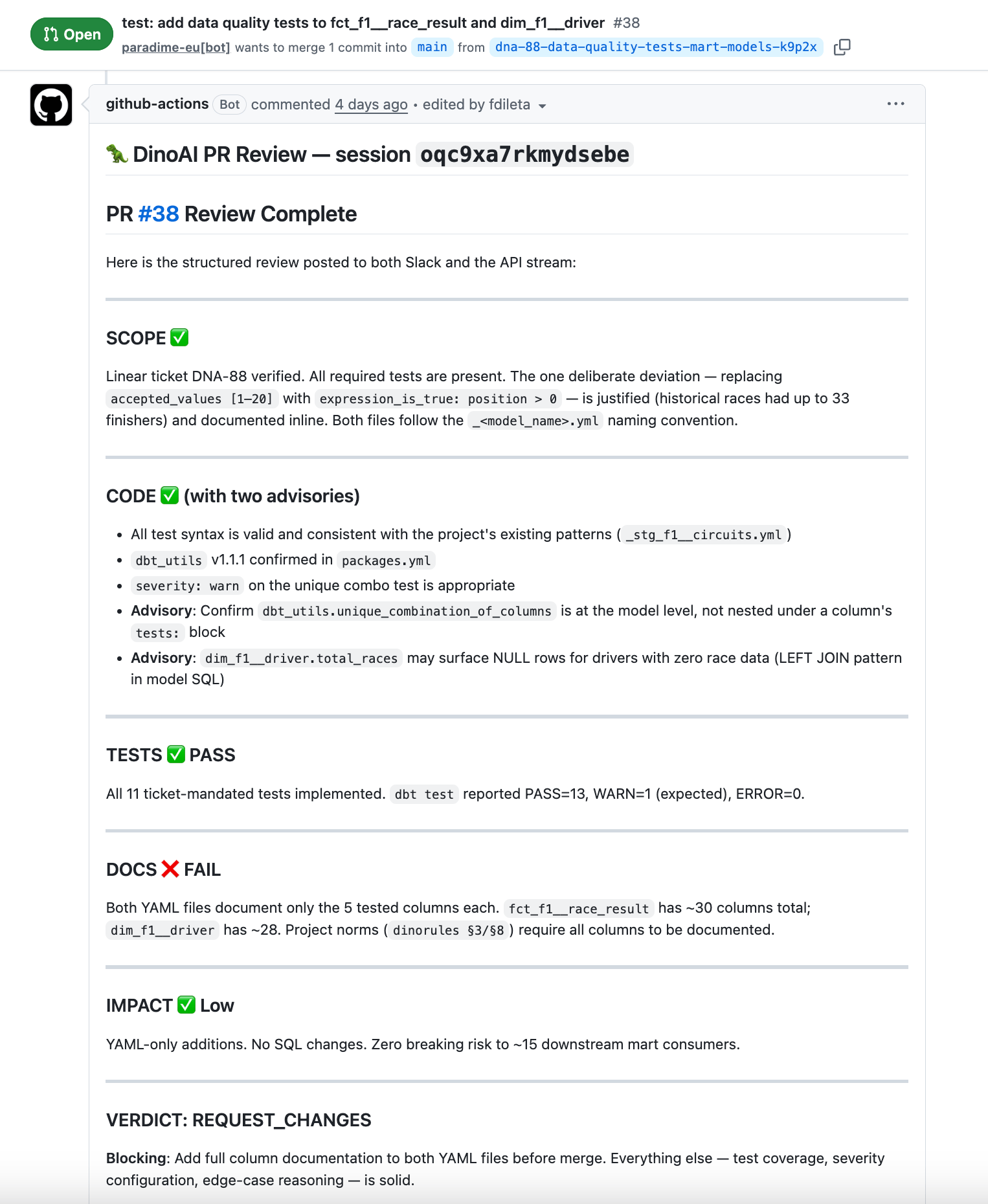
#pr-reviews. The agent always cites the file and line number for every issue it raises, and it never returns APPROVE if either TESTS or DOCS is FAIL. On a REJECT verdict the workflow exits non-zero, so the check fails and blocks the merge.Next steps
Set up DinoAI Code Review
The DinoAI reviewer, step by step, on GitHub and GitLab.
Custom reviewers
What a custom reviewer receives and the findings format.
dbt™ test maintainer
Delegate test-writing to this sub-agent from the reviewer.
dbt™ documentation backfiller
Backfill missing descriptions on the same pull request.