

Prerequisites
Dremio offers different authentication methods for Dremio Cloud and Dremio Software deployments. Choose the appropriate method and ensure complete their respective prerequisites.Dremio Cloud
- Access to a Dremio Cloud workspace
- Access to the ID of the Sonar project you want to use. See Obtaining the ID of a Project.
- A valid personal access token (PAT) for authenticating to Dremio Cloud. See Creating a Token.
- Python 3.9 or later installed on the system that you are running dbt on.
Dremio Software
- Dremio Software version 22.0 or later
- Python 3.9 or later installed
- Required support keys enabled in your Dremio cluster (See Support Keys docs for details)
dremio.iceberg.enableddremio.iceberg.ctas.enableddremio.execution.support_unlimited_splits
Setup Instructions
- Click Settings in the top menu bar of the Paradime interface to access Account Settings
- In the left sidebar, click “Connections”
- Click “Add New” next to the Bolt Schedules section
- Select “Dremio”
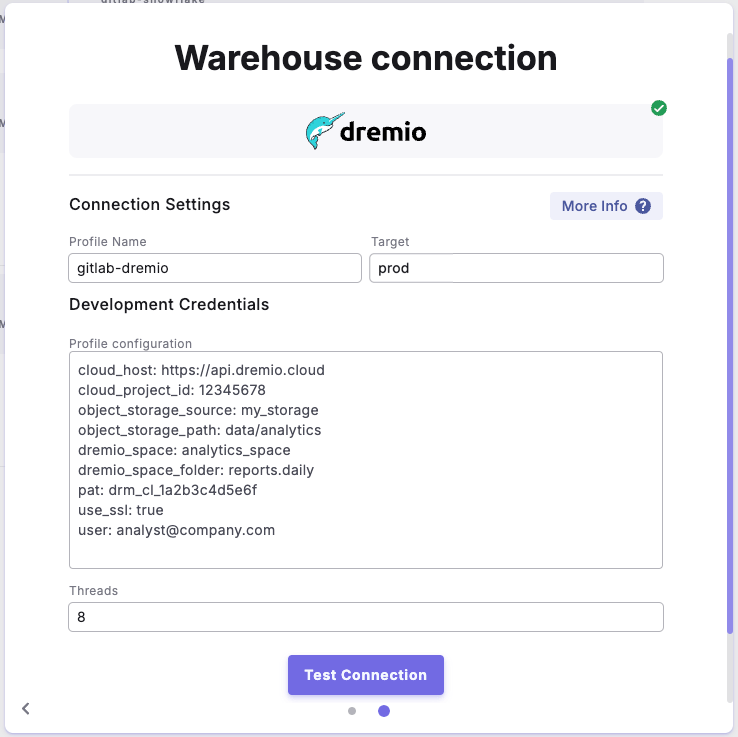
- In the Profile Configuration field, add the following parameters based on your authentication method. Reference the Profile Fields Reference section below for additional context and configurations:
- Dremio Cloud
- Dremio Software (Username/Password)
- Dremio Software (Personal Access Token)
After adding the configuration, ensure it’s properly formatted using a YAML formatter like YAML Formatter.
- Provide a dbt™ Profile Name (This should match with the profile name set in your
dbt_project.yml). - In the Target field, enter “
prod”. This is the default target your dbt™ project will use for your Bolt Schedules. - The “Threads” value is pre-configured to 1, but you can adjust this number to specify how many parallel operations your dbt project can run.
Example Profile Configuration
Profile Fields Reference
- Common Fields
- Dremio Cloud
- Dremio Software