

Authentication Methods
Microsoft Fabric uses Microsoft Entra ID (formerly Azure AD) as its primary authentication system. Setauthentication to one of these values:
ActiveDirectoryPassword- Microsoft Entra ID username and PasswordServicePrincipal- Service Principal Authentication
Setup Instructions
- Click Settings in the top menu bar of the Paradime interface to access Account Settings
- In the left sidebar, click “Connections”
- Click “Add New” next to the Bolt Schedules section
- Select “Microsoft Fabric”
- In the Profile Configuration field, add the following parameters based on your authentication method. Reference the Profile Fields Reference section below for additional context and configurations:
- Microsoft Entra ID username and Password
- Service Principal
Microsoft Entra ID username and Password
After adding the configuration, ensure it’s properly formatted using a YAML formatter like YAML Formatter.
- Provide a dbt™ Profile Name (This should match with the profile name set in your
dbt_project.yml). - In the Target field, enter “
prod”. This is the default target your dbt™ project will use for your Bolt Schedules. - The “Schema” field is pre-configured, but you can change it to specify the schema where dbt will build objects.
- The “Threads” value is pre-configured to 1, but you can adjust this number to specify how many parallel operations your dbt project can run.
Example Profile Configuration
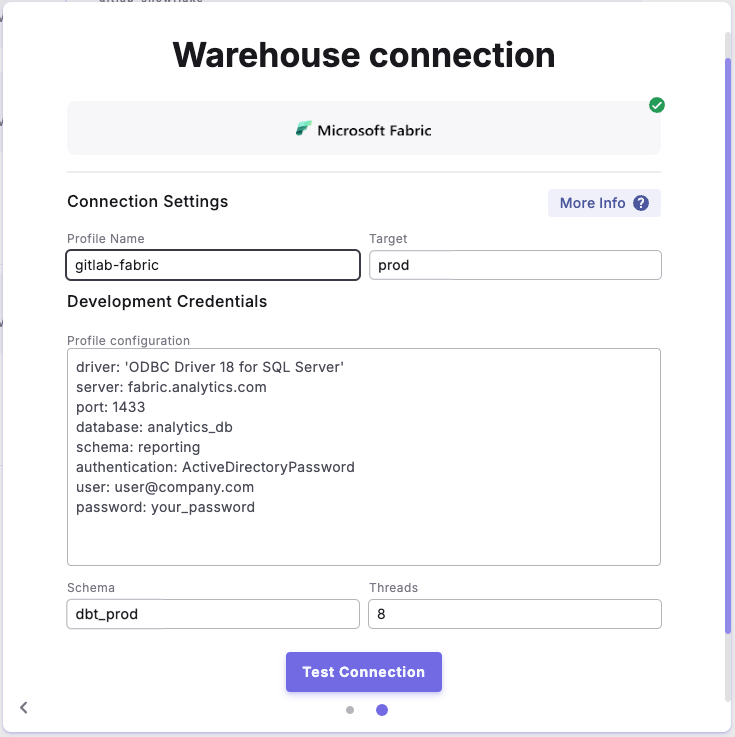
Profile configuration example is for 'Microsoft Entra ID username and Password'
Schema Authorization
When creating schemas in Microsoft Fabric, you can control who owns them. Here’s what you need to know:- Schema ownership is defined using the AUTHORIZATION Argument. The syntax follows this pattern:
- Useful for managing permissions in Microsoft Entra ID environments
- Recommended when working with group-based permissions