

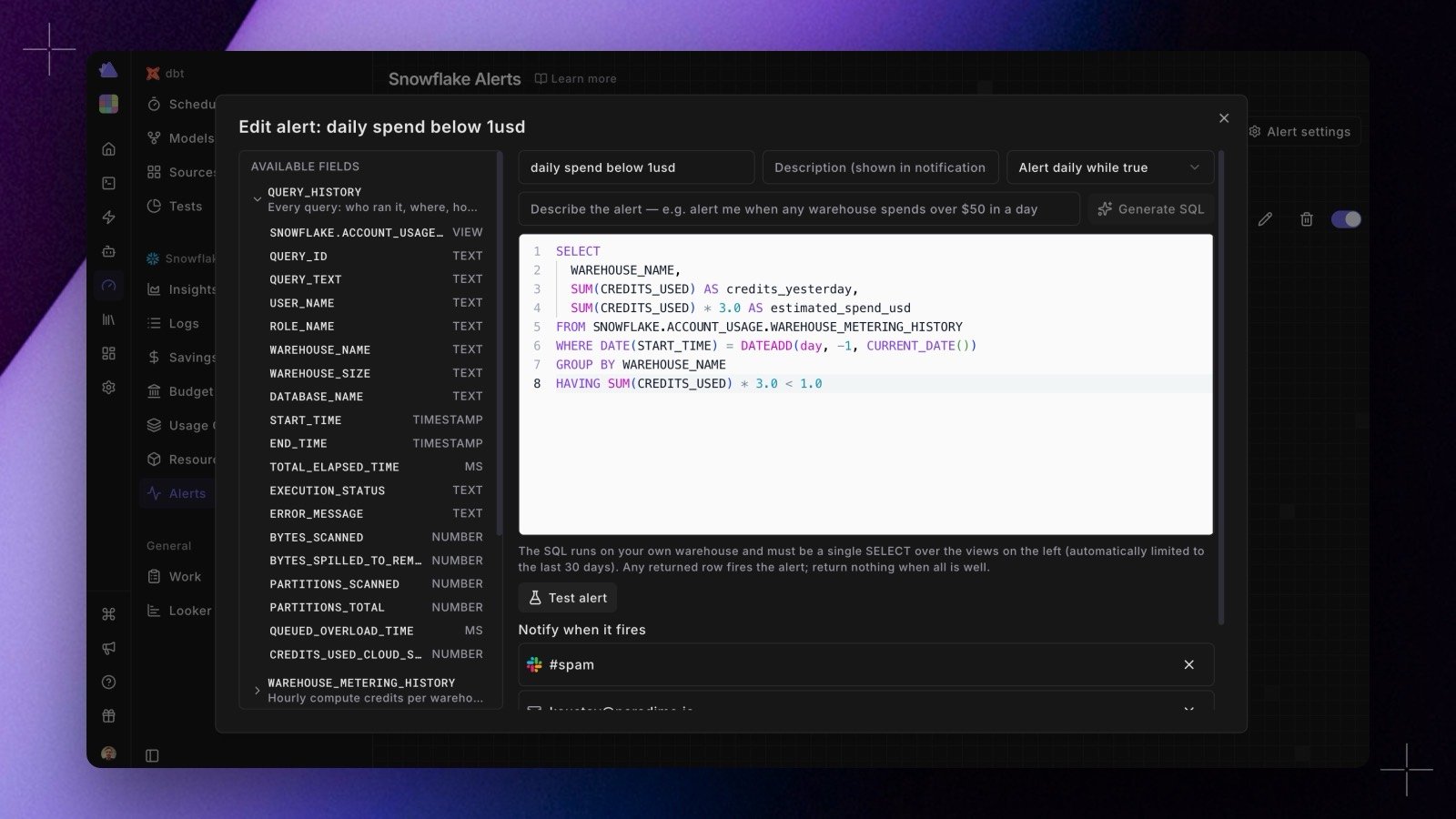
Create one
On the alerts page for your warehouse, click Create alert.- Name and describe the alert so the notification says something useful when it fires.
- Write the SQL, or describe what you want in plain language and click Generate SQL to have Paradime draft it. The draft lands in the editor, where you can read and change it before saving. The left pane lists the fields available to you, such as
QUERY_HISTORYandWAREHOUSE_METERING_HISTORY, with the type of each column. - Test alert runs the query immediately and shows whether it would fire, along with sample rows, so you are not waiting for a schedule to find out you had a typo.
- Choose how often it repeats: Alert daily while true keeps reminding you each day the condition holds, Alert once until it resets tells you once and stays quiet until the condition clears.
- Pick destinations: a Slack channel, a Microsoft Teams webhook, or email, the same way Bolt notifications are configured.
The contract. The query runs on your own warehouse and must be a single
SELECT over the views listed in the left pane, automatically limited to the last 30 days. Any row it returns fires the alert, so write it to return nothing when everything is fine and the offending rows when it is not.