

Chains work with the Paradime GitHub app only.
Prerequisites
- Install the Paradime GitHub app and authorize access to your dbt™ repository.
- For pull request chains, complete the Turbo CI setup: the CI environment, the custom schema macro, and a production schedule to defer to.
- For merge chains, configure a production environment.
Define a chain
Chains use the schedule settings you already know. You link schedules together, and nothing else changes:- Pull request chain: a set of Turbo CI schedules. A Turbo CI schedule that doesn’t run after another Turbo CI schedule is a first step: it starts when a pull request opens or gets a new commit. Every later step is a Turbo CI schedule that runs after the step before it.
- Merge chain: the first step is an on-merge schedule. Every later step runs after the step before it. Later steps can be on-merge schedules or any other schedule in the same workspace.
- Independent schedules: schedules with no link between them run at the same time.
In the schedule form
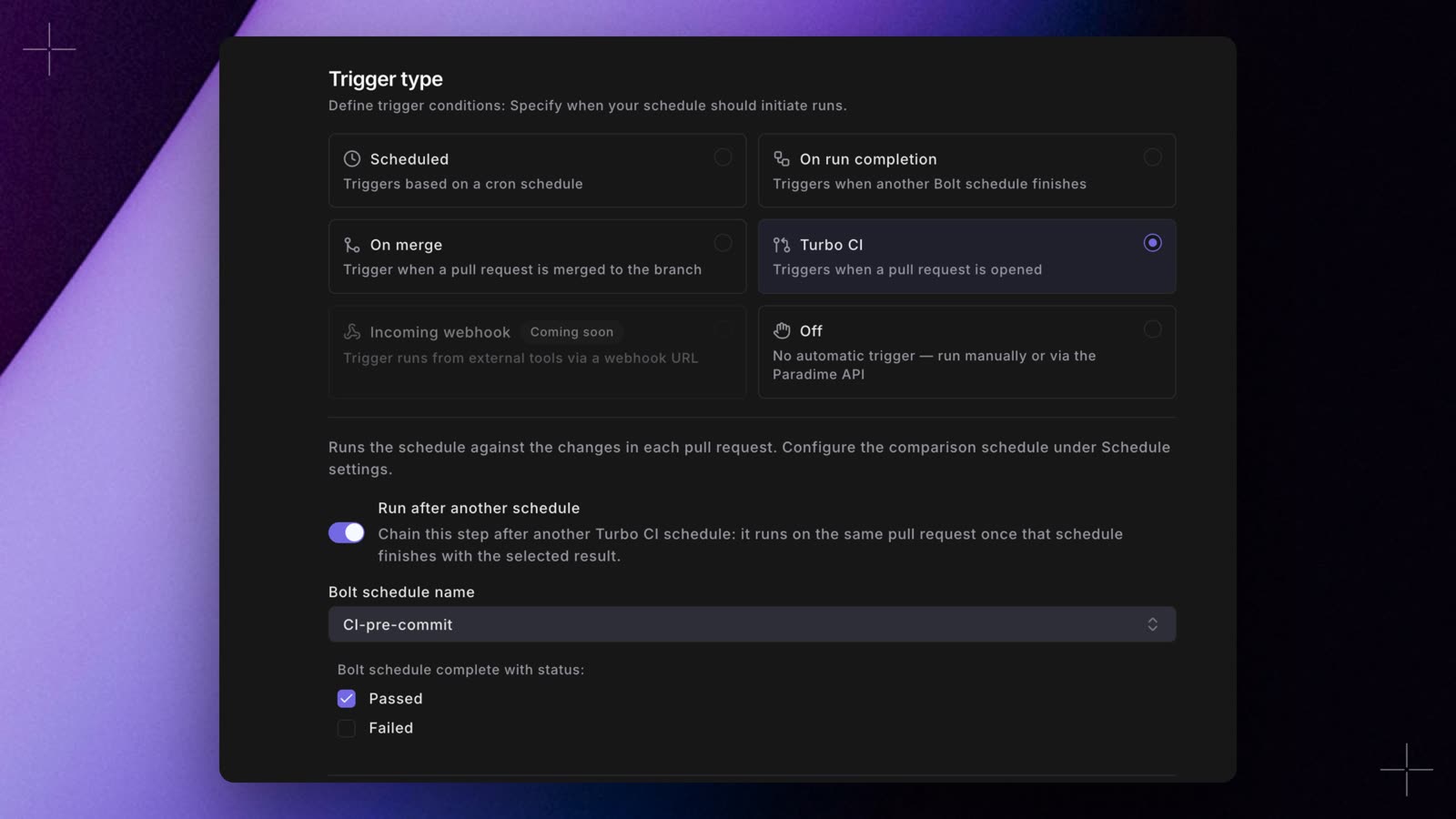
- Open the schedule that should be a later step, and select the Turbo CI or On merge trigger.
- Turn on Run after another schedule.
- In Bolt schedule name, pick the step before this one. Only schedules in the current workspace are listed.
- Under Bolt schedule complete with status:, pick Passed, Failed, or both.
- Save the schedule.
In YAML
Addrun_after to each later step. run_after is a shorter way to write schedule_trigger, and existing schedule_trigger blocks keep working. Paradime reads chains from your deployed schedules, so a pull request that changes a chain takes effect once it merges and your schedules redeploy.
This paradime_schedules.yml has a nightly production build, a two-step pull request chain and a two-step merge chain. Replace the slugs with the ones paradime schedule verify generates, and the commands with your own.
paradime_schedules.yml
How a chain runs
On a pull request
- Each pull request runs its own chain in its own temporary schemas (
paradime_turbo_ci_pr_followed by the pull request number), so any number of pull requests can run at the same time. - Every step runs on the pull request’s latest commit. Later steps write to the same schemas, so they can build on what earlier steps created.
- A step starts only after the step before it finishes with a result you picked. When a step fails, the steps after it are skipped, and other running steps of that chain are cancelled. Schedules that aren’t linked to that chain keep running.
- A suspended step is skipped.
- Pushing a new commit cancels the chain’s runs for the previous commit and starts again from the first step.
- Closing the pull request, or converting it to a draft, cancels its runs. Reopening it, or marking it ready for review, starts a new chain. When it closes, Paradime deletes its temporary schemas as usual.
On merge
- A merge chain runs once per merge. Steps on the branch that was merged into run on the merge commit, even if more commits land on the branch while the chain runs. A step whose schedule is on another branch runs that branch’s latest commit.
- Each merge starts its own chain straight away, so two merges close together run at the same time. To make merges take turns, use a merge queue.
- A running merge chain is never cancelled, so a deploy is never stopped halfway.
- A failure stops that merge’s chain. The next merge still runs, since it may contain the fix.
Merge queue
If your merge jobs take long, a second merge can start deploying while the first is still running, even though it assumes the first is already in production. A merge queue makes merges run a schedule one at a time, in the order they merged.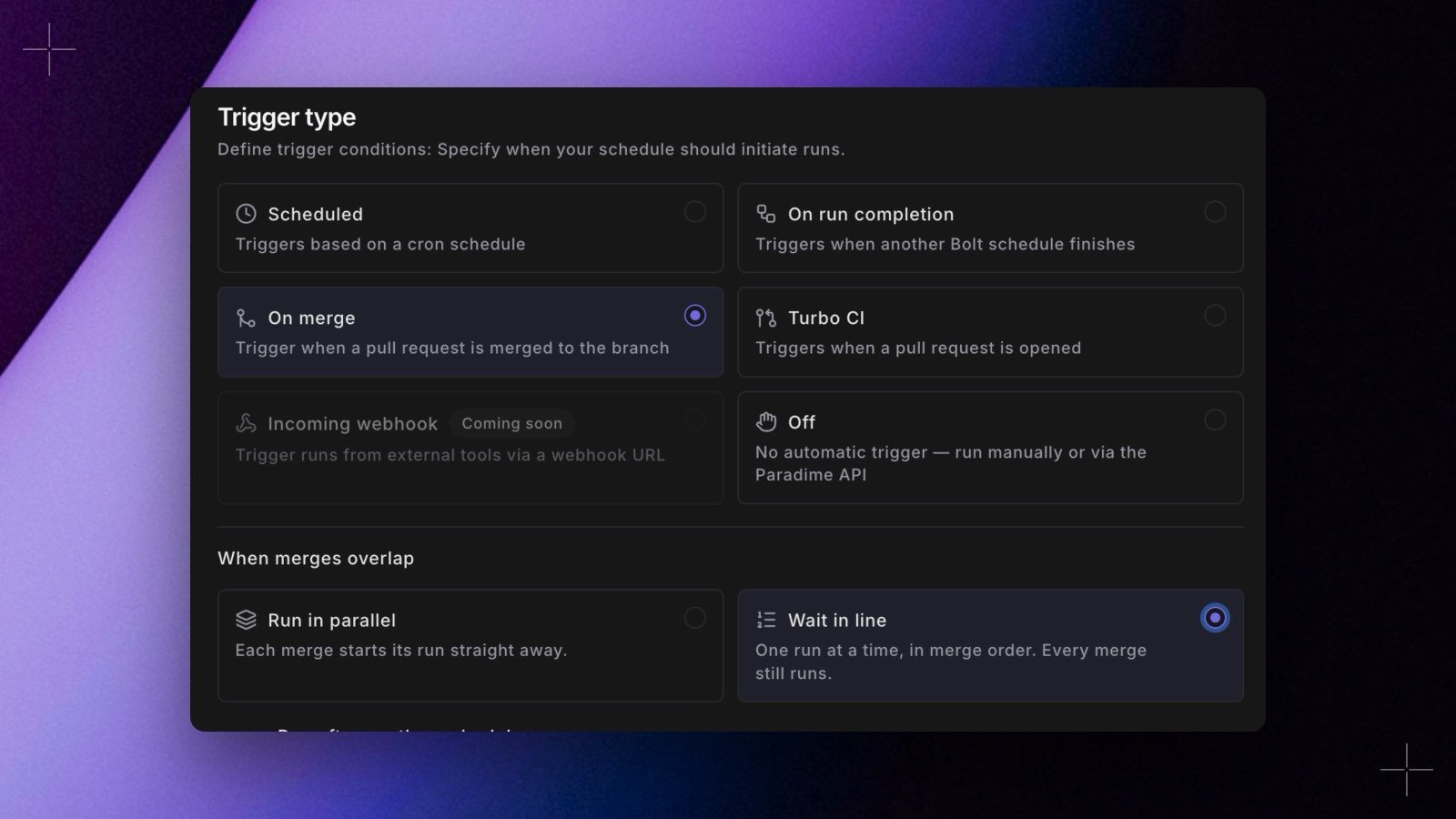
concurrency: queue next to trigger_on_merge: true.
- Set it on the first step of a merge chain. The steps after it run as part of each merge’s chain, and the setting has no effect on them.
concurrency: queueis allowed only on on-merge schedules.- A merge that waits more than 24 hours stops with Couldn’t run: still waiting for the merge queue after 24 hours.
- The first merge in line starts about a minute after it merged, so an older merge whose GitHub event arrives late can still take its turn first.
- An older merge that arrives after a newer one already had its turn is skipped, with Skipped: the merge of #N is newer and already had its turn. The newer merge commit already contains its changes.
- Remove takes a merge out of the queue. Its steps are skipped. You need permission to run the schedule.
- Run now starts a waiting merge out of turn, so two merges build the schedule at the same time. You need permission to edit the schedule.
merge_queue_removed and merge_queue_run_now.
The Bolt merge queue orders Paradime’s on-merge runs. It’s separate from GitHub’s merge queue, which orders the merges themselves.
What you see on GitHub
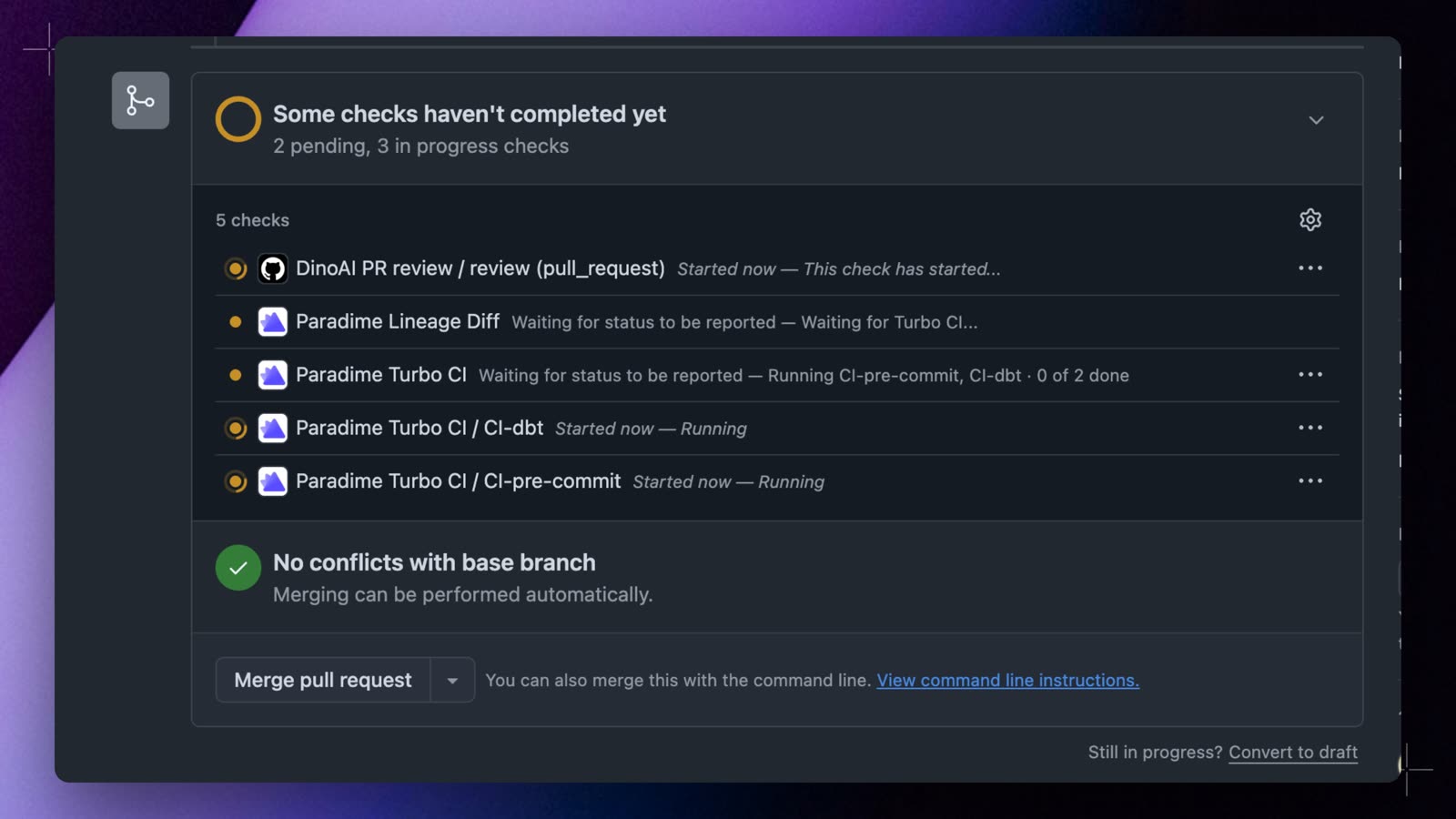
Paradime Turbo CI check is the overall result of the pull request’s Turbo CI runs. It stays pending while steps run, passes when every step passes, and fails as soon as one step fails. If other steps are still running at that point, it says how many, for example 0 of 3 passed · 2 still running · failed: PR 1 - build changed models.
When a pull request’s base branch has two or more Turbo CI schedules, each one also gets its own check, named Paradime Turbo CI / <schedule name>. A step shows as queued while it waits for the step before it, then running with a link to the run, and finally passed, failed, cancelled, or skipped. With a single Turbo CI schedule, Paradime Turbo CI stays the only check.
Re-run or retry a step
From GitHub
Select Re-run on a step’s check in GitHub to run that step again, and the steps after it, on the same commit. The steps before it keep their results. Step checks, and so Re-run, appear when the pull request’s base branch has two or more Turbo CI schedules.- Re-running a step that was skipped because an earlier step failed re-runs the failed step first.
- Re-run works while the pull request is open, ready for review, and on the commit the check belongs to. A new push runs the whole chain again on its own.
- If the pull request’s chain hasn’t run for a day, Paradime no longer has its earlier results. Re-run still runs the step and the steps after it. The step’s check says it ran without the steps before it, and
Paradime Turbo CIkeeps its earlier result. - Re-run needs the GitHub app’s checks permission. Without it, steps show as commit statuses, which GitHub can’t re-run.
From Paradime
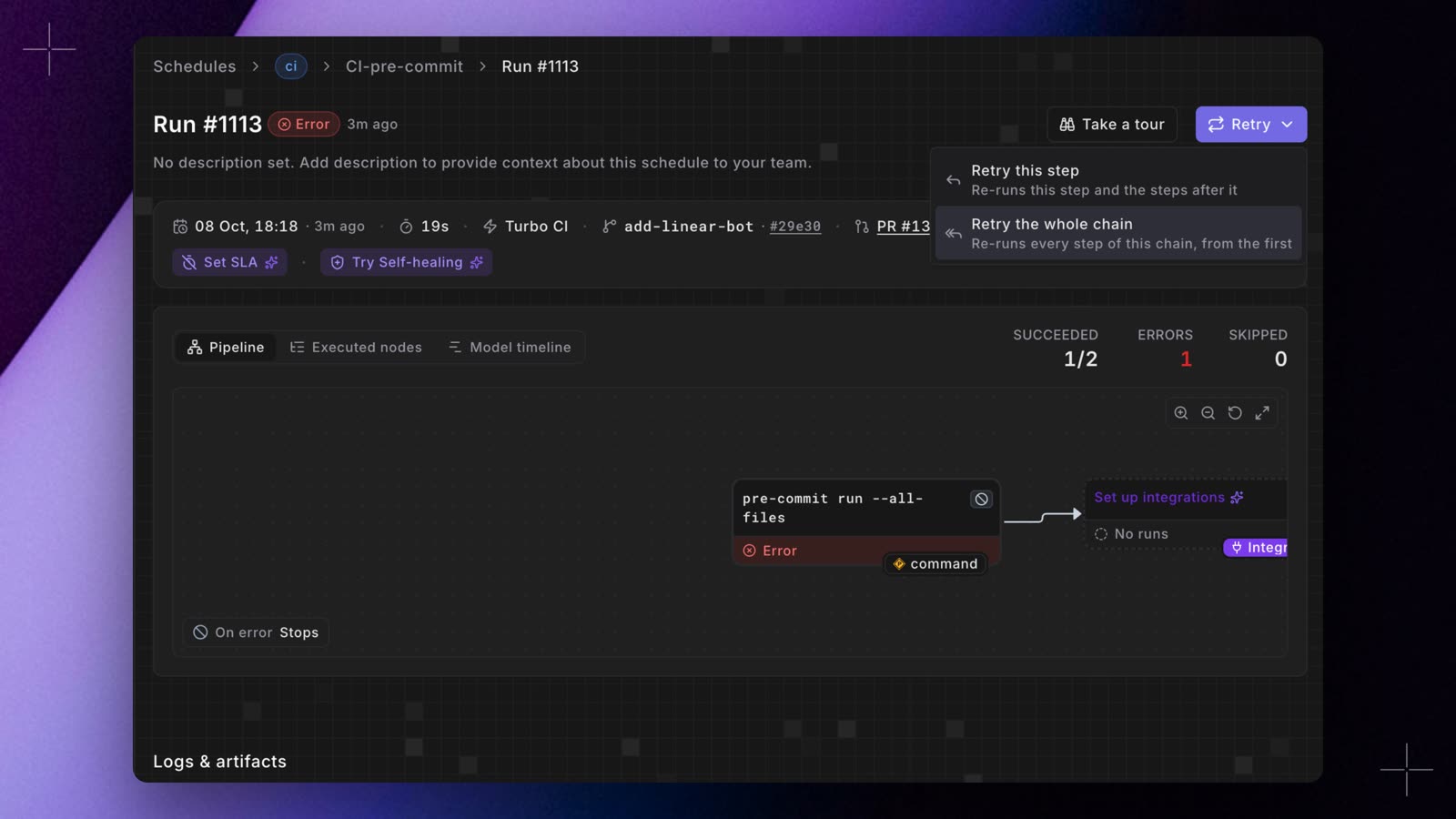
- Retry this step: runs this step again in full, then the steps after it.
- Retry the whole chain: runs every step of the chain again, from the first.
Things to know
- Keep merge-chain schedules on
schedule: "OFF". A cron run starts on its own clock, so it can’t wait for a merge chain and could overlap one. - Changes outside your dbt™ project folder trigger nothing. Pull requests and merges that don’t change files in the folder are ignored.
- Independent Turbo CI schedules share the pull request’s schemas. Give them different model selections (for example, one per project or tag), or chain them, so two runs don’t build the same model at the same time.
- All the steps of a chain must be in the same workspace.
- A Turbo CI run doesn’t start schedules that aren’t Turbo CI. A schedule that runs after a Turbo CI schedule but has no Turbo CI of its own starts only after that schedule’s scheduled, manual, or API runs. The
Paradime Schedule Parsecheck flags it as Passed with warnings. Turn on Turbo CI for it to make it a step of the pull request chain. - Chains have a time limit. A pull request chain stops after 12 hours and a merge chain after 6 hours. Steps still running are cancelled.