

Datadog Integration
Connect Datadog to Paradime to automatically create incidents when Bolt runs fail, with centralized incident management and monitoring workflows.Need to connect Datadog first? Follow our Datadog integration setup guide to authenticate and connect your account.
Configure Datadog Trigger
Step 1: Add Datadog Destination
- Navigate to the Triggers integration section
- Click Add Integration
- Select Datadog from the dropdown
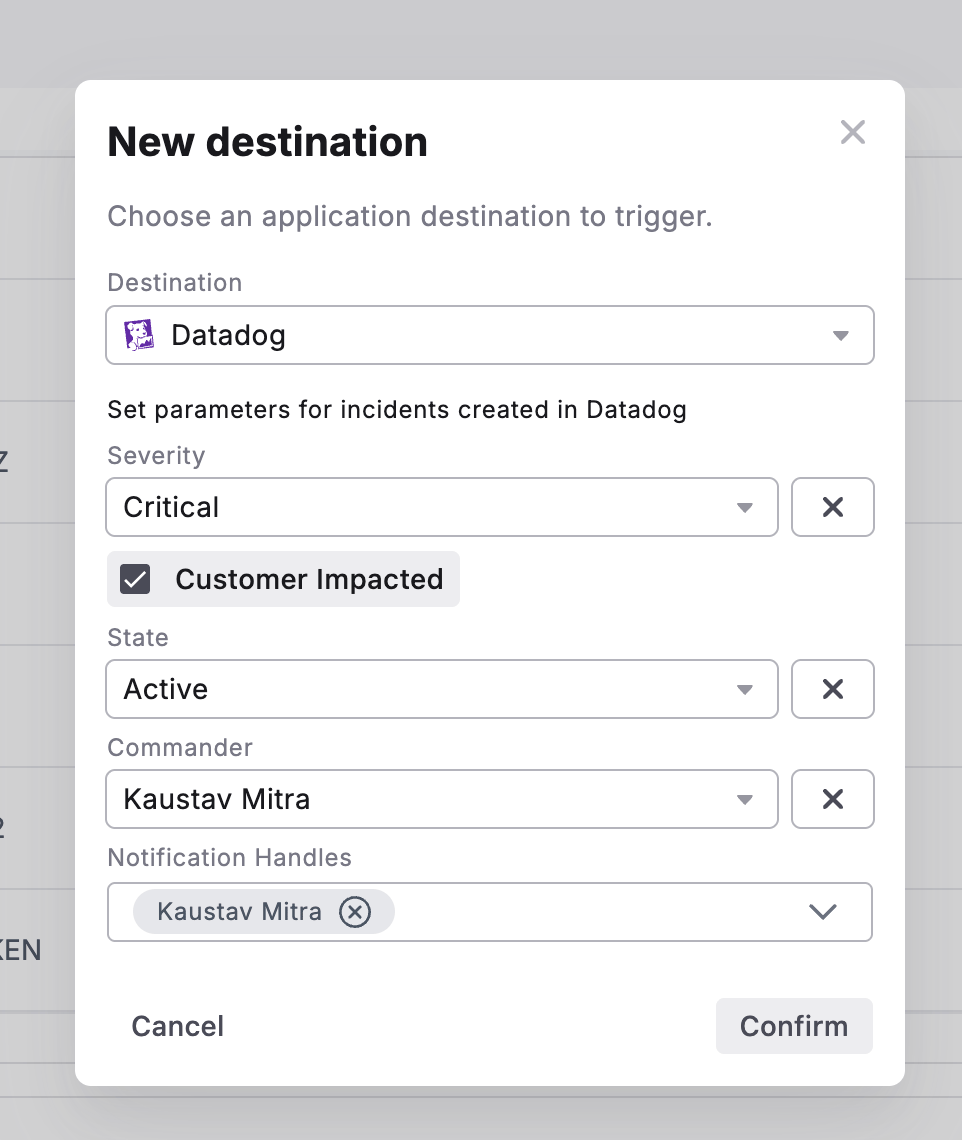
Step 2: Set Incident Parameters
Configure the following fields to customize incidents created in Datadog:Step 3: Confirm Configuration
- Review your incident parameters
- Click Confirm to save the trigger
- The Datadog trigger is now active for this schedule
What Gets Created
When a Bolt run fails, Datadog will automatically create an incident containing:- Incident title with schedule name and workspace
- Incident details including:
- Direct link to Paradime run logs
- Run ID with direct link
- Execution timestamps
- Commands executed
- Branch information
- AI Summary of the command logs
- Configured severity, state, and customer impact flag
- Assigned commander and notification recipients
Testing Your Configuration
- Manually run a schedule that will fail
- Check your Datadog dashboard for the new incident
- Verify the incident contains the correct parameters and run details
- Confirm the appropriate users were notified
Key Benefits
- Centralized incident management - Track all pipeline failures alongside infrastructure incidents
- Accelerate debugging - Jump directly from Datadog alerts to Paradime run logs
- Improve MTTR - Leverage Datadog’s incident workflow for faster resolution
- Enable cross-team visibility - Share pipeline health with platform and DevOps teams