

Example Prompt
Help me fix the issue described in PROD-123
Prerequisite: You must add Jira as an integration in your Paradime environment for the Jira Tool to work properly.
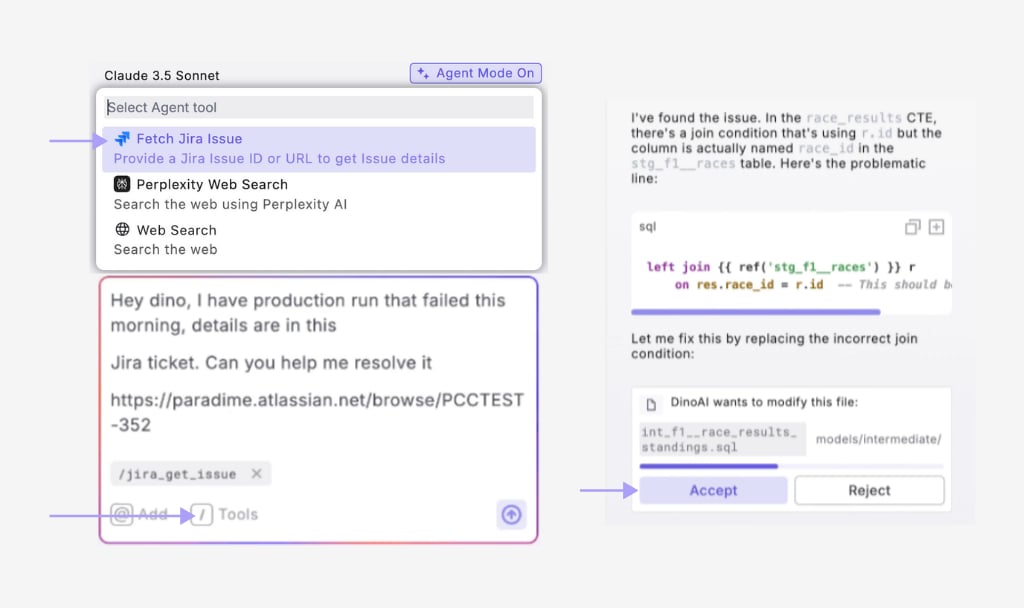
Step-by-Step Instructions
- Set up Jira integration (if not already configured):
- Open DinoAI by clicking the DinoAI icon (🪄) in the left panel
- Select the Jira tool from the tools menu
- Enter the Jira ticket ID (e.g., “PROD-123”) in your prompt
- Optional***:*** Add context about what you want to do with the ticket information
- Review/Accept the changes to create the file in your project
- Test the solution to ensure it resolves the issue
- Commit and push the changes with a reference to the ticket ID
How It Works
After you enter your prompt:- DinoAI accesses your Jira ticket using the provided credentials
- It analyzes the ticket details, including description, comments, and attachments
- It identifies the issue type, severity, and any error logs or context
- If configured, DinoAI applies any relevant .dinorules preferences
- It provides a structured plan to resolve the issue with appropriate Git workflow
Key Benefits
- Reduced Context Switching: Access ticket information without leaving your IDE
- Guided Troubleshooting: Receive step-by-step instructions for resolving issues
- Integrated Git Workflow: Create branches, commit changes, and push fixes in one workflow
- Knowledge Integration: Combine ticket requirements with your project’s context
- Traceability: Maintain connections between code changes and ticket references