

Example Prompt
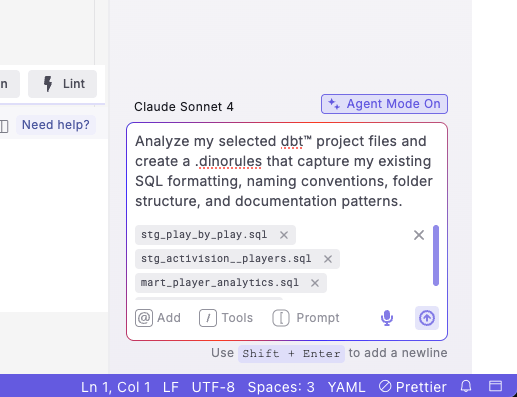
Analyze my selected dbt™ project files and create a .dinorules that capture my existing SQL formatting, naming conventions, folder structure, and documentation patterns.
Recommended: Add context by selecting multiple files that represent your best practices - include well-structured models from different folders (staging, marts), your dbt_project.yml, and existing schema files.
Step-by-Step Instructions
- Open DinoAI by clicking the DinoAI icon (🪄) in the right panel
- Select Agent Mode if it’s not already selected
- Add files as context using the ”@” icon in the DinoAI panel. Select representative files from different folders:
- Staging models (e.g., stg_customers.sql, stg_orders.sql)
- Intermediate models (e.g., int_customer_orders.sql)
- Marts models (e.g., dim_customers.sql, fct_sales.sql)
- Your dbt_project.yml file
- Existing schema.yml files from each folder
- Enter your prompt requesting .dinorules creation based on selected files
- Review the generated .dinorules file preview
- Accept the changes to create the file in your project root
- Test the rules by generating new models to ensure they follow the established patterns
Note: For best results, select files that represent your team’s current best practices rather than legacy code that might not follow your preferred standards
Example Output
DinoAI will generate a comprehensive .dinorules file like this:Example .dinorules file
Example .dinorules file
How It Works
After you enter your prompt:- File Analysis: DinoAI analyzes the structure and patterns in your selected files
- Pattern Recognition: It identifies consistent naming conventions, SQL formatting styles, and organizational patterns
- Rule Generation: It creates a .dinorules file that codifies these discovered patterns
- Standard Application: The generated rules ensure future AI-generated code matches your established standards
Key Benefits
- Consistency: Ensures all future AI-generated code matches your existing standards
- Team Alignment: Codifies implicit knowledge that experienced team members understand
- Efficiency: Creates comprehensive rules without starting from scratch
Example Use Cases
- New Project Setup: Establish standards when transitioning from manual to AI-assisted development
- Team Onboarding: Document implicit conventions for new team members
- Standard Formalization: Convert organic patterns into explicit rules
Tip: Consider updating your .dinorules periodically as your project evolves and new best practices emerge. The file can be modified to reflect changing team standards.