

Setup Steps
Select the feature(s) you want to enable and follow the corresponding setup steps. Radar’s dbt™ pages (Schedules, Models, Sources, and Tests) and the Work page need a connected repository and a Bolt production warehouse connection. Until both are set up, those pages show a setup checklist. The cost pages, Alerts, and Looker work without them, so a workspace with only a cost connection opens Radar on its warehouse’s cost pages.1. Cost Management
If you want to monitor and optimize data warehouse costs, add a cost connection to your data warehouse:- Snowflake
- BigQuery
Set up Snowflake Cost Access - Complete all steps to give Paradime the necessary Snowflake access to optimize your Snowflake spend.
2. dbt™ Monitoring
To enable dbt™ monitoring features, ensure you have:- A connected git repository
- A production data warehouse connected to Paradime
- At least one active Bolt Schedule.
3. Team Efficiency Tracking
To enable team efficiency tracking:- Go to
Settings > Integrations - Find the GitHub integration and click
Connect - Follow the GitHub App Installation instructions.
4. Real-time Alerting
To enable real-time alerting, follow these steps:4.1 Integrate Notification Platform
- Go to
Settings > Integrations - Find your preferred integration:
- Click on the integration and follow the installation instructions
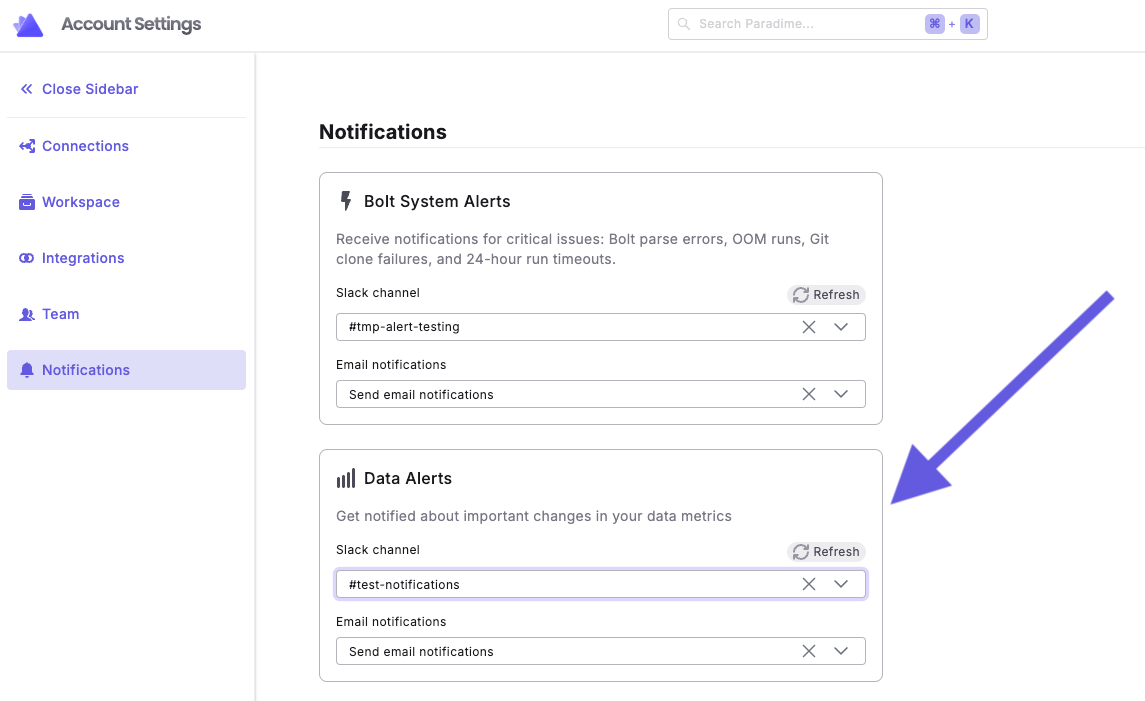
4.2 Configure Alert Notifications
- Go to
Settings > Integrations - Choose your notification destination:
- Slack: Select a channel from the dropdown
- Microsoft Teams: Select a channel from the dropdown
- Email: Click “Send Email notification” to send alerts to workspace admin(s)
Looker Monitoring
To monitor Looker performance and usage, add an integration:- Looker
VerificationAfter setting up your chosen Radar features:
- Navigate to the Radar dashboard
- Confirm that data is populating in the relevant section(s)
- Explore each enabled feature to familiarize yourself with the available metrics