

What you can do
Catalog & Lineage
Hightouch syncs appear as assets in Paradime’s catalog and lineage, so you can trace activated data back to your dbt™ models.
Orchestration
Trigger Hightouch syncs from the CLI once a Bolt schedule completes, so activation runs as soon as fresh data is available.
Prerequisites
To create API keys in Hightouch, you will need Admin access. See also the Hightouch docs here.
Step 1: Generate an API key
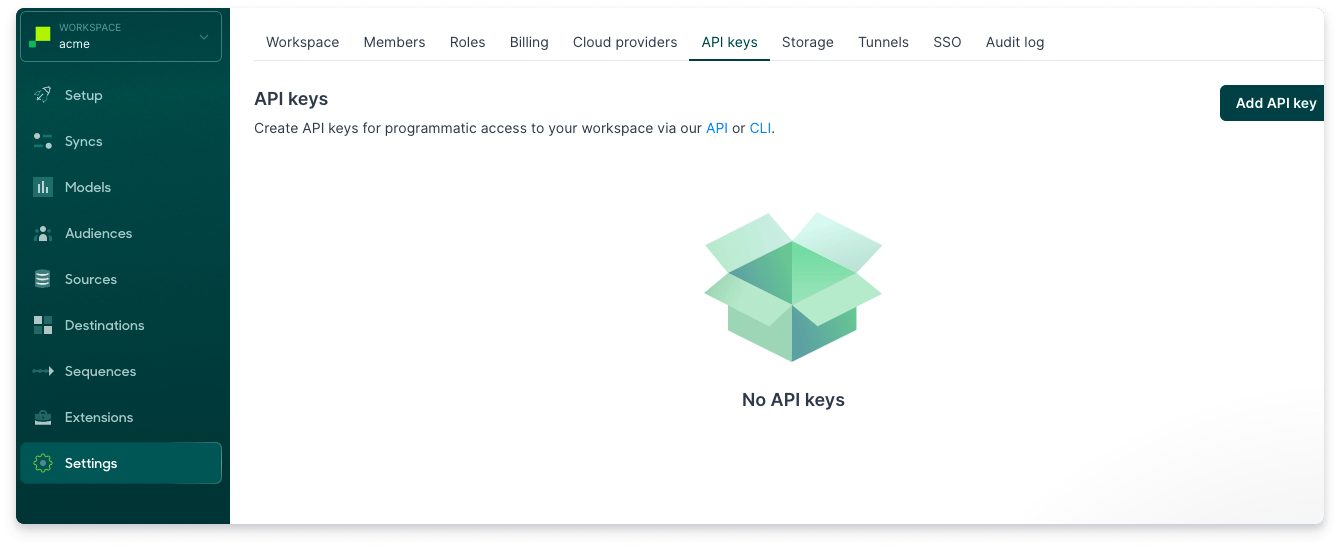
- From the API keys tab on the Settings page, select Add API key.
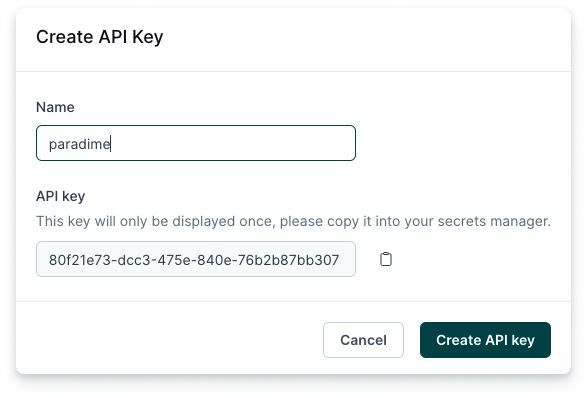
- Enter a descriptive Name for your key. Copy your API key and store it in a safe location. The key will only be displayed once. Click Create API key.
Step 2: Connect the Hightouch Integration
The Hightouch integration can be connected by a Paradime Admin user. In Paradime, go to Settings → Integrations (see connecting integrations), find Hightouch, and click Connect.- Add the API Key for your Hightouch account
- Click on Test Connection to validate that Paradime can connect to Hightouch and start importing Metadata from your Connectors.
Connection parameters
Now that the integration is connected, you can trigger syncs after a Paradime Schedule completes.