

What you can do
Catalog & Lineage
Sigma workbooks and datasets appear as assets in Paradime’s catalog and lineage, so you can trace dbt™ models through to the reports built on them.
Step 1: Identify your organization’s cloud
You’ll need your organization’s cloud details to identify the endpoint for Paradime authentication.For GCP organizations, use:
https://api.sigmacomputing.com/For AWS organizations, use: https://aws-api.sigmacomputing.com/- Login to your Sigma account.
- In the top right of the screen, click your profile avatar and then click Administration to open your Account page.
- On the Account page, under Site in General Settings, view the cloud details.
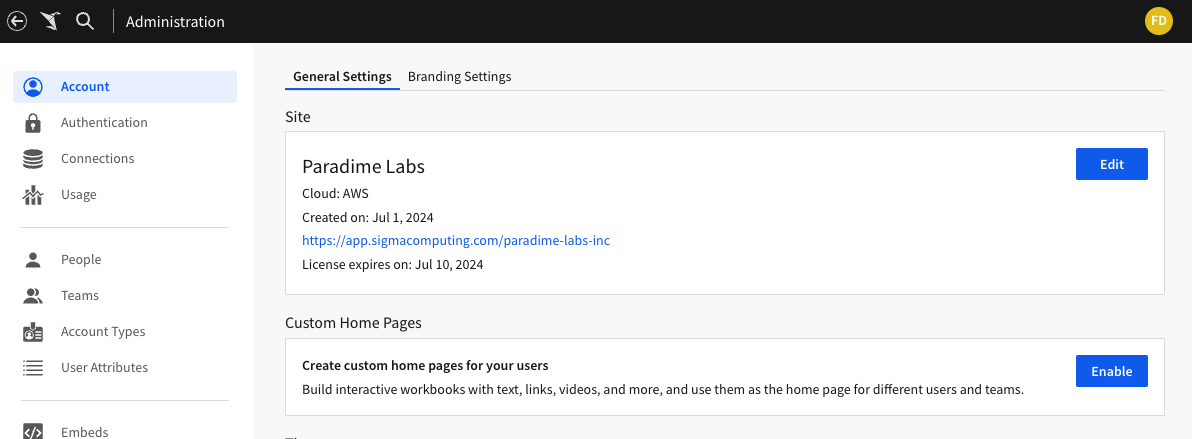
Step 2: Create an API token and client ID
To create an API token and client ID:- Login to your Sigma account.
- In the top right of the screen, click your profile avatar and then click Administration.
- In the left panel, navigate to Developer Access.
- In the top right of the Developer Access page, click the Create New button.
- In the Create client credentials dialog,
- Select privileges: click the Rest API checkbox
- Name: enter a meaningful name like
Paradime API credentials - Owner: select the user you would like to associate with the token
- Click Create to finish creating the API token.
- Once prompted, copy and paste your Client ID and API key secret in a secure location.
Verify necessary permissions
Ensure that the owner associated with the API token has the following permissions:
Can Viewpermission for all the Sigma workbooks and datasets you want to crawl.Can Usepermission for all the Sigma connections used in the workbooks and datasets.
Catalog & Lineage
Bring Sigma assets into Paradime’s data catalog and column-level lineage, so you can trace dbt™ models through to the workbooks built on them. The Sigma integration is set up by the Admin user for your organization profile. In Paradime, go to Settings → Integrations (see connecting integrations), find Sigma, and click Connect.Step 3: Connection parameters
Click on Test Connection to validate that Paradime can connect to your Sigma account.