Connect your managed Airbyte Cloud workspace to Paradime using OAuth client credentials so you can orchestrate ELT syncs alongside your dbt runs.
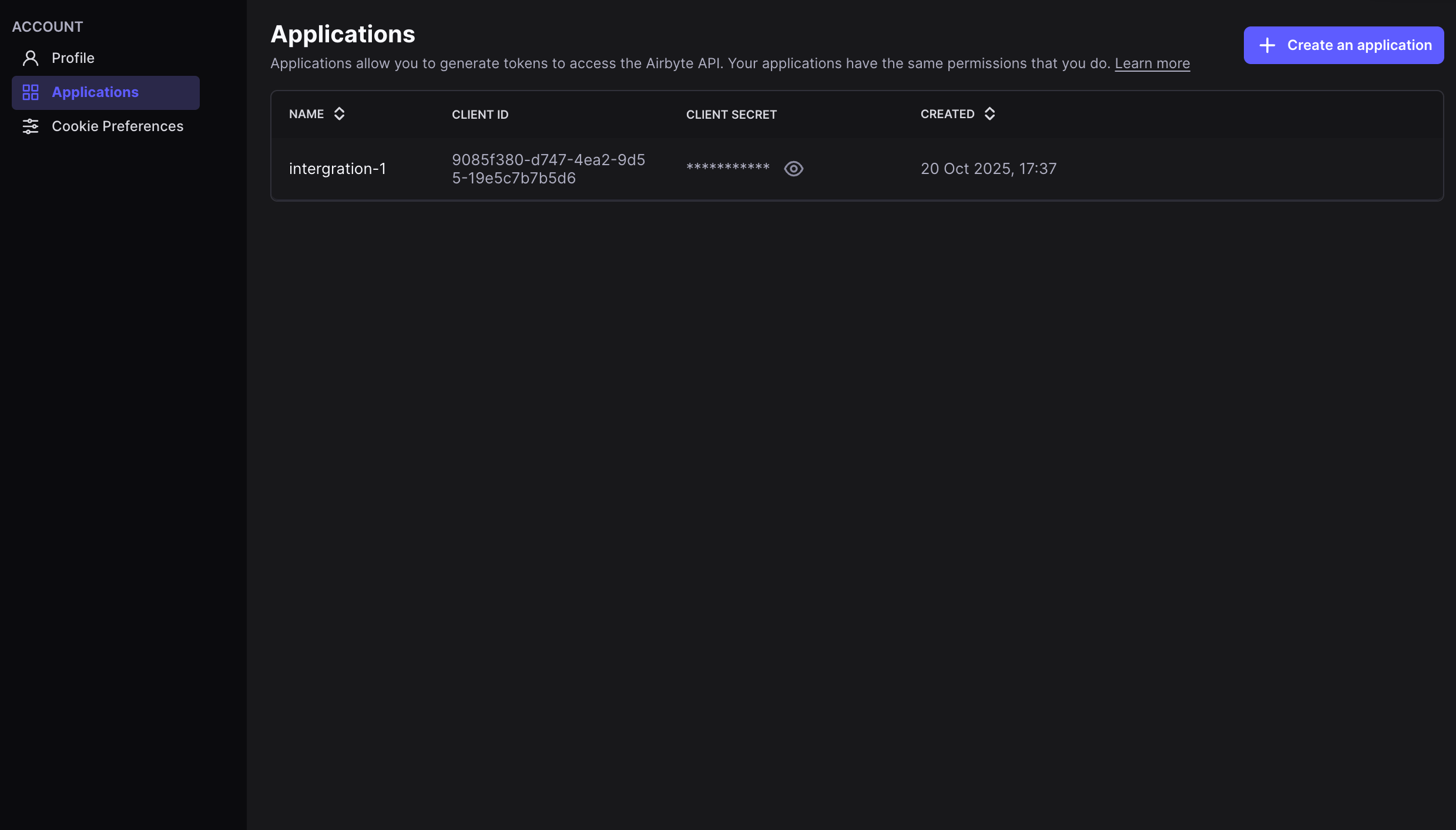
Connect your managed Airbyte Cloud workspace to Paradime. Once connected, Airbyte sources and connections appear in the catalog and you can trigger syncs from Bolt.
The client secret from your Airbyte Cloud application
{"docsConfig":{"theme":"mint","$schema":"https://mintlify.com/docs.json","name":"Paradime","colors":{"primary":"#726AE3","light":"#9291F4","dark":"#5943D6"},"logo":{"light":"https://mintcdn.com/paradime-docs/C-R77mCdstNPsNTv/logo/paradime-logo-light-mode.svg?fit=max\u0026auto=format\u0026n=C-R77mCdstNPsNTv\u0026q=85\u0026s=7a32141c8f01f795c35f0c3c48b2f26a","dark":"https://mintcdn.com/paradime-docs/C-R77mCdstNPsNTv/logo/paradime-logo-dark-mode.svg?fit=max\u0026auto=format\u0026n=C-R77mCdstNPsNTv\u0026q=85\u0026s=e8b1dae8a943bf2a7c4d0088d7cc107b"},"favicon":"https://mintcdn.com/paradime-docs/F1X35JoCsYMKtOFi/favicon.svg?fit=max\u0026auto=format\u0026n=F1X35JoCsYMKtOFi\u0026q=85\u0026s=4ba032ce7ca6b66ccd44805e1e22567a","appearance":{"default":"system"},"background":{"decoration":"gradient"},"navbar":{"links":[{"href":"mailto:support@paradime.io","label":"Support"}],"primary":{"type":"button","label":"Launch Paradime","href":"https://app.paradime.io"}},"footer":{"socials":{"x":"https://x.com/paradimelabs","github":"https://github.com/paradime-io","linkedin":"https://www.linkedin.com/company/paradimelabs"},"links":[{"header":"Resources","items":[{"label":"Paradime Blog","href":"https://www.paradime.io/blog"},{"label":"SQL Resources Hub","href":"https://www.paradime.io/sql"},{"label":"Community","href":"https://paradimers.slack.com/join/shared_invite/zt-1mzax4sb8-jgw~hXRlDHAx~KN0az18bw"}]}]},"fonts":{"family":"Geist"},"icons":{"library":"lucide"},"styling":{"eyebrows":"breadcrumbs","codeblocks":"system","latex":true},"contextual":{"options":["copy","view","chatgpt","claude","perplexity","mcp","cursor","vscode"],"display":"header"},"thumbnails":{"appearance":"light"},"markdown":{"schema":true},"navigation":{"pages":[]}},"deployment":{"deploymentMetadataValue":{"subdomain":"paradime-docs","hasAudioNarration":false,"actualSubdomain":"paradime-docs","customDomains":["docs.paradime.io"],"gitSource":{"type":"github","owner":"paradime-io","repo":"paradime-docs-mintlify","deployBranch":"main","contentDirectory":"paradime-docs","isPrivate":true,"mountPath":"","label":""},"chroma":{"liveDeploymentHistoryId":"6ae9aad85ef2c10d596e22d0","collectionId":"0ae7ba9e-9bdb-49b2-acf1-c49a95f71a3e","schemaVersion":"v3","latestBuiltDeploymentHistoryId":"6ae9aad85ef2c10d596e22d0"},"entitlements":{"AI_CHAT":{"status":"ENABLED"},"WEB_MCP":{"status":"ENABLED"},"NARRATION":{"status":"ENABLED"}},"buildId":"6aedf586aaaef32f9954dbde","clientVersion":"0.0.4074","searchFilterCounts":[{"language":"default","tag":"Products","count":286},{"language":"default","tag":"Guides","count":182},{"language":"default","tag":"Integrations","count":163},{"language":"default","tag":"Changelog","count":101},{"language":"default","tag":"DinoAI","count":88},{"language":"default","tag":"Bolt","count":83},{"language":"default","tag":"Developers","count":57},{"language":"default","tag":"Orchestrate data pipelines","count":45},{"language":"default","tag":"Schedule Anatomy","count":45},{"language":"default","tag":"Administration","count":44}]},"assistantConfig":{"enableAskAiButton":false,"enableStarterQuestions":false,"enableContextualStarterQuestions":false,"enableAskAiSearchBar":true},"basePath":"","hasChatPermissions":true,"hasWebMcpPermissions":true,"toggles":[{"name":"kill-isr","enabled":true,"variant":{"name":"disabled","enabled":false,"feature_enabled":true},"impressionData":false},{"name":"agent-mintlify-slack","enabled":true,"variant":{"name":"disabled","enabled":false,"feature_enabled":true},"impressionData":false},{"name":"agent-integrations-settings","enabled":true,"variant":{"name":"disabled","enabled":false,"feature_enabled":true},"impressionData":false},{"name":"rbac-expansion","enabled":true,"variant":{"name":"disabled","enabled":false,"feature_enabled":true},"impressionData":false},{"name":"automations-pr-grouping","enabled":true,"variant":{"name":"disabled","enabled":false,"feature_enabled":true},"impressionData":false},{"name":"custom-prefix","enabled":true,"variant":{"name":"disabled","enabled":false,"feature_enabled":true},"impressionData":false},{"name":"analytics-v7","enabled":true,"variant":{"name":"disabled","enabled":false,"feature_enabled":true},"impressionData":false},{"name":"user-flows-analytics","enabled":true,"variant":{"name":"disabled","enabled":false,"feature_enabled":true},"impressionData":false},{"name":"no-publish-flow","enabled":true,"variant":{"name":"disabled","enabled":false,"feature_enabled":true},"impressionData":false},{"name":"workos-onboarding","enabled":true,"variant":{"name":"disabled","enabled":false,"feature_enabled":true},"impressionData":false},{"name":"llms-txt-v2","enabled":true,"variant":{"name":"disabled","enabled":false,"feature_enabled":true},"impressionData":false},{"name":"snapshot-serving-live","enabled":true,"variant":{"name":"disabled","enabled":false,"feature_enabled":true},"impressionData":false},{"name":"stripTemperatureMiddleware","enabled":true,"variant":{"name":"disabled","enabled":false,"feature_enabled":true},"impressionData":false},{"name":"support-platform-pylon-zendesk","enabled":true,"variant":{"name":"disabled","enabled":false,"feature_enabled":true},"impressionData":false},{"name":"snapshot-serving","enabled":true,"variant":{"name":"disabled","enabled":false,"feature_enabled":true},"impressionData":false},{"name":"instant-rollback","enabled":true,"variant":{"name":"disabled","enabled":false,"feature_enabled":true},"impressionData":false},{"name":"granular-notifications-server","enabled":true,"variant":{"name":"disabled","enabled":false,"feature_enabled":true},"impressionData":false},{"name":"granular-notifications","enabled":true,"variant":{"name":"disabled","enabled":false,"feature_enabled":true},"impressionData":false},{"name":"automations-fable","enabled":true,"variant":{"name":"disabled","enabled":false,"feature_enabled":true},"impressionData":false},{"name":"fixed-ai-action-pricing","enabled":true,"variant":{"name":"disabled","enabled":false,"feature_enabled":true},"impressionData":false},{"name":"automation-resolve-merge-conflict","enabled":true,"variant":{"name":"disabled","enabled":false,"feature_enabled":true},"impressionData":false},{"name":"scoped-publishing","enabled":true,"variant":{"name":"disabled","enabled":false,"feature_enabled":true},"impressionData":false},{"name":"mintql","enabled":true,"variant":{"name":"disabled","enabled":false,"feature_enabled":true},"impressionData":false},{"name":"page-level-analytics","enabled":true,"variant":{"name":"disabled","enabled":false,"feature_enabled":true},"impressionData":false},{"name":"editor-version-history-v2","enabled":true,"variant":{"name":"disabled","enabled":false,"feature_enabled":true},"impressionData":false},{"name":"billing-page-v2","enabled":true,"variant":{"name":"disabled","enabled":false,"feature_enabled":true},"impressionData":false},{"name":"full-page-search","enabled":true,"variant":{"name":"disabled","enabled":false,"feature_enabled":true},"impressionData":false},{"name":"workspace-projects","enabled":true,"variant":{"name":"disabled","enabled":false,"feature_enabled":true},"impressionData":false},{"name":"assistant-v5","enabled":true,"variant":{"name":"disabled","enabled":false,"feature_enabled":true},"impressionData":false},{"name":"fork-pr-previews","enabled":true,"variant":{"name":"disabled","enabled":false,"feature_enabled":true},"impressionData":false},{"name":"revalidation-jwt","enabled":true,"variant":{"name":"disabled","enabled":false,"feature_enabled":true},"impressionData":false},{"name":"vite-origin","enabled":true,"variant":{"name":"disabled","enabled":false,"feature_enabled":true},"impressionData":false},{"name":"workos-sso-scim","enabled":true,"variant":{"name":"disabled","enabled":false,"feature_enabled":true},"impressionData":false},{"name":"hobby-abuse-scan","enabled":true,"variant":{"name":"disabled","enabled":false,"feature_enabled":true},"impressionData":false},{"name":"dashboard-inbox","enabled":true,"variant":{"name":"disabled","enabled":false,"feature_enabled":true},"impressionData":false},{"name":"workos-signup","enabled":true,"variant":{"name":"disabled","enabled":false,"feature_enabled":true},"impressionData":false},{"name":"turbopuffer-dual-write","enabled":true,"variant":{"name":"disabled","enabled":false,"feature_enabled":true},"impressionData":false},{"name":"workos-enabled","enabled":true,"variant":{"name":"disabled","enabled":false,"feature_enabled":true},"impressionData":false},{"name":"approve-review-flow","enabled":true,"variant":{"name":"disabled","enabled":false,"feature_enabled":true},"impressionData":false},{"name":"sso-setup-deadline-banner","enabled":true,"variant":{"name":"disabled","enabled":false,"feature_enabled":true},"impressionData":false},{"name":"turbopuffer-serve","enabled":true,"variant":{"name":"disabled","enabled":false,"feature_enabled":true},"impressionData":false},{"name":"live-agents","enabled":true,"variant":{"name":"disabled","enabled":false,"feature_enabled":true},"impressionData":false},{"name":"comment-mode","enabled":true,"variant":{"name":"disabled","enabled":false,"feature_enabled":true},"impressionData":false}],"googleFontsInlined":true},"customCss":[{"filePath":"custom.css","content":"#navigation-items>ul.sidebar-group~ul.sidebar-group{margin-top:0}#navigation-items a .rounded-md[style*=\"background\"] svg{background:white!important}div[class*=\"w-[160px]\"] .flex.flex-wrap>span.inline-block.rounded-lg.font-medium{padding:2px 8px;background-color:rgba(114, 106, 227, 0.12);color:#5943D6}#content-area h1,#content-area h2,#content-area h3,#content-area h4{letter-spacing:-0.03em}#content-area #page-title{font-size:2.25rem;line-height:1.1}.nav-logo{height:22px}#background-color::after{content:\"\";position:absolute;inset:0;pointer-events:none;background-image:linear-gradient(to right, rgba(114, 106, 227, 0.13) 1px, transparent 1px),\n linear-gradient(to bottom, rgba(114, 106, 227, 0.13) 1px, transparent 1px);background-size:44px 44px;-webkit-mask-image:radial-gradient(700px circle at 100% 0%, black 12%, transparent 68%),\n radial-gradient(700px circle at 0% 0%, black 12%, transparent 68%);-webkit-mask-composite:source-over;mask-image:radial-gradient(700px circle at 100% 0%, black 12%, transparent 68%),\n radial-gradient(700px circle at 0% 0%, black 12%, transparent 68%);mask-composite:add}#sidebar .sidebar-group-header{color:rgb(113, 113, 122)}#sidebar div:has(>.sidebar-group-header)~div:has(>.sidebar-group-header){border-top:1px solid rgba(128, 128, 140, 0.18);padding-top:1.25rem}img[src*=\"dino-ai\"]{background:transparent!important;filter:brightness(0) invert(0.64)}a[aria-current=\"location\"] img[src*=\"dino-ai\"],a.group:hover img[src*=\"dino-ai\"]{filter:brightness(0) invert(1)}img.sidebar-group-icon[src*=\"slack\"]{filter:brightness(0) invert(0.44)}"}],"page":{"pagePath":"integrations/airbyte/airbyte-cloud","slug":"/integrations/airbyte/airbyte-cloud","pageMetadata":{"title":"Airbyte Cloud","sidebarTitle":"Airbyte Cloud","description":"Connect your managed Airbyte Cloud workspace to Paradime using OAuth client credentials so you can orchestrate ELT syncs alongside your dbt runs.","href":"/integrations/airbyte/airbyte-cloud"},"description":{"compiledSource":"\"use strict\";\nconst {jsx: _jsx} = arguments[0];\nconst {useMDXComponents: _provideComponents} = arguments[0];\nfunction _createMdxContent(props) {\n const _components = {\n p: \"p\",\n ..._provideComponents(),\n ...props.components\n };\n return _jsx(_components.p, {\n children: \"Connect your managed Airbyte Cloud workspace to Paradime using OAuth client credentials so you can orchestrate ELT syncs alongside your dbt runs.\"\n });\n}\nfunction MDXContent(props = {}) {\n const {wrapper: MDXLayout} = {\n ..._provideComponents(),\n ...props.components\n };\n return MDXLayout ? _jsx(MDXLayout, {\n ...props,\n children: _jsx(_createMdxContent, {\n ...props\n })\n }) : _createMdxContent(props);\n}\nreturn {\n default: MDXContent\n};\n","frontmatter":{},"scope":{}},"pageType":"default","mdx":{"mdxSource":{"compiledSource":"\"use strict\";const{Fragment:_Fragment,jsx:_jsx,jsxs:_jsxs}=arguments[0];const{useMDXComponents:_provideComponents}=arguments[0];function _createMdxContent(props){const _components={a:`a`,code:`code`,li:`li`,ol:`ol`,p:`p`,strong:`strong`,tbody:`tbody`,td:`td`,th:`th`,thead:`thead`,tr:`tr`,ul:`ul`,..._provideComponents(),...props.components},{Frame,Heading,OptimizedImage,Table,Warning}=_components;if(!Frame)_missingMdxReference(`Frame`,true);if(!Heading)_missingMdxReference(`Heading`,true);if(!OptimizedImage)_missingMdxReference(`OptimizedImage`,true);if(!Table)_missingMdxReference(`Table`,true);if(!Warning)_missingMdxReference(`Warning`,true);return _jsxs(_Fragment,{children:[_jsxs(_components.p,{children:[`Connect your managed Airbyte Cloud workspace to Paradime. Once connected, Airbyte sources and connections appear in the `,_jsx(_components.a,{href:`/products/data-catalog/asset-details/airbyte`,children:`catalog`}),` and you can `,_jsx(_components.a,{href:`/products/bolt/creating-schedules/command-settings/airbyte-connector-sync`,children:`trigger syncs from Bolt`}),`.`]}),`\n`,_jsx(Heading,{level:`2`,id:`prerequisites`,children:`Prerequisites`}),`\n`,_jsxs(_components.ul,{children:[`\n`,_jsx(_components.li,{children:`An active Airbyte Cloud workspace.`}),`\n`,_jsx(_components.li,{children:`Account Administrator or workspace owner permissions in Airbyte.`}),`\n`]}),`\n`,_jsx(Heading,{level:`2`,id:`step-1-generate-api-credentials`,children:`Step 1: Generate API credentials`}),`\n`,_jsx(_components.p,{children:`Airbyte Cloud lets you create multiple applications, each with its own client ID and secret.`}),`\n`,_jsxs(_components.ol,{children:[`\n`,_jsx(_components.li,{children:`Log in to your Airbyte Cloud workspace as a user with the Account Administrator or workspace owner role.`}),`\n`,_jsxs(_components.li,{children:[`Navigate to `,_jsx(_components.strong,{children:`Settings`}),` by clicking the gear icon in the bottom left corner.`]}),`\n`,_jsxs(_components.li,{children:[`Select the `,_jsx(_components.strong,{children:`Applications`}),` tab.`]}),`\n`,_jsxs(_components.li,{children:[`Click `,_jsx(_components.strong,{children:`Create New Application`}),`.`]}),`\n`,_jsxs(_components.li,{children:[`Enter a name (e.g. `,_jsx(_components.code,{children:`Paradime Integration`}),`) and click `,_jsx(_components.strong,{children:`Create`}),`.`]}),`\n`,_jsxs(_components.li,{children:[`Copy the `,_jsx(_components.strong,{children:`Client ID`}),` and `,_jsx(_components.strong,{children:`Client Secret`}),`.`]}),`\n`]}),`\n`,_jsx(Warning,{children:_jsx(_components.p,{children:`The Client Secret is only displayed once. Copy and store it securely before closing the dialog.`})}),`\n`,_jsx(Frame,{children:_jsx(OptimizedImage,{src:`https://mintcdn.com/paradime-docs/vrtvqFryCVgm3kAH/images/image-3-1-1-1.png?fit=max\u0026auto=format\u0026n=vrtvqFryCVgm3kAH\u0026q=85\u0026s=69a324bd94efa4013150eb0bdf765ac3`,alt:`Creating an Airbyte Cloud application`,\"data-og-width\":`2478`,width:`2478`,\"data-og-height\":`1412`,height:`1412`,\"data-path\":`images/image-3-1-1-1.png`,\"data-optimize\":`true`,\"data-opv\":`3`,srcset:`https://mintcdn.com/paradime-docs/vrtvqFryCVgm3kAH/images/image-3-1-1-1.png?w=280\u0026fit=max\u0026auto=format\u0026n=vrtvqFryCVgm3kAH\u0026q=85\u0026s=4950d4a8716ce119e7319497e46a3b1e 280w, https://mintcdn.com/paradime-docs/vrtvqFryCVgm3kAH/images/image-3-1-1-1.png?w=560\u0026fit=max\u0026auto=format\u0026n=vrtvqFryCVgm3kAH\u0026q=85\u0026s=d95974785bf03cd7c295c7ca7b1a20c6 560w, https://mintcdn.com/paradime-docs/vrtvqFryCVgm3kAH/images/image-3-1-1-1.png?w=840\u0026fit=max\u0026auto=format\u0026n=vrtvqFryCVgm3kAH\u0026q=85\u0026s=5059310f297827f7a40705a496ffec62 840w, https://mintcdn.com/paradime-docs/vrtvqFryCVgm3kAH/images/image-3-1-1-1.png?w=1100\u0026fit=max\u0026auto=format\u0026n=vrtvqFryCVgm3kAH\u0026q=85\u0026s=57c81ff391c8672ba07c615e77976558 1100w, https://mintcdn.com/paradime-docs/vrtvqFryCVgm3kAH/images/image-3-1-1-1.png?w=1650\u0026fit=max\u0026auto=format\u0026n=vrtvqFryCVgm3kAH\u0026q=85\u0026s=5f7fb57736ad68ef7b7d6cfdbbe4b9a0 1650w, https://mintcdn.com/paradime-docs/vrtvqFryCVgm3kAH/images/image-3-1-1-1.png?w=2500\u0026fit=max\u0026auto=format\u0026n=vrtvqFryCVgm3kAH\u0026q=85\u0026s=7532fcc8970e91ed81959404abdba607 2500w`})}),`\n`,_jsx(Heading,{level:`2`,id:`step-2-connect-in-paradime`,children:`Step 2: Connect in Paradime`}),`\n`,_jsxs(_components.p,{children:[`A Paradime Admin sets the credentials as `,_jsx(_components.a,{href:`/products/settings/environment-variables/bolt-schedule-env-variables`,children:`environment variables`}),` before connecting.`]}),`\n`,_jsxs(_components.ol,{children:[`\n`,_jsxs(_components.li,{children:[`In Paradime, go to `,_jsx(_components.strong,{children:`Workspace Settings → Environment Variables`}),`.`]}),`\n`,_jsxs(_components.li,{children:[`Add these two variables:`,`\n`,_jsxs(_components.ul,{children:[`\n`,_jsxs(_components.li,{children:[_jsx(_components.code,{children:`AIRBYTE_CLIENT_ID`}),`: your Airbyte Cloud Client ID`]}),`\n`,_jsxs(_components.li,{children:[_jsx(_components.code,{children:`AIRBYTE_CLIENT_SECRET`}),`: your Airbyte Cloud Client Secret`]}),`\n`]}),`\n`]}),`\n`,_jsxs(_components.li,{children:[`Click `,_jsx(_components.strong,{children:`Save`}),`.`]}),`\n`]}),`\n`,_jsx(Heading,{level:`2`,id:`connection-parameters`,children:`Connection parameters`}),`\n`,_jsxs(Table,{children:[_jsx(_components.thead,{children:_jsxs(_components.tr,{children:[_jsx(_components.th,{children:`Environment variable`}),_jsx(_components.th,{children:`Required`}),_jsx(_components.th,{children:`Description`})]})}),_jsxs(_components.tbody,{children:[_jsxs(_components.tr,{children:[_jsx(_components.td,{children:_jsx(_components.code,{children:`AIRBYTE_CLIENT_ID`})}),_jsx(_components.td,{children:`✅`}),_jsx(_components.td,{children:`The client ID from your Airbyte Cloud application`})]}),_jsxs(_components.tr,{children:[_jsx(_components.td,{children:_jsx(_components.code,{children:`AIRBYTE_CLIENT_SECRET`})}),_jsx(_components.td,{children:`✅`}),_jsx(_components.td,{children:`The client secret from your Airbyte Cloud application`})]})]})]})]})}function MDXContent(props={}){const{wrapper:MDXLayout}={..._provideComponents(),...props.components};return MDXLayout?_jsx(MDXLayout,{...props,children:_jsx(_createMdxContent,{...props})}):_createMdxContent(props)}return{default:MDXContent};function _missingMdxReference(id,component){throw new Error(`Expected `+(component?`component`:`object`)+\" `\"+id+\"` to be defined: you likely forgot to import, pass, or provide it.\")}","frontmatter":{},"scope":{"codeStyling":"system","config":{},"pageMetadata":{"title":"Airbyte Cloud","sidebarTitle":"Airbyte Cloud","description":"Connect your managed Airbyte Cloud workspace to Paradime using OAuth client credentials so you can orchestrate ELT syncs alongside your dbt runs.","href":"/integrations/airbyte/airbyte-cloud"}}},"mdxSourceWithNoJs":null},"mdxExtracts":{"tableOfContents":[{"title":"Prerequisites","slug":"prerequisites","depth":2,"children":[]},{"title":"Step 1: Generate API credentials","slug":"step-1-generate-api-credentials","depth":2,"children":[]},{"title":"Step 2: Connect in Paradime","slug":"step-2-connect-in-paradime","depth":2,"children":[]},{"title":"Connection parameters","slug":"connection-parameters","depth":2,"children":[]}],"codeExamples":{}},"jsLinks":["/_mintlify/custom/paradime-docs/d89c3c6c95bfc95f/snitcher.js"],"subdomain":"paradime-docs","siteName":"Paradime","title":"Airbyte Cloud - Paradime","relatedPagesConfig":{"enabled":true,"limit":5,"mode":"automatic"},"navMaps":{"firstHrefInVersion":{},"firstHrefInLanguage":{}},"lastModified":"2026-08-03T03:59:56.269Z","originalFileLocation":"integrations/airbyte/airbyte-cloud.mdx"},"headHtml":"\u003cscript data-mint-head>(function(){var d=document.documentElement,p=null;if(!p){try{p=localStorage.getItem(\"isDarkMode\")}catch(e){}if(p==='true')p='dark';else if(p==='false')p='light';if(p!=='light'\u0026\u0026p!=='dark'\u0026\u0026p!=='system')p=\"system\"}var r=p==='system'?(matchMedia(\"(prefers-color-scheme: dark)\").matches?'dark':'light'):p;d.classList.remove(r==='dark'?'light':'dark');d.classList.add(r);d.setAttribute(\"data-theme-preference\",p)})();\u003c/script>\u003cmeta data-mint-head name=\"description\" content=\"Connect your managed Airbyte Cloud workspace to Paradime using OAuth client credentials so you can orchestrate ELT syncs alongside your dbt runs.\">\u003cmeta data-mint-head name=\"application-name\" content=\"Paradime\">\u003cmeta data-mint-head name=\"generator\" content=\"Mintlify\">\u003clink data-mint-head rel=\"icon\" type=\"image/png\" sizes=\"192x192\" href=\"/mintlify-assets/_mintlify/favicons/paradime-docs/M6Wm7PyWfTcwC_Oc/_generated/favicon/android-chrome-192x192.png\" media=\"(prefers-color-scheme: light)\">\u003clink data-mint-head rel=\"apple-touch-icon\" type=\"image/png\" sizes=\"180x180\" href=\"/mintlify-assets/_mintlify/favicons/paradime-docs/M6Wm7PyWfTcwC_Oc/_generated/favicon/apple-touch-icon.png\">\u003clink data-mint-head rel=\"icon\" type=\"image/png\" sizes=\"16x16\" href=\"/mintlify-assets/_mintlify/favicons/paradime-docs/M6Wm7PyWfTcwC_Oc/_generated/favicon/favicon-16x16.png\" media=\"(prefers-color-scheme: light)\">\u003clink data-mint-head rel=\"icon\" type=\"image/png\" sizes=\"32x32\" href=\"/mintlify-assets/_mintlify/favicons/paradime-docs/M6Wm7PyWfTcwC_Oc/_generated/favicon/favicon-32x32.png\" media=\"(prefers-color-scheme: light)\">\u003clink data-mint-head rel=\"shortcut icon\" type=\"image/x-icon\" href=\"/mintlify-assets/_mintlify/favicons/paradime-docs/M6Wm7PyWfTcwC_Oc/_generated/favicon/favicon.ico\" media=\"(prefers-color-scheme: light)\">\u003clink data-mint-head rel=\"icon\" type=\"image/png\" sizes=\"192x192\" href=\"/mintlify-assets/_mintlify/favicons/paradime-docs/M6Wm7PyWfTcwC_Oc/_generated/favicon-dark/android-chrome-192x192.png\" media=\"(prefers-color-scheme: dark)\">\u003clink data-mint-head rel=\"icon\" type=\"image/png\" sizes=\"16x16\" href=\"/mintlify-assets/_mintlify/favicons/paradime-docs/M6Wm7PyWfTcwC_Oc/_generated/favicon-dark/favicon-16x16.png\" media=\"(prefers-color-scheme: dark)\">\u003clink data-mint-head rel=\"icon\" type=\"image/png\" sizes=\"32x32\" href=\"/mintlify-assets/_mintlify/favicons/paradime-docs/M6Wm7PyWfTcwC_Oc/_generated/favicon-dark/favicon-32x32.png\" media=\"(prefers-color-scheme: dark)\">\u003clink data-mint-head rel=\"shortcut icon\" type=\"image/x-icon\" href=\"/mintlify-assets/_mintlify/favicons/paradime-docs/M6Wm7PyWfTcwC_Oc/_generated/favicon-dark/favicon.ico\" media=\"(prefers-color-scheme: dark)\">\u003cmeta data-mint-head property=\"og:title\" content=\"Airbyte Cloud - Paradime\">\u003cmeta data-mint-head property=\"og:description\" content=\"Connect your managed Airbyte Cloud workspace to Paradime using OAuth client credentials so you can orchestrate ELT syncs alongside your dbt runs.\">\u003cmeta data-mint-head property=\"og:site_name\" content=\"Paradime\">\u003cmeta data-mint-head property=\"og:url\" content=\"https://docs.paradime.io/integrations/airbyte/airbyte-cloud\">\u003cmeta data-mint-head property=\"og:type\" content=\"website\">\u003cmeta data-mint-head property=\"og:image\" content=\"https://paradime-docs.mintlify.site/_mintlify/api/og/v2?division=Airbyte\u0026amp;title=Airbyte+Cloud\u0026amp;description=Connect+your+managed+Airbyte+Cloud+workspace+to+Paradime+using+OAuth+client+credentials+so+you+can+orchestrate+ELT+syncs+alongside+your+dbt+runs.\u0026amp;theme=5da792a529ae15a65836c568\u0026amp;signature=df59f25bb5aca624c348484a58222a4bd98891580ba3b602f35b1570dbc2d213\">\u003cmeta data-mint-head property=\"og:image:width\" content=\"1200\">\u003cmeta data-mint-head property=\"og:image:height\" content=\"630\">\u003cmeta data-mint-head name=\"twitter:card\" content=\"summary_large_image\">\u003cmeta data-mint-head name=\"twitter:title\" content=\"Airbyte Cloud - Paradime\">\u003cmeta data-mint-head name=\"twitter:description\" content=\"Connect your managed Airbyte Cloud workspace to Paradime using OAuth client credentials so you can orchestrate ELT syncs alongside your dbt runs.\">\u003cmeta data-mint-head name=\"twitter:image\" content=\"https://paradime-docs.mintlify.site/_mintlify/api/og/v2?division=Airbyte\u0026amp;title=Airbyte+Cloud\u0026amp;description=Connect+your+managed+Airbyte+Cloud+workspace+to+Paradime+using+OAuth+client+credentials+so+you+can+orchestrate+ELT+syncs+alongside+your+dbt+runs.\u0026amp;theme=5da792a529ae15a65836c568\u0026amp;signature=df59f25bb5aca624c348484a58222a4bd98891580ba3b602f35b1570dbc2d213\">\u003cmeta data-mint-head name=\"twitter:image:width\" content=\"1200\">\u003cmeta data-mint-head name=\"twitter:image:height\" content=\"630\">\u003cmeta data-mint-head name=\"msapplication-config\" content=\"/mintlify-assets/_mintlify/favicons/paradime-docs/M6Wm7PyWfTcwC_Oc/_generated/favicon/browserconfig.xml\">\u003cmeta data-mint-head name=\"apple-mobile-web-app-title\" content=\"Paradime\">\u003cmeta data-mint-head name=\"msapplication-TileColor\" content=\"#726AE3\">\u003clink data-mint-head rel=\"canonical\" href=\"https://docs.paradime.io/integrations/airbyte/airbyte-cloud\">\u003clink data-mint-head rel=\"alternate\" type=\"application/xml\" href=\"/sitemap.xml\">\u003clink data-mint-head rel=\"alternate\" type=\"text/markdown\" href=\"/integrations/airbyte/airbyte-cloud.md\">\u003cscript data-mint-head type=\"application/ld+json\">{\"@context\":\"https://schema.org\",\"@graph\":[{\"@type\":\"Organization\",\"@id\":\"https://docs.paradime.io/#organization\",\"name\":\"Paradime\",\"url\":\"https://docs.paradime.io\",\"logo\":{\"@type\":\"ImageObject\",\"url\":\"https://mintcdn.com/paradime-docs/C-R77mCdstNPsNTv/logo/paradime-logo-light-mode.svg?fit=max\u0026auto=format\u0026n=C-R77mCdstNPsNTv\u0026q=85\u0026s=7a32141c8f01f795c35f0c3c48b2f26a\"}},{\"@type\":\"WebSite\",\"@id\":\"https://docs.paradime.io#website\",\"name\":\"Paradime\",\"url\":\"https://docs.paradime.io\",\"publisher\":{\"@id\":\"https://docs.paradime.io/#organization\"}},{\"@type\":\"WebPage\",\"@id\":\"https://docs.paradime.io/integrations/airbyte/airbyte-cloud#webpage\",\"url\":\"https://docs.paradime.io/integrations/airbyte/airbyte-cloud\",\"name\":\"Airbyte Cloud\",\"description\":\"Connect your managed Airbyte Cloud workspace to Paradime using OAuth client credentials so you can orchestrate ELT syncs alongside your dbt runs.\",\"dateModified\":\"2026-08-03T03:59:56.269Z\",\"isPartOf\":{\"@id\":\"https://docs.paradime.io#website\"},\"breadcrumb\":{\"@id\":\"https://docs.paradime.io/integrations/airbyte/airbyte-cloud#breadcrumb\"}},{\"@type\":\"BreadcrumbList\",\"@id\":\"https://docs.paradime.io/integrations/airbyte/airbyte-cloud#breadcrumb\",\"itemListElement\":[{\"@type\":\"ListItem\",\"position\":1,\"name\":\"Airbyte\",\"item\":\"https://docs.paradime.io/integrations/airbyte/index\"},{\"@type\":\"ListItem\",\"position\":2,\"name\":\"Airbyte Cloud\",\"item\":\"https://docs.paradime.io/integrations/airbyte/airbyte-cloud\"}]},{\"@type\":[\"Article\",\"TechArticle\"],\"@id\":\"https://docs.paradime.io/integrations/airbyte/airbyte-cloud#article\",\"headline\":\"Airbyte Cloud\",\"name\":\"Airbyte Cloud\",\"description\":\"Connect your managed Airbyte Cloud workspace to Paradime using OAuth client credentials so you can orchestrate ELT syncs alongside your dbt runs.\",\"url\":\"https://docs.paradime.io/integrations/airbyte/airbyte-cloud\",\"mainEntityOfPage\":{\"@id\":\"https://docs.paradime.io/integrations/airbyte/airbyte-cloud#webpage\"},\"dateModified\":\"2026-08-03T03:59:56.269Z\",\"publisher\":{\"@id\":\"https://docs.paradime.io/#organization\"},\"isPartOf\":{\"@id\":\"https://docs.paradime.io#website\"}}]}\u003c/script>\u003cscript data-mint-head type=\"application/ld+json\">{\"@context\":\"https://schema.org\",\"@type\":\"WebSite\",\"name\":\"Paradime\",\"creator\":{\"@type\":\"Organization\",\"name\":\"Mintlify\",\"url\":\"https://mintlify.com\"}}\u003c/script>","siteName":"Paradime","nav":{"global":null,"tabs":[{"tab":"Start here","pages":[{"title":"Start here","href":""}]},{"tab":"Guides","pages":[{"title":"Guides","href":"/guides/foundations"}]},{"tab":"Products","pages":[{"title":"Products","href":"/products/dino-ai"}]},{"tab":"Integrations","pages":[{"title":"Integrations","sidebarTitle":"Overview","href":"/integrations"},{"title":"Connecting integrations","sidebarTitle":"Connecting integrations","href":"/integrations/connecting-integrations"},{"group":"Airbyte","root":{"title":"Airbyte","description":"Connect Airbyte Cloud or Airbyte Server to Paradime to bring Airbyte sources and connections into the catalog, and trigger Airbyte syncs from Bolt or the CLI.","href":"/integrations/airbyte/index"},"pages":[{"title":"Airbyte Cloud","sidebarTitle":"Airbyte Cloud","href":"/integrations/airbyte/airbyte-cloud"},{"title":"Airbyte Server","sidebarTitle":"Airbyte Server","description":"Connect your self-hosted Airbyte Server to Paradime using its API and client credentials so you can trigger EL syncs from Bolt schedules or the CLI.","href":"/integrations/airbyte/airbyte-server"}]},{"title":"Airflow","href":"/integrations/airflow"},{"title":"Altimate AI","href":"/integrations/altimate"},{"title":"Amazon Athena","href":"/integrations/amazon-athena"},{"title":"Amazon S3","href":"/integrations/amazon-s3"},{"title":"AWS ECS","href":"/integrations/aws-ecs"},{"title":"AWS Glue","href":"/integrations/aws-glue"},{"title":"AWS Lambda","href":"/integrations/aws-lambda"},{"group":"AWS PrivateLink","root":{"title":"AWS PrivateLink","sidebarTitle":"Overview","href":"/integrations/aws-privatelink/index"},"pages":[{"title":"Snowflake PrivateLink","href":"/integrations/aws-privatelink/snowflake-privatelink"},{"title":"Redshift PrivateLink","href":"/integrations/aws-privatelink/redshift-privatelink"}]},{"title":"AWS SageMaker","href":"/integrations/aws-sagemaker"},{"title":"AWS Secret Manager","href":"/integrations/aws-secret-manager"},{"title":"AWS Step Functions","href":"/integrations/aws-step-functions"},{"title":"Azure Data Factory (ADF)","href":"/integrations/azure-data-factory-adf"},{"title":"Azure DevOps","href":"/integrations/azure-devops"},{"title":"Azure Key Vault","href":"/integrations/azure-key-vault"},{"group":"BigQuery","root":{"title":"BigQuery","sidebarTitle":"Overview","href":"/integrations/bigquery/index"},"pages":[{"title":"Service account JSON","sidebarTitle":"Service account JSON","href":"/integrations/bigquery/service-account"},{"title":"BigQuery OAuth","sidebarTitle":"BigQuery OAuth","href":"/integrations/bigquery/oauth"},{"title":"BigQuery cost connection","sidebarTitle":"Cost connection","href":"/integrations/bigquery/cost-connection"}]},{"title":"BitBucket","href":"/integrations/bitbucket"},{"title":"ClickHouse","href":"/integrations/clickhouse"},{"group":"Confluence","root":{"title":"Confluence","href":"/integrations/confluence/index"},"pages":[{"title":"Confluence Cloud","href":"/integrations/confluence/confluence-cloud"},{"title":"Confluence Data Center","href":"/integrations/confluence/confluence-data-center"}]},{"title":"Cube CLI","href":"/integrations/cube-cli"},{"title":"Databricks","href":"/integrations/databricks"},{"title":"Dagster","href":"/integrations/dagster"},{"title":"Datadog","href":"/integrations/datadog"},{"title":"DataHub","href":"/integrations/datahub"},{"title":"dbt Cloud","href":"/integrations/dbt-cloud"},{"title":"dbt™ Generator","href":"/integrations/dbt-generator"},{"title":"Dremio","href":"/integrations/dremio"},{"title":"DuckDB","href":"/integrations/duckdb"},{"group":"Elementary Data","root":{"title":"Elementary Data","href":"/integrations/elementary-data/index"},"pages":[{"group":"Anomaly Detection Tests","root":{"title":"Anomaly Detection Tests","href":"/integrations/elementary-data/anomaly-detection-tests/index"},"pages":[{"title":"Anomaly Tests Parameters","href":"/integrations/elementary-data/anomaly-detection-tests/anomaly-tests-parameters"},{"title":"Volume Anomalies","href":"/integrations/elementary-data/anomaly-detection-tests/volume-anomalies"},{"title":"Freshness Anomalies","href":"/integrations/elementary-data/anomaly-detection-tests/freshness-anomalies"},{"title":"Event Freshness Anomalies","href":"/integrations/elementary-data/anomaly-detection-tests/event-freshness-anomalies"},{"title":"Dimension Anomalies","href":"/integrations/elementary-data/anomaly-detection-tests/dimension-anomalies"},{"title":"All Columns Anomalies","href":"/integrations/elementary-data/anomaly-detection-tests/all-columns-anomalies"},{"title":"Column Anomalies","href":"/integrations/elementary-data/anomaly-detection-tests/column-anomalies"}]},{"group":"Schema Tests","root":{"title":"Schema Tests","href":"/integrations/elementary-data/schema-tests/index"},"pages":[{"title":"Schema Changes","href":"/integrations/elementary-data/schema-tests/schema-changes"},{"title":"Schema Changes From Baseline","href":"/integrations/elementary-data/schema-tests/schema-changes-from-baseline"}]},{"group":"Sending alerts","root":{"title":"Sending Alerts","href":"/integrations/elementary-data/sending-alerts/index"},"pages":[{"title":"Send Elementary dbt alerts to Datadog","href":"/integrations/elementary-data/sending-alerts/datadog-alerts"},{"title":"Slack Alerts","href":"/integrations/elementary-data/sending-alerts/slack-alerts"},{"title":"Microsoft Teams Alerts","href":"/integrations/elementary-data/sending-alerts/microsoft-teams-alerts"},{"title":"Alerts Configuration and Customization","href":"/integrations/elementary-data/sending-alerts/alerts-configuration-and-customization"}]},{"title":"Generate Observability Report","href":"/integrations/elementary-data/generate-observability-report"},{"title":"CLI Commands and Usage","href":"/integrations/elementary-data/cli-commands-and-usage"}]},{"title":"Firebolt","href":"/integrations/firebolt"},{"title":"Fivetran","href":"/integrations/fivetran"},{"title":"GCP BigQuery Transfer","href":"/integrations/gcp-bigquery-transfer"},{"title":"GCP Cloud Functions","href":"/integrations/gcp-cloud-function"},{"title":"GCP Cloud Run","href":"/integrations/gcp-cloud-run"},{"title":"GCP Dataflow","href":"/integrations/gcp-dataflow"},{"title":"GCP Dataproc","href":"/integrations/gcp-dataproc"},{"title":"GCP Datastream","href":"/integrations/gcp-datastream"},{"title":"GCP Secret Manager","href":"/integrations/gcp-secret-manager"},{"group":"GitHub","root":{"title":"GitHub","sidebarTitle":"Overview","href":"/integrations/github/index"},"pages":[{"title":"GitHub App","sidebarTitle":"GitHub App","href":"/integrations/github/github-app"},{"title":"Connect a GitHub repository","sidebarTitle":"Connect a repository","href":"/integrations/github/connect-a-repository"}]},{"group":"GitLab","root":{"title":"GitLab","sidebarTitle":"Overview","href":"/integrations/gitlab/index"},"pages":[{"title":"Connect gitlab.com","sidebarTitle":"Connect gitlab.com","href":"/integrations/gitlab/gitlab-com"},{"title":"Connect GitLab Self-Managed","sidebarTitle":"Connect GitLab Self-Managed","href":"/integrations/gitlab/self-managed"},{"title":"Connect a GitLab repository","sidebarTitle":"Connect a repository","href":"/integrations/gitlab/connect-a-repository"},{"title":"GitLab connection health","sidebarTitle":"Connection health","href":"/integrations/gitlab/connection-health"}]},{"title":"Google Docs","href":"/integrations/google-docs"},{"title":"Google Drive","href":"/integrations/google-drive"},{"title":"Google Sheets","href":"/integrations/google-sheets"},{"title":"Harlequin","href":"/integrations/harlequin"},{"title":"Hex","href":"/integrations/hex"},{"title":"Hightouch","href":"/integrations/hightouch"},{"title":"Incident.io","href":"/integrations/incident.io"},{"group":"Jira","root":{"title":"Jira","href":"/integrations/jira/index"},"pages":[{"title":"Jira Cloud","href":"/integrations/jira/jira-cloud"},{"title":"Jira Data Center","href":"/integrations/jira/jira-data-center"},{"title":"Required Jira Permissions","href":"/integrations/jira/required-jira-permissions"}]},{"title":"Lightdash","href":"/integrations/lightdash"},{"title":"Linear","href":"/integrations/linear"},{"title":"Looker","href":"/integrations/looker"},{"title":"Matillion","href":"/integrations/matillion"},{"group":"Mermaid.js","root":{"title":"Mermaid","href":"/integrations/mermaid-js/index"},"pages":[{"title":"Architecture Diagrams","href":"/integrations/mermaid-js/architecture-diagrams"},{"title":"Block Diagrams","href":"/integrations/mermaid-js/block-diagrams"},{"title":"Class Diagrams","href":"/integrations/mermaid-js/class-diagrams"},{"title":"Entity Relationship Diagrams","href":"/integrations/mermaid-js/entity-relationship-diagrams"},{"title":"Gantt Diagrams","href":"/integrations/mermaid-js/gantt-diagrams"},{"title":"Gitgraph Diagrams","href":"/integrations/mermaid-js/gitgraph-diagrams"},{"title":"Mindmaps","href":"/integrations/mermaid-js/mindmaps"},{"title":"Pie Chart","href":"/integrations/mermaid-js/pie-chart-diagrams"},{"title":"Quadrant Chart","href":"/integrations/mermaid-js/quadrant-charts"},{"title":"Requirement Diagrams","href":"/integrations/mermaid-js/requirement-diagrams"},{"title":"Sankey Diagrams","href":"/integrations/mermaid-js/sankey-diagrams"},{"title":"Sequence Diagrams","href":"/integrations/mermaid-js/sequence-diagrams"},{"title":"State Diagrams","href":"/integrations/mermaid-js/state-diagrams"},{"title":"Timeline Diagrams","href":"/integrations/mermaid-js/timeline-diagrams"},{"title":"User Journey Diagrams","href":"/integrations/mermaid-js/user-journey-diagrams"},{"title":"XY Chart","href":"/integrations/mermaid-js/xy-chart"},{"title":"Zenuml","href":"/integrations/mermaid-js/zenuml"}]},{"title":"Metabase","href":"/integrations/metabase"},{"title":"Microsoft Fabric","href":"/integrations/microsoft-fabric"},{"title":"Microsoft SQL Server","href":"/integrations/microsoft-sql-server"},{"title":"Microsoft Teams","href":"/integrations/microsoft-teams"},{"title":"MongoDB","href":"/integrations/mongodb"},{"title":"Monte Carlo","href":"/integrations/monte-carlo"},{"title":"MotherDuck","href":"/integrations/motherduck"},{"title":"New Relic","href":"/integrations/new-relic"},{"title":"Notion","href":"/integrations/notion"},{"title":"Omni","href":"/integrations/omni"},{"title":"PagerDuty","href":"/integrations/pagerduty"},{"title":"PostgreSQL","href":"/integrations/postgresql"},{"title":"Power BI","href":"/integrations/power-bi"},{"group":"Pre-Commit","root":{"title":"Pre-commit","href":"/integrations/pre-commit/index"},"pages":[{"title":"Configure pre-commit for your dbt project in Paradime","href":"/integrations/pre-commit/paradime-setup-and-configuration"},{"group":"dbt™ Checkpoint Hooks","root":{"title":"dbt™-checkpoint Hooks","href":"/integrations/pre-commit/dbt-tm-checkpoint-hooks/index"},"pages":[{"title":"dbt™ Model Checks","href":"/integrations/pre-commit/dbt-tm-checkpoint-hooks/dbt-tm-model-checks"},{"title":"dbt™ Script Checks","href":"/integrations/pre-commit/dbt-tm-checkpoint-hooks/dbt-tm-script-checks"},{"title":"dbt™ Source Checks","href":"/integrations/pre-commit/dbt-tm-checkpoint-hooks/dbt-tm-source-checks"},{"title":"dbt™ Macro Checks","href":"/integrations/pre-commit/dbt-tm-checkpoint-hooks/dbt-tm-macro-checks"},{"title":"dbt™ Modifiers","href":"/integrations/pre-commit/dbt-tm-checkpoint-hooks/dbt-tm-modifiers"},{"title":"dbt™ Commands","href":"/integrations/pre-commit/dbt-tm-checkpoint-hooks/dbt-tm-commands"},{"title":"dbt™ Checks","href":"/integrations/pre-commit/dbt-tm-checkpoint-hooks/dbt-tm-checks"}]},{"title":"SQLFluff Hooks","href":"/integrations/pre-commit/sqlfluff-hooks"},{"title":"Prettier Hooks","href":"/integrations/pre-commit/prettier-hooks"}]},{"title":"Prettier","href":"/integrations/prettier"},{"title":"Rainbow CSV","href":"/integrations/rainbow-csv"},{"group":"Redshift","root":{"title":"Redshift","sidebarTitle":"Overview","href":"/integrations/redshift/index"},"pages":[{"title":"Username and password","sidebarTitle":"Username and password","href":"/integrations/redshift/username-and-password"},{"title":"IAM","sidebarTitle":"IAM","href":"/integrations/redshift/iam"}]},{"title":"Sigma","href":"/integrations/sigma"},{"title":"Slack","href":"/integrations/slack"},{"group":"Snowflake","root":{"title":"Snowflake","sidebarTitle":"Overview","href":"/integrations/snowflake/index"},"pages":[{"title":"Username and password","sidebarTitle":"Username and password","href":"/integrations/snowflake/username-and-password"},{"title":"Snowflake OAuth","sidebarTitle":"Snowflake OAuth","href":"/integrations/snowflake/oauth"},{"title":"Key-pair authentication","sidebarTitle":"Key-pair authentication","href":"/integrations/snowflake/key-pair"},{"title":"Snowflake cost connection","sidebarTitle":"Cost connection","href":"/integrations/snowflake/cost-connection"},{"title":"Snowflake Native App","sidebarTitle":"Native App","href":"/integrations/snowflake/native-app"}]},{"title":"Snowflake Storage","href":"/integrations/snowflake-storage"},{"title":"Spectacles","href":"/integrations/spectacles"},{"title":"SQLFluff","href":"/integrations/sql-fluff"},{"title":"Starburst/Trino","href":"/integrations/starburst-trino"},{"title":"Tableau","href":"/integrations/tableau"},{"title":"ThoughtSpot","href":"/integrations/thoughtspot"},{"title":"Zapier","href":"/integrations/zapier"}]},{"tab":"Developers","pages":[{"title":"Developers","href":"/developers"}]},{"tab":"GraphQL Schema (generated - do not remove; powers API Reference pages)","hidden":true,"pages":[{"title":"GraphQL Schema (generated - do not remove; powers API Reference pages)","href":"/graphql-reference/queries/apiKeyIdentity"}]},{"tab":"Help \u0026 Resources","pages":[{"title":"Help \u0026 Resources","href":"/get-help/support"}]},{"tab":"Changelog","pages":[{"title":"Changelog","href":"/changelog/overview"}]}]},"basePath":"","title":"Airbyte Cloud - Paradime","buildId":"dpl_BLQvU86QFwq3AhPofSTw6q8dGWKm","deploymentId":"dpl_BLQvU86QFwq3AhPofSTw6q8dGWKm","dynamics":["07c022d89b","a74be98ba7"],"chunks":["Frame-CK6QbnxT.js","DynamicMarkdown-BKiHAm_d.js","zoom-image-lightbox-CLQdF-Ar.js","lightbox-handle-r17bVUz3.js"]}