

What are Block Diagrams?
Marmaid’s Block diagrams are intuitive and efficient visual tools used to represent complex systems, processes, or architectures. They consist of blocks and connectors:- Blocks represent fundamental components or functions.
- Connectors show relationships or flows between these components.
Block diagrams are widely used across industries to:
- Simplify complex systems.
- Provide a high-level overview of components and interactions.
- Enhance understanding and facilitate communication.
Creating Your First Block Diagram
- Launch DinoAI: From Code IDE, access DinoAI to start creating diagrams.
- Use a Simple Prompt: Tell DinoAI what kind of Block Diagram you want to create. For example:
- Get Your Diagram: DinoAI will generate a complete
.mmdfile with proper Mermaid syntax. - Preview Your Work: Click the eye icon (👁️) to preview your diagram in real-time as you edit.
- Iterate and Refine: Modify the generated
.mmdfile directly, or ask DinoAI to make specific changes.
Example:
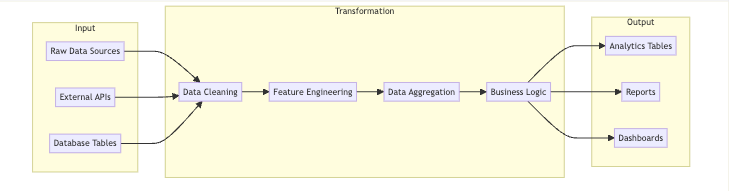
Reusable Block prompts for you and your teamYou can create custom, standardized .dinoprompts for Mermaid’s Block Diagrams ensure consistency across your data team. See step-by-step guide.
Diagram Syntax Guide
Basic Structure
At its core, a block diagram consists of blocks arranged in rows or columns. Blocks are labeled with identifiers and connected using arrows. Example:Columns and Layout
Arrange blocks into columns for a structured layout:Styling Blocks
Apply styles to blocks for enhanced clarity:Nested Blocks
Create composite or nested blocks for hierarchical structures:Advanced Features
Block Shapes
Mermaid supports various block shapes to cater to specific needs:- Rectangle: Standard shape.
- Circle: For pivotal components.
- Cylinder: Ideal for databases.
Connecting Blocks
Use arrows to link blocks, representing data flow or relationships:Block Arrows and Space Blocks
Use block arrows for directional emphasis and space blocks for layout adjustments:Data Team Examples
Software Architecture
Business Workflow
Best Practices
- Plan Layout: Organize blocks logically to reflect the system’s structure.
- Use Consistent Styles: Maintain uniform block and connector styles.
- Add Labels: Provide context for connectors with descriptive labels.
- Iterate: Continuously refine diagrams for clarity and accuracy.
Troubleshooting and Tips
Common Issues
- Misplaced Links: Ensure correct syntax for arrows.
- Overlapping Blocks: Adjust columns or use space blocks.
Modular Design
Break large diagrams into smaller components for better readability.Additional ResourcesFor more details, visit the official Mermaid documentation.