

What are User Journey Diagrams?
Mermaid’s User Journey Diagrams are a visual representation of the steps users take to complete a task within a system, application, or website. These diagrams illustrate the current (“as-is”) user workflow, helping identify bottlenecks and areas for improvement in the future (“to-be”) workflow. Mermaid provides the ability to render User Journey Diagrams using simple text-based syntax. These diagrams are useful for analyzing and improving user experience.Creating Your First User Journey Diagram
- Launch DinoAI: From Code IDE, access DinoAI to start creating diagrams.
- Use a Simple Prompt: Tell DinoAI what kind of User Journey Diagram you want to create. For example:
- Get Your Diagram: DinoAI will generate a complete
.mmdfile with proper Mermaid syntax. - Preview Your Work: Click the eye icon (👁️) to preview your diagram in real-time as you edit.
- Iterate and Refine: Modify the generated
.mmdfile directly, or ask DinoAI to make specific changes.
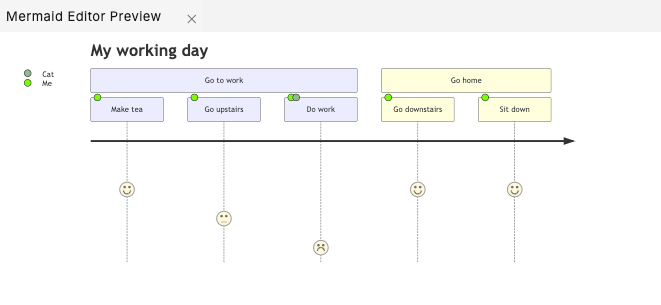
Example:
Reusable Sequence Diagram prompts for you and your teamYou can create custom, standardized .dinoprompts for Mermaid’s Sequence Diagram that ensure consistency across your data team. See step-by-step guide.
Diagram Syntax Guide
Basic Structure
A User Journey Diagram consists of the following components:- Title: Describes the overall user journey.
- Sections: Break down the journey into major steps or phases.
- Tasks: Individual actions within a section.
Defining Tasks
Each task is defined with:- Task Name: A descriptive label for the task.
- Score: A number from 1 (negative experience) to 5 (positive experience).
- Actors: The individuals or entities involved in the task, separated by commas.
Defining Sections
Sections group related tasks together and are defined using thesection keyword followed by the section title.
Example:
Examples
E-Commerce Purchase Journey
Software Installation Journey
Best Practices
- Keep it Simple: Use clear task names and group related tasks into sections.
- Use Scores Effectively: Assign scores based on user experience (1 = poor, 5 = excellent).
- Include Relevant Actors: Specify all participants involved in each task.
- Iterate: Refine the diagram as new insights are gained about the user journey.
- Focus on the User: Highlight pain points and positive moments in the journey.
Additional ResourcesFor more syntax options and advanced features, visit the official Mermaid documentation.