

What are Entity Relationship Diagrams?
Mermaid’s Entity Relationship Diagrams (ERDs) help you visualize database structures and relationships. For analytics engineers, they’re essential for documenting data models, table relationships, and database schemas. ERDs show how different entities (tables) in your database relate to each other, including their attributes and the nature of their relationships.Creating Your First ERD
- Launch DinoAI: From Code IDE, access DinoAI to start creating diagrams.
- Use a Simple Prompt: Tell DinoAI what kind of ERD you want to create. For example:
- Get Your Diagram: DinoAI will generate a complete
.mmdfile with proper Mermaid syntax. - Preview Your Work: Click the eye icon (👁️) to preview your diagram in real-time as you edit.
- Iterate and Refine: Modify the generated
.mmdfile directly, or ask DinoAI to make specific changes.
Example
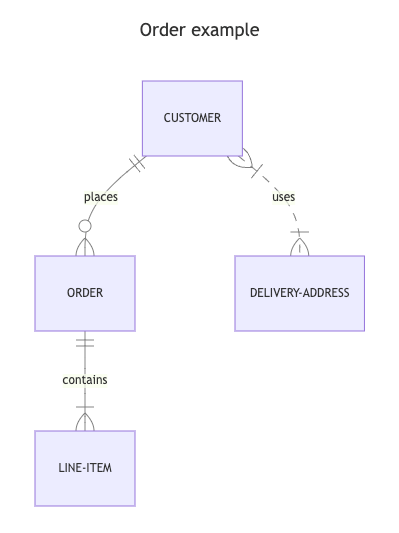
Reusable ERD prompts for you and your teamYou can create custom, standardized .dinoprompts for Mermaid’s ERDiagrams that ensure consistency across your data team. See step-by-step guide.
Diagram Syntax Guide
Basic Entity Definition
Cardinality Notation
Show relationships between entities using crow’s foot notation:||--||: Exactly one to exactly one||--o{: One to many (zero or more)||--|{: One to many (one or more)}o--o{: Many to many
Relationship Types
- Solid lines (—): Identifying relationship
- Dotted lines (..): Non-identifying relationship
Best Practices
- Use clear, descriptive entity names
- Show only relevant attributes
- Include key relationships
- Use consistent naming conventions
- Document primary and foreign keys
- Group related entities together
Additional ResourcesFor more syntax options and advanced features, visit the official Mermaid documentation