

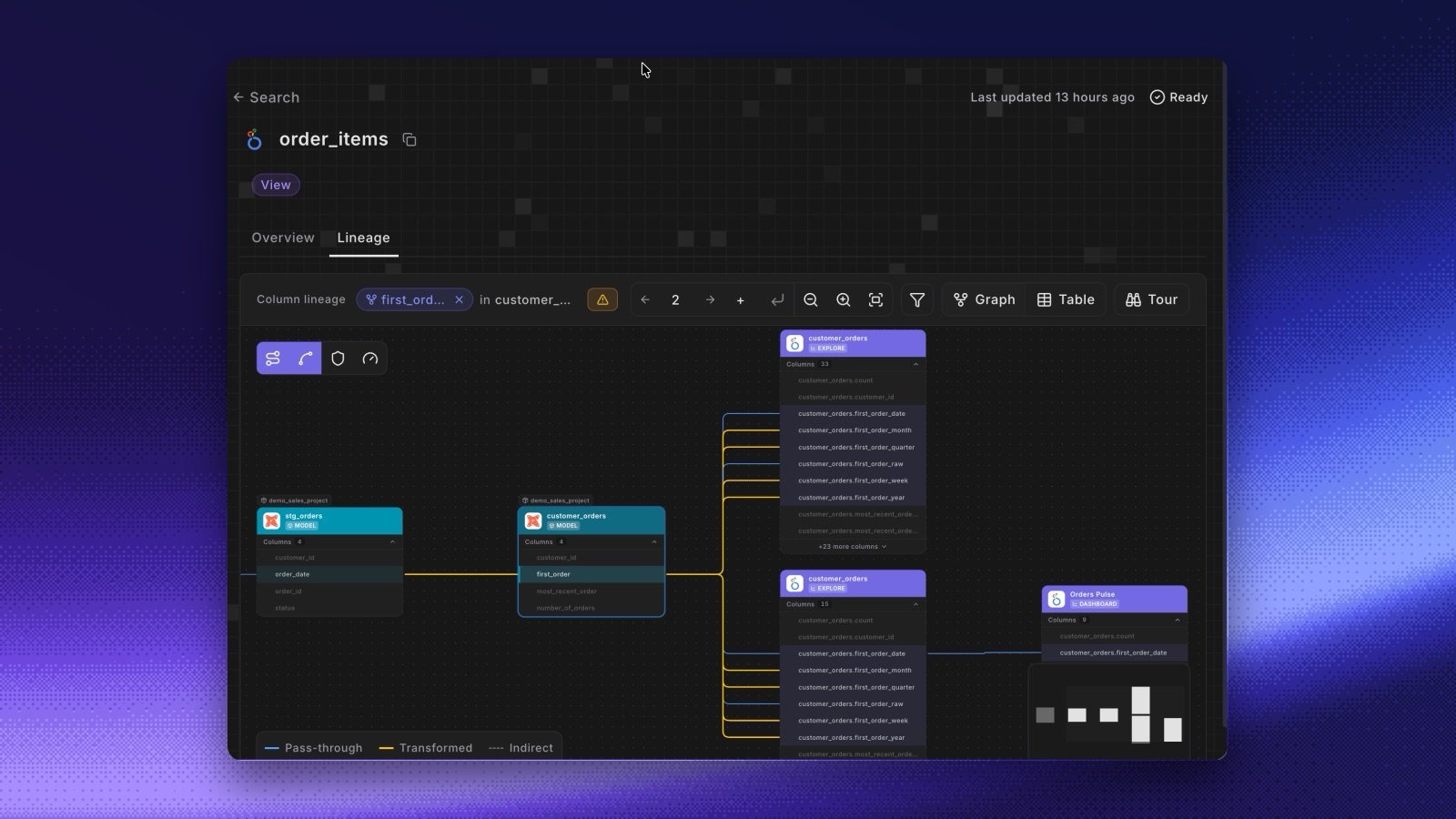
- Open it from any asset. On the Columns tab of a BI or ingestion asset, click Lineage on a column, or click a column on any card in the Lineage tab. Integration assets show as cards with their tool’s logo, such as dashboards, worksheets, and syncs.
- See how a column is computed. Click an edge to see the expression behind it, for example the DAX measure, the LookML dimension, or the Tableau calculation.
- Know when it’s incomplete. Where Paradime can’t resolve a field to its columns, the lineage falls back to the asset and shows node-level fallback used.
- Asset-level lineage too. Integration assets now have asset-level lineage in the Catalog, including the links between Looker or Tableau assets in the same tool.
- Ask DinoAI. DinoAI agents, the copilot, the Slack agent, and MCP clients trace a dbt™ column into these tools with the Column-Level Lineage tool. Ask “Which Looker dashboards use
fct_orders.revenue?” and the agent names them. - Bring your own tool. The Custom Integration API takes
upstreamFieldsanddownstreamFieldson each field, so lineage into an in-house tool shows on the same canvas.